
Bricks
A brick is a damaged device that can no longer function; in other words, something that becomes "as useful as a brick".
Bricks can occur for a variety of reasons, however usually it results through corrupted software, or from improper modifications made through homebrew.
Brick Prevention
Bricks can best be prevented by educating yourself on the common risks that lead to them. Here are the general recommendations of the most common risks, and why you should avoid them:
| Brick Risk | Explanation |
|---|---|
| Following video guides or old tutorials | As stated on the home page of this website, this is risky because video guides are most often not updated once uploaded and can be several months or years out of date with contemporary recommendations. Old tutorials have the same issue to a lesser extent; they are usually out of date. Do not follow either unless explicitly recommended by a developer. |
Use convenience modding software like Pimp My Wii | Modding software like Pimp My Wii is intended to make console modification easy, but they are ultimately a dangerous black box. They often make breaking, unnecessary changes to your console to accomplish a simple objective, and can render your console unusable. We hold that ModMii is an exception to this as it is open source, tested, and ultimately vetted by guide staff. |
Install IOS packs like DARKCORP | IOS packs are a concept that have been outdated for years, as they overwrite crucial IOS on your console with cIOS. They are wholly unsupported and incompatible with this guide as can cause several unexplainable issues, such as the Homebrew Channel being upside down. If you need to fix a console with an IOS pack, see ModMii. |
| Restoring NAND backups from another console | This will immediately and likely irreversibly brick your Wii. Your NAND has unique AES/HMAC keys that are hardcoded to your console. By installing another console's NAND backup, the Wii's hardware will be unable to verify the authenticity of your NAND. As a result, it will halt and refuse to start up. If you have a NAND backup for your console that is nonfunctional, use the factory reset guide to create a functional, blank NAND. |
| Installing IOS designed for another system | This will result in a brick in the worst case scenario and is best avoided. The best example is installing a Wii IOS on a Wii mini; the Wii mini was designed without a Wi-Fi card. If you install a Wii IOS on the console, it will check for the presence of a Wi-Fi card and find none. As a result, it will hang and create the aformentioned Wi-Fi brick. |
| Changing console region erroneously | Region locks can be easily bypassed via software like Priiloader, as such, there is often no reason to region change your console. If you choose to, you must exercise extreme caution as the process can render your Wii unusable if you do not know what you are doing; especially if you use region changers for the Wii on a vWii or Wii mini, or vice versa. |
| Installing updates for another region | Going in-hand with console region changes, there is often no reason to do this. In the worst case, it can result in a Korean Kii/Error 003 brick, which will likely render your console unusable. You are highly advised to run SysCheck on your console if you plan to make any version changes, such that you can determine its original region. Seek support using instructions at the bottom of the page if you are attempting to apply updates to a Korean console. |
| Using non-RCE patched Nintendo WFC services | We only recommend using the WFC services provided in the Nintendo WFC guide as they are known to be patched against RCE (remote code execution) exploits for the Wii. Other services are not patched against RCE, which could allow bad actors on their servers to brick your Wii. |
| Modifying system files, or installing old Wii Menu versions | This is almost always unnecessary. We highly recommend doing these tasks in Dolphin if you are curious, instead of attempting it on a real console. Attempting to do this will likely render your console unusable via an IOS brick if you are not aware of what you are doing. |
| Installing unknown homebrew | Homebrew is created by real people for many different reasons. There have been previous incidents of malicious homebrew created for the Wii, although it is highly unlikely you would find this software. We advise that you source homebrew from the Open Shop Channel as submitted homebrew is vetted for safety and held to a baseline standard of quality. |
| Running dangerous homebrew apps | Homebrew can be dangerous not just because it is made maliciously, but because it makes dangerous changes to your Wii; this type of software should only be used by informed users. This includes homebrew like AnyTitle Deleter, AnyRegion Changer, KoreanKii, and more. |
| Install forwarders erroneously | Forwarders can cause a banner brick if produced incorrectly. Be wary of what you install and always have Priiloader installed to properly fix a banner brick if necessary. |
| Turning off console erroneously | Do not turn off your console during certain processes, such as restoring a BootMii NAND backup. We advise that you postpone plans to make dangerous changes to your Wii in the event of unstable electricity (e.g. through a storm, or during rolling blackouts). Power interruptions can lead to a full brick in the worst case. |
In any case, you should absolutely:
- Have BootMii installed as boot2 if available, but otherwise as IOS.
- Have Priiloader installed regardless of BootMii installation method.
- Backup your NAND with BootMii or nanddumper@ios and always have a valid spare copy on hand, but especially before attempting anything risky. Note that in some brick scenarios, and on some consoles, BootMii is not accessible; plan ahead accordingly.
Diagnosis
This is a section intended to help you diagnose a potential brick, in order by least to highest console functionality. If you seem to have a brick that isn't covered in this section or in the guide, please scroll to the bottom of the page for support instructions.
Wii Boot Process
[   POWERON   ]
       │
       │
       ▼
[    boot0    ]  ──► Reads, decrypts, and verifies boot1 hash. Rejects
       │             boot1 and does not boot if data does not match.
       │             (Stage 1 bootloader)
       ▼
[    boot1    ]  ──► Initializes memory. Reads, decrypts, and verifies
       │             boot2 hash. Rejects boot2 and does not boot if
       │             data does not match. Exploitable on early Wiis.
       │             (Stage 2 bootloader)
       ▼
[    boot2    ]  ──► Loads System Menu and IOS data, also loads
       │             GameCube (MIOS) mode. Can hold BootMii if
       │             boot1 has an exploitable hash algorithm.
       │             (Stage 3 bootloader)
       ▼
[ IOS/SysMenu ]
Bricking Triage
The below table uses the following color coding for possible solutions:
🟩 - indicates fixable with no brick prevention software
🟦 - indicates fixable with Priiloader and/or BootMii as IOS
🟨 - indicates fixable with BootMii as boot2
🟥 - indicates fixable with hardware modification
| Brick Type | Functionality |
|---|---|
| ⬛ No brick | Wii starts, and progresses to the Wii Menu. No app is malfunctioning and Wii Settings is error free; there are no visible issues. |
| 🟩 Semibrick | You get an error that resembles the Opera web browser when accessing the Wii settings. |
| 🟩 Banner brick (can access Wii menu) | You get the message The system files are corrupted after accessing a specific channel. |
| 🟩 OR 🟦 Banner brick (cannot access Wii menu) | You see a black screen after pressing A to start on the Health and Safety screen. This happened after installing a WAD. |
| 🟩 OR 🟦 Mail brick | You see a black screen after pressing A to start on the Health and Safety screen. This happened at random, BUT you can access Maintenance Mode by holding + and - on the Health and Safety screen, after which it should start automatically. |
| 🟦 Theme brick | You see a black screen after pressing A to start on the Health and Safety screen. This happened after installing a theme. |
| 🟦 Wii Menu/Opera brick | Wii starts, but you instantly see an error that resembles the Opera web browser. |
| 🟨 Error 003 | Wii starts, and you see the message Error:003 unauthorized device has been detected. |
| 🟨 IOS brick | Wii starts, and nothing happens; console remains on a black screen. BootMii as boot2 is accessible. |
| 🟥 Wi-Fi brick | Wii starts, and nothing happens; console remains on a black screen. Wii can be powered on with a Wiimote and Recovery Mode can be accessed. BootMii as boot2 is inaccessible. Common on Wii mini after installing wrong IOS. |
| 🟥 Low-level brick | Wii starts, and nothing happens; console remains on a black screen. The console cannot be powered on with a Wiimote. Recovery mode cannot be accessed. BootMii as boot2 is inaccessible. |
Brick Types
Here, the different Wii bricks will be discussed in order of severity, with symptoms, causes, and solutions.
Semibrick
Details
Symptoms
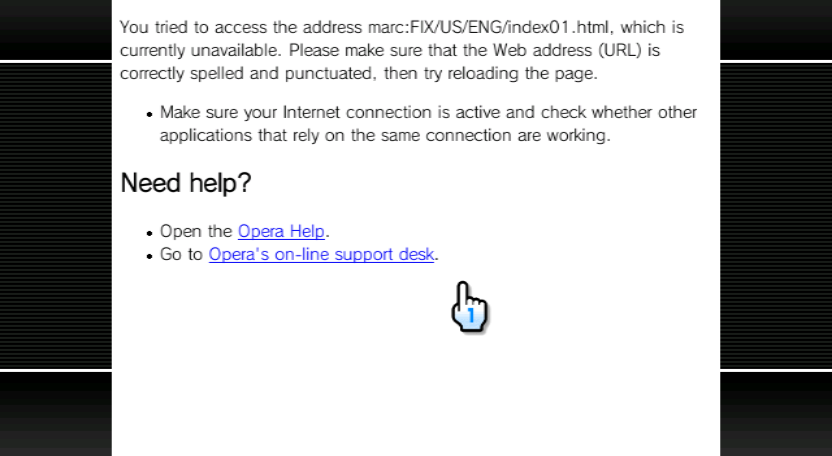
When navigating to Wii Settings, you get an error from the Opera web browser with something along the lines of You tried to access the address (URL), which is currently unavailable. In some cases, some parts of the Wii Settings menu may still be accessible, but other parts may not (such as the Country menu).
Cause
A semibrick occurs when a different region Wii Menu or a different region custom theme is installed. As the Wii Settings menu is rendered using HTML pages with Opera, themes often replace these pages and put them in different directories; essentially leading to a 404 Not Found error but in the form of a conDescription
sole brick.
Solutions
Verify in AnyRegion Changer that your console region is the same as the theme or Wii Menu that you have installed.
If this was caused by a theme you installed, use csm-installer to reinstall the original theme.
If this was caused by a Wii Menu WAD you installed, use NUSGet to re-obtain your original Wii Menu. Be cautious when downloading the Wii Menu WAD. Make sure to pick the same version with the correct region.
If you are actually in the process of a region change, use ARC-ME to automatically fix all your region settings to match your Wii Menu.
Banner brick
Details
Symptoms
You attempt to start the Wii, the Health and Safety screen shows up, and when A is pressed, the screen passes normally; however, beyond this point, nothing happens and the Wii remains on a black screen. This happened after installing a WAD and rebooting, or returning to the Wii Menu. Alternatively, the Wii Menu can still be accessed, but opening a particular channel results in the console freezing. In some cases, you may see the "System files are corrupted" screen.

Cause
Banner bricks occur if you install a WAD file that has an invalid Wii Menu banner or icon.
Solutions
If you are able to still access the Wii Menu, go into the Homebrew Channel and use YAWM ModMii Edition or your current WAD manager to uninstall the corrupt channel.
If you cannot access the Wii Menu, and have Priiloader installed, enter it by holding RESET while turning your Wii on. Select Homebrew Channel and use YAWM ModMii Edition or your current WAD manager to uninstall the corrupt channel.
If you don't have or can't access Priiloader, Maintenance Mode may be worth a try. Hold down + and - on the Health and Safety screen (do not press A!).
As a last resort, you may use BlueBomb to boot into the Homebrew Channel while idling at the Health and Safety screen.
Mail brick
Details
Symptoms
You attempt to start the Wii, the Health and Safety screen shows up, and when A is pressed, the screen passes normally; however, beyond this point, nothing happens and the Wii remains on a black screen. Maintenance Mode is still accessible.
Cause
A mail brick occurs when a Wii has too much mail to handle, or when malformed mail is in the Wii Message Board, causing a crash upon booting through normal means. Because the Wii Message Board is always drawn below Wii channels, this causes the Wii Menu to fail before fully loading.
Solutions
By entering holding + and - on the warning screen, Maintenance Mode can be entered, where the Wii Message Board is not loaded at all. If the Homebrew Channel is not installed, follow Bluebomb.
From here, the Homebrew Channel can be loaded and the brick can be fixed by deleting Wii Message Board data with cdbackup.
Theme brick
Details
Symptoms
You attempt to start the Wii, the Health and Safety screen shows up, and when A is pressed, the screen passes normally; however, beyond this point, nothing happens and the Wii remains on a black screen. This happened after installing a theme.
Cause
A theme brick occurs when a wrongly formatted theme is installed.
Solutions
To resolve this issue, open HBC through Priiloader or BootMii as boot2 and access csm-installer to install a default theme such as the base Wii Menu theme. Alternatively, go into YAWM ModMii Edition and install the CORRECT default Wii Menu WAD for your region and version.
Wii Menu/Opera brick
Details
Symptoms
When starting the Wii, you get an error from the Opera web browser with something along the lines of You tried to access the address (URL), which is currently unavailable. This will happen every time you start the Wii, and cannot be bypassed by any other means.
Cause
This brick is a more fatal version of a Semibrick. If your SYSCONF (system configuration file) gets corrupt or damaged, the Wii will regenerate it and start the setup phase.
However, the setup pages are in a similar location to the Wii Settings pages. If you have an incorrect region Wii Menu or theme, the Wii cannot find them.

Solutions
If you have Priiloader, use it to enter the Homebrew Channel and re-install the original theme file/original Wii Menu.
In case you do not have Priiloader or your Wii is not modded, you can try BlueBomb.
Alternatively, Recovery Mode can be used to attempt a fix.
KoreanKii/Error 003 Brick
Details
Symptoms
Screen shows up as listed below on normal boot.
Error:003
unauthorized device has been detected.
Cause
When releasing the Korean Wiis, Nintendo changed the encryption key for these units specifically as a last ditch attempt at preventing homebrew. While this failed at its intended goal, Nintendo also left a check in the System Menu versions 4.2/4.3 to determine whether or not the Korean Key is present on a system software region that is not Korean. If this check succeeds, the error triggers and the Wii is effectively bricked.
This is usually an immediate follow-up to a Wii System Update on an unsuspecting region-changed Korean Wii.
Solutions
Since this brick most often occurs after the Wii Menu updates, Priiloader will not be present. In the case that Priiloader is present, you can simply fix it by either installing the previous Wii System Menu or removing the key with the KoreanKii homebrew app.
Korean Wiis released with Wii Menu 3.3, around the time that Nintendo fixed the Trucha bug in boot1, so BootMii as boot2 cannot be installed to or used on any Korean Wii.
While this leaves the Wii in a particularly dangerous situation, it is still fixable. This involves going into Recovery Mode, where an exploit can be triggered in order to gain access to the Homebrew Channel and revert the conditions that caused the brick. Note that you must have a drivechip in order for this method to work.
IOS brick
Details
Symptoms
This brick will appear identical to a low-level brick due to a Wii Menu failure via IOS; however there is not a full low-level NAND corruption, or a low-level hardware failure.
Cause
This brick most often happens when the Wii Menu's IOS is a stub, or if the wrong kind of IOS is installed to the console. A stubbed system menu IOS is usually the consequence of attempting to downgrade your Wii Menu. If this error began happening after installing a normal IOS80 to a Wii mini, see Wi-Fi brick.
Solutions
You must have BootMii as boot2 to fix this.
You can either restore a NAND backup, or do this:
- Use NUSGet to pack a WAD of your original Wii Menu.
- Use BootMii to enter the Homebrew Channel, and use a WAD manager to install the Wii Menu WAD.
For vWii, see Recover a vWii IOS/Channel.
Wi-Fi brick
Details
Symptoms
This brick appears identical to a low-level brick, however you can still power on the Wii with a Wiimote, and you can still boot into Recovery Mode on an original revision Wii.
Cause
This brick arises when your Wii's Wi-Fi (or Bluetooth) module is damaged or not inserted properly. In such cases, the Wii gets stuck on a black screen while awaiting a response from IOS.
This will also happen on the Wii mini if you install a normal Wii IOS, because the Wii mini doesn't have a Wi-Fi module.
Solutions
To resolve this problem, you can try to reseat or replace the Wi-Fi/Bluetooth module.
If you are on a Wii mini, you must install a Wi-Fi module.
If both fail, see low-level brick.
Low-level brick
Details
Symptoms
Completely black screen, no response to user input. Recovery Mode cannot be booted, neither can BootMii as boot2 (or it never existed in the first place). For all intents and purposes the console appears dead.
Cause
This brick occurs when boot1/boot2 is corrupt, or if there is a hardware failure.
Solutions
First, troubleshooting must be done to determine if hardware is at fault. In the order listed, do the following:
- Test to make sure that your Wii actually still functions (it accepts discs as normal, spins up correctly, Wiimotes connect) before attempting the following steps. If this is the case and only video is not being displayed, you may have a bad video cable, or an exceptionally rare failure of the video port or the GPU.
- If on a Wii mini, and if a normal IOS80 was installed, see Wi-Fi brick. If steps to resolve the Wi-Fi brick failed, proceed.
- Attempt to boot into Recovery Mode (normal Wiis only). If the Wii boots into Recovery Mode, see Wi-Fi brick or IOS brick. If steps to resolve the Wi-Fi brick or IOS brick failed, proceed.
- Reseat the disc drive and attempt to boot normally. If still unsuccessful, replace the disc drive. If still unsuccessful, proceed.
- At this point, either there is a low-level boot0/boot1 corruption, a NAND chip failure, or there is a wider unknown hardware failure. Consider consulting online help or buying another Wii.
INFO
Further Assistance
Need more assistance? Join the Nintendo Homebrew Discord and ask for help in English on the #wii-vwii-assistance channel, while noting that you came from this page and are trying to resolve a brick or other issue. Please provide the following information:
- The exact error message or console state that you see, with a photo if applicable
- The exact steps you took prior to the issue, as far as you remember
- A SysCheck log if possible to obtain
- Whether or not you have a NAND backup available
- Whether or not you installed Priiloader, BootMii as IOS, or BootMii as boot2
- The specific model of console you are working with (Original Wii, Family Edition Wii, Wii mini, vWii on Wii U)
If your English isn't the best, use a translator such as Google Translate to submit your questions so that we can assist.
