> ## Documentation Index
> Fetch the complete documentation index at: https://docs.coderabbit.ai/llms.txt
> Use this file to discover all available pages before exploring further.
# Issue Planner
> Turn issues into comprehensive Coding Plans ready for your favorite coding agent or IDE copilot. Works with GitHub, GitLab, Azure DevOps, Jira, and Linear!
export const Hint = ({type, children, headline, tip, href, cta}) => {
const TIPS = {
learnings: {
headline: "Learnings",
tip: "Review preferences CodeRabbit learns from your chat conversations and applies automatically to future reviews.",
cta: "Learn about Learnings",
href: "/knowledge-base/learnings",
content: "Learnings"
},
walkthrough: {
headline: "PR Walkthrough",
tip: "A structured comment posted by CodeRabbit at the top of every pull request, summarizing changes, sequence diagrams, review effort, and more.",
cta: "Learn about PR Walkthroughs",
href: "/pr-reviews/walkthroughs",
content: "Walkthrough"
},
"finishing-touches": {
headline: "Finishing Touches",
tip: "Post-review agentic actions (Autofix, writing docstrings or unit tests, and more) you trigger from a PR comment or a checkbox in the Walkthrough.",
cta: "See all Finishing Touches",
href: "/finishing-touches",
content: "Finishing Touches"
},
"coding-plan": {
headline: "Coding Plan",
tip: "A detailed, codebase-aware implementation plan CodeRabbit generates from an issue or description, ready to hand off to any coding agent.",
cta: "Learn about Coding Plans",
href: "/plan",
content: "Coding Plan"
},
"knowledge-base": {
headline: "Knowledge Base",
tip: "The collected context sources CodeRabbit draws on during reviews: Learnings, Code Guidelines, issue trackers, connected MCP servers, and cross-repo analysis.",
cta: "Explore the Knowledge Base",
href: "/knowledge-base",
content: "Knowledge Base"
},
"path-instructions": {
headline: "Path Instructions",
tip: "Custom review rules that only apply to files matching a glob pattern, e.g. 'src/controllers/**'.",
cta: "Configure path instructions",
href: "/configuration/path-instructions",
content: "Path Instructions"
},
"change-stack": {
headline: "Change Stack",
tip: "An improved code inspection interface that reorganizes a pull request from a flat file list into a structured, layer-by-layer walkthrough with range-specific summaries and diagrams when useful.",
cta: "Learn about Change Stack",
href: "/change-stack",
content: "Change Stack"
},
scope: {
headline: "Scope",
tip: "A named set of repositories, connections, and spend limits that controls what CodeRabbit Agent can access in a given Slack conversation.",
cta: "Learn about Scopes",
href: "/slack-agent/scopes",
content: "Scope"
},
"coderabbit-agent": {
headline: "CodeRabbit Agent for Slack",
tip: "An AI agent built into Slack that investigates issues, generates implementation plans, and opens pull requests right from the Slack threads.",
cta: "Explore CodeRabbit Agent",
href: "/slack-agent",
content: "CodeRabbit Agent"
},
"configuration-inheritance": {
headline: "Configuration Inheritance",
tip: "A setting that merges configuration values across multiple levels — repository YAML, central YAML, and UI settings — instead of using only the highest-priority source.",
cta: "Learn about Configuration Inheritance",
href: "/configuration/configuration-inheritance",
content: "Configuration Inheritance"
},
"coding-agent": {
headline: "Coding Agent",
tip: "Turns a user request, a review finding, a coding plan or a failing CI check into a task that CodeRabbit's agent implements in the cloud, then delivers as a commit or a stacked pull request for you to approve.",
cta: "Learn about Coding Agent",
href: "/code",
content: "Coding Agent"
}
};
const defaults = TIPS[type] || ({});
return
{children ?? defaults.content}
;
};
export const TeamPlanBadge = ({tip = "This feature is available on Team (formerly Pro+), Advanced, and Enterprise. Please refer to our pricing page for more information about our plans and features.", title = "Team Plan", cta = "Read more", href = "https://coderabbit.ai/pricing", disabled = false}) => {
return
{title}
;
};
Issue Planner is one way to use **CodeRabbit Plan**. You can also create plans directly using free-form descriptions, PRDs, or design specs. See the full [CodeRabbit Plan documentation](/plan) for an overview of all options.
CodeRabbit analyzes your issues, specifications, and project codebase to generate Coding Plans you can hand off to any coding agent or IDE copilot. Because CodeRabbit [deeply understands](/overview/architecture) your codebase through continuous analysis, each plan is tailored to your architecture and conventions, covering codebase research, step-by-step tasks, and agent-ready prompts.
## Supported Issue Trackers
CodeRabbit supports five issue trackers for plan generation. See the platform-specific guides for setup and configuration details.
Guide
Guide
Guide
Guide
Guide
## Planning
The recommended way to use issue planning is to **enable auto-planning** on your platform so that Coding Plans are generated automatically whenever issues match the conditions you configure. Refer to the platform-specific guides above to set up auto-planning.
To generate a plan on demand, comment `@coderabbitai plan` on any issue.
## Viewing and Refining Plans
How you view and refine Coding Plans depends on your platform:
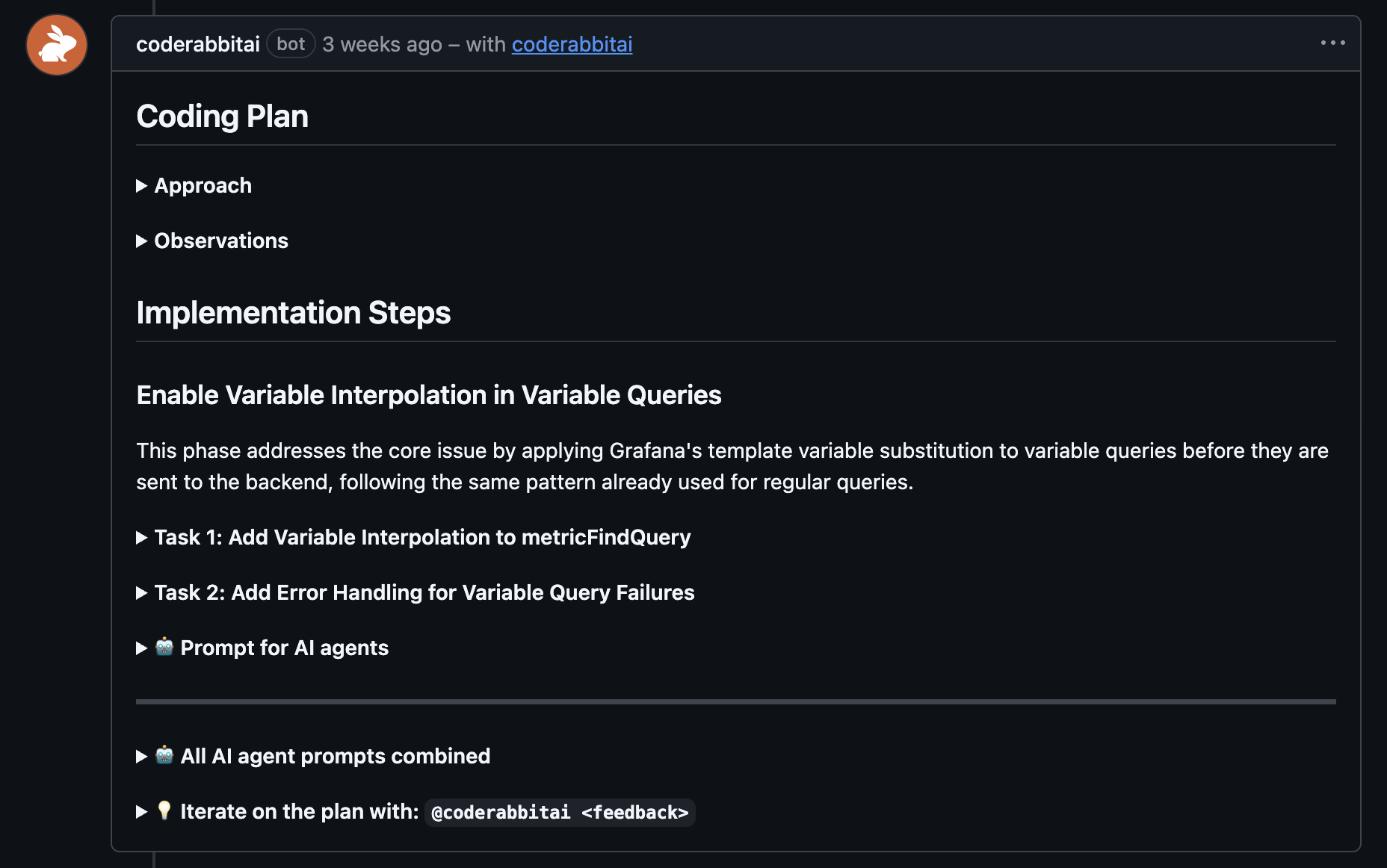
The full Coding Plan is posted as a comment directly on the issue. Reply to
the plan comment to refine details, challenge design choices, or request
changes.
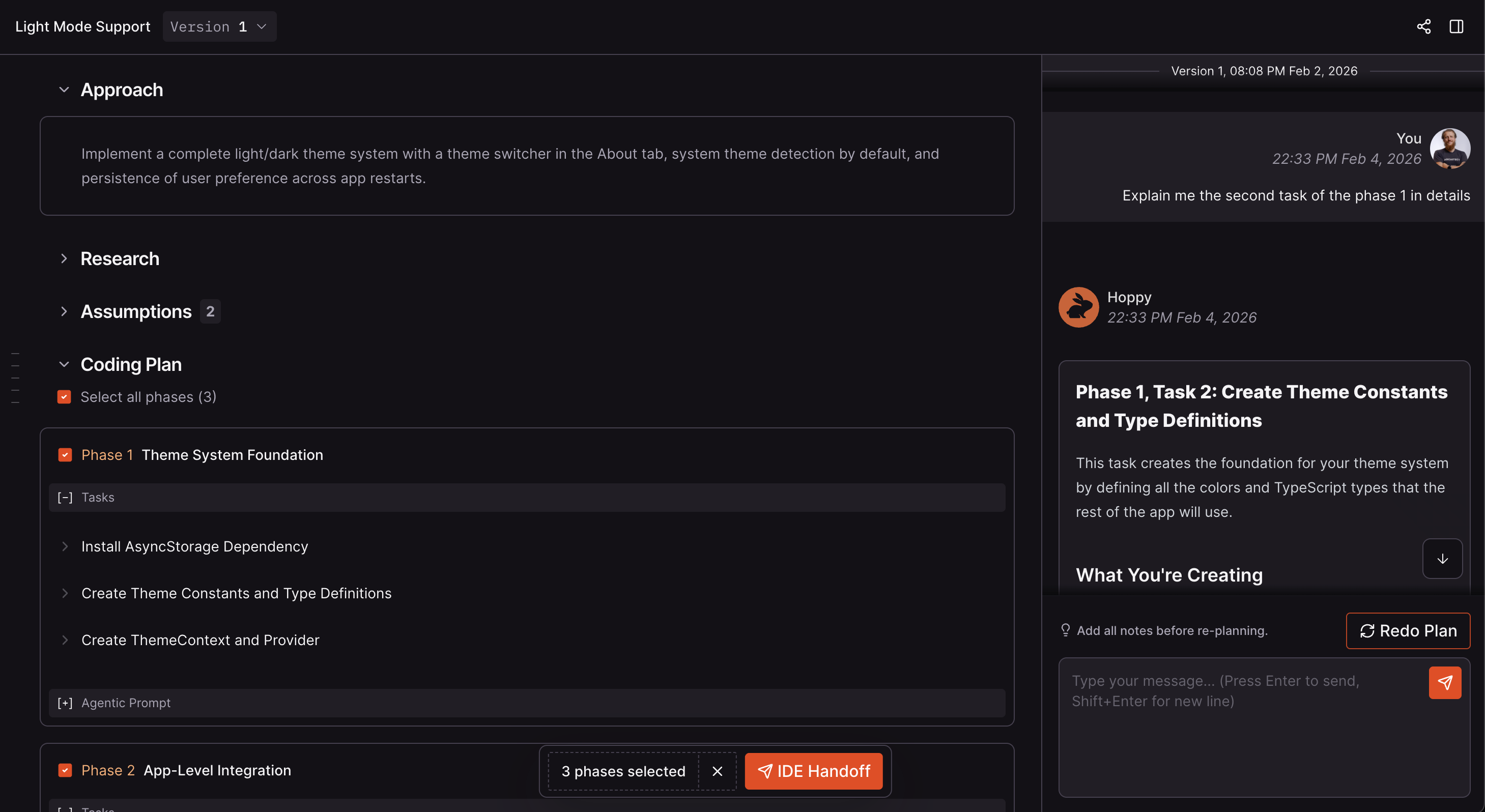
 The Coding Plan is available in the CodeRabbit web app. Use the chat
panel on the right to iterate on the plan before handing off the finalized prompts to
your coding agent.
The Coding Plan is available in the CodeRabbit web app. Use the chat
panel on the right to iterate on the plan before handing off the finalized prompts to
your coding agent.
 For platform-specific details on triggering and configuring plans, see the
[GitHub](/issues/planner/github), [GitLab](/issues/planner/gitlab),
[Azure DevOps](/issues/planner/azure-devops), [Jira](/issues/planner/jira),
and [Linear](/issues/planner/linear) guides.
### Plan Structure
Each Coding Plan contains the following sections:
| Section | Description |
| ------------------ | ------------------------------------------------------------------------------------------------------------------------------------------------------------------------- |
| **Summary** | 2-3 sentence overview of the implementation approach |
| **Research** | Deep codebase analysis leveraging CodeRabbit's project knowledge, identifying relevant files, patterns, dependencies, and architectural decisions specific to the project |
| **Design Choices** | Decisions made during planning with rationale for each |
| **Phases** | Logical chunks of work that should be done together |
| **Tasks** | Individual tasks within each phase |
| **Agent Prompt** | Machine-readable instructions for coding agents (per phase and combined) |
### Chatting about Your Plan
Chat with CodeRabbit to ask questions, request changes to specific tasks or phases, challenge design choices, or get clarification on implementation details. CodeRabbit responds and updates the plan accordingly. See the platform-specific guides for details on how chatting works on your platform.
### Re-planning
Provide feedback and regenerate your plan to incorporate changes. See the platform-specific guides for details on the re-planning workflow.
### Handing off to your coding agent
Once you're satisfied with a Coding Plan, copy the agentic prompts and paste them into your preferred coding agent (Claude Code, Cursor, GitHub Copilot, etc.). Depending on the platform, you can also hand off directly through the CodeRabbit IDE extension or ask an agent with direct platform access (for example, GitHub or GitLab MCP) to fetch the issue and execute CodeRabbit's plan. See the platform-specific guides for handoff options.
Organizations with access can open an eligible plan as a coding task, approve it, and have Coding Agent implement it. See [Start from an approved plan](/code/start-a-task#from-an-approved-plan).
## Frequently Asked Questions
### How long does plan generation take?
Plan generation typically takes [between 5 and 10 minutes](#how-is-coderabbit-different-from-using-chatgpt-or-coding-agents-for-planning) depending on the complexity of the issue and codebase.
### Can I regenerate a plan?
Yes. You can regenerate a plan on all supported platforms. See your platform's guide for specific instructions.
### Can multiple people work on the same plan?
Yes. Anyone in your organization can view plans, discuss them with CodeRabbit, and trigger re-plans.
### How is CodeRabbit different from using ChatGPT or coding agents for planning?
Any AI agent or LLM can write an implementation plan. The difference is in the quality and context behind that plan:
1. **Deeper codebase understanding** - When an AI agent generates a plan, it typically reviews only a handful of files. CodeRabbit's Coding Plans are grounded in [deep codebase understanding](/overview/architecture) through continuous code analysis and an extensive knowledge base. This means plans reference the right files, follow your established patterns, and integrate seamlessly with your existing code.
2. **Access to issues and better context** - CodeRabbit works with issue trackers, surfacing relevant related issues, even when the assigned engineer isn't aware of them. This broader context ensures plans account for ongoing work, previous decisions, and the full scope of your project's direction.
3. **Collaborative review** - CodeRabbit plans are available for review by other engineers and product owners. Team members can discuss, challenge design choices, and refine plans together before implementation begins.
4. **Accountability and history** - Every plan version is preserved. You can track what was planned, when it was planned, and why decisions were made. This audit trail provides accountability and helps teams understand the evolution of features over time.
For platform-specific details on triggering and configuring plans, see the
[GitHub](/issues/planner/github), [GitLab](/issues/planner/gitlab),
[Azure DevOps](/issues/planner/azure-devops), [Jira](/issues/planner/jira),
and [Linear](/issues/planner/linear) guides.
### Plan Structure
Each Coding Plan contains the following sections:
| Section | Description |
| ------------------ | ------------------------------------------------------------------------------------------------------------------------------------------------------------------------- |
| **Summary** | 2-3 sentence overview of the implementation approach |
| **Research** | Deep codebase analysis leveraging CodeRabbit's project knowledge, identifying relevant files, patterns, dependencies, and architectural decisions specific to the project |
| **Design Choices** | Decisions made during planning with rationale for each |
| **Phases** | Logical chunks of work that should be done together |
| **Tasks** | Individual tasks within each phase |
| **Agent Prompt** | Machine-readable instructions for coding agents (per phase and combined) |
### Chatting about Your Plan
Chat with CodeRabbit to ask questions, request changes to specific tasks or phases, challenge design choices, or get clarification on implementation details. CodeRabbit responds and updates the plan accordingly. See the platform-specific guides for details on how chatting works on your platform.
### Re-planning
Provide feedback and regenerate your plan to incorporate changes. See the platform-specific guides for details on the re-planning workflow.
### Handing off to your coding agent
Once you're satisfied with a Coding Plan, copy the agentic prompts and paste them into your preferred coding agent (Claude Code, Cursor, GitHub Copilot, etc.). Depending on the platform, you can also hand off directly through the CodeRabbit IDE extension or ask an agent with direct platform access (for example, GitHub or GitLab MCP) to fetch the issue and execute CodeRabbit's plan. See the platform-specific guides for handoff options.
Organizations with access can open an eligible plan as a coding task, approve it, and have Coding Agent implement it. See [Start from an approved plan](/code/start-a-task#from-an-approved-plan).
## Frequently Asked Questions
### How long does plan generation take?
Plan generation typically takes [between 5 and 10 minutes](#how-is-coderabbit-different-from-using-chatgpt-or-coding-agents-for-planning) depending on the complexity of the issue and codebase.
### Can I regenerate a plan?
Yes. You can regenerate a plan on all supported platforms. See your platform's guide for specific instructions.
### Can multiple people work on the same plan?
Yes. Anyone in your organization can view plans, discuss them with CodeRabbit, and trigger re-plans.
### How is CodeRabbit different from using ChatGPT or coding agents for planning?
Any AI agent or LLM can write an implementation plan. The difference is in the quality and context behind that plan:
1. **Deeper codebase understanding** - When an AI agent generates a plan, it typically reviews only a handful of files. CodeRabbit's Coding Plans are grounded in [deep codebase understanding](/overview/architecture) through continuous code analysis and an extensive knowledge base. This means plans reference the right files, follow your established patterns, and integrate seamlessly with your existing code.
2. **Access to issues and better context** - CodeRabbit works with issue trackers, surfacing relevant related issues, even when the assigned engineer isn't aware of them. This broader context ensures plans account for ongoing work, previous decisions, and the full scope of your project's direction.
3. **Collaborative review** - CodeRabbit plans are available for review by other engineers and product owners. Team members can discuss, challenge design choices, and refine plans together before implementation begins.
4. **Accountability and history** - Every plan version is preserved. You can track what was planned, when it was planned, and why decisions were made. This audit trail provides accountability and helps teams understand the evolution of features over time.