<?xml version="1.0" encoding="UTF-8"?>
<feed xmlns="http://www.w3.org/2005/Atom" xml:lang="en-us"><id></id><link rel="self" type="application/atom+xml"/><link rel="alternate" type="text/html" href="https://jlongster.com/"/><updated>2025-12-03T00:00:00.000Z</updated><title>James Long&#x27;s sketchbook</title><subtitle>A bunch of little things and sketches</subtitle><icon>https://jlongster.com/favicon.ico</icon><author><name>James Long</name><uri>https://jlongster.com/</uri></author><rights>© 2022 James Long</rights><generator>jimmy</generator><entry><id>https://jlongster.com/caught-up-in-design</id><link rel="alternate" type="text/html" href="https://jlongster.com/caught-up-in-design"/><published>2025-12-03T12:00:00.000Z</published><updated>2025-12-03T12:00:00.000Z</updated><title>I got caught up in design again</title><author><name>James Long</name><uri>https://jlongster.com/</uri></author><content type="html"><![CDATA[<p>Over a week ago, I had a thought: &quot;I'm gonna make my website cool.&quot;</p>
<p>I really love visual exploration. But there's a problem: given no constraints, it's so easy to get wrapped up into a one idea and go too far down that path.</p>
<p>Here's what happened: <a href="https://x.com/jlongster/status/1990916194174443810">I found a cool trick</a> to &quot;warp&quot; real DOM elements. I took this approach to the extreme and tried to build my whole site around it. Here was one early version:</p>
<p><video
muted playsinline preload="auto" controls autoPlay
src="https://static.jlongster.com/20251203/papers.mp4"> </video></p>
<p>I still really like this. It feels like my personal messy desk that that world can see.</p>
<p>But that's also a problem: it's too messy. The hardest part about design is executing it in a way that doesn't detract from the original need. It still needs to fulfill the original requirement.</p>
<p>In this case, the requirement is I should be able to quickly write content for you to read. I spent almost a week working on this before realizing this approach just fundamentally detracted from the experience too much. Maybe a better designer could have figured out how to execute this better.</p>
<p>For now, I ripped it out and implemented what you see in ONE HOUR. It's time to focus on content again.</p>
<p><a href="https://jlongster.com/old-paper-refresh/">I left my in-progress work up so you can see it on this page</a>.</p>
<p>(I also wrote this up as a <a href="https://x.com/jlongster/status/1996346054736814410">thread</a> which has a few more details &amp; videos)</p>
<p>This is my favorite part of the design by far. I made the demo videos into little polaroid pictures. These are real videos that are playing! They animate in like a paper would, and there's a nice paper-like interaction on hover, and you can drag them around:</p>
<p><video
muted playsinline preload="auto" controls autoPlay
src="https://static.jlongster.com/20251203/video-paper.mp4"> </video></p>
<p>(I wrote some notes when implementing this: <a href="https://jlongster.com/slicing-up-a-video">https://jlongster.com/slicing-up-a-video</a>)</p>
<p>I learned a ton throughout this process. The biggest thing was I used AI to create design tools on the fly. For example, I create a full animation keyframe editor that let me create keyframes of the warped DOM nodes, and then a runtime player plays these keyframes to make the animation:</p>
<p><video
muted playsinline preload="auto" controls
src="https://static.jlongster.com/20251203/anim-editor.mp4"> </video></p>
<p>I installed the <a href="https://github.com/steveruizok/perfect-freehand">perfect-freehand</a> library and created a live animation drawing tool. You can press record, draw stuff on the screen, and stop recording and get an animation back. It automatically saves the animation to the real site:</p>
<p><video
muted playsinline preload="auto" controls
src="https://static.jlongster.com/20251203/freehand-tool.mp4"> </video></p>
<p>The site has 3 tools available: paper, text, and animation tools. Paper lets you create and edit paper animations, even opening up the animation keyframe editor itself! Text just lets me position those text and arrows. And animation is the global animation coordinator that lets me change the delay and other properties, and retrigger animations to see them live:</p>
<p><video
muted playsinline preload="auto" controls
src="https://static.jlongster.com/20251203/dev-tools.mp4"> </video></p>
<p>This was one of the most fun things I've done recently, but alas, I just couldn't get it to work with the content in a satisfying way. I needed to timebox this to a week, so it's time to move on.</p>
<p>You can view this experiment live <a href="https://jlongster.com/old-paper-refresh/">on this page</a>.</p>
]]></content><rights>© 2024 James Long</rights></entry><entry><id>https://jlongster.com/about</id><link rel="alternate" type="text/html" href="https://jlongster.com/about"/><published>2025-11-22T12:00:00.000Z</published><updated>2025-11-22T12:00:00.000Z</updated><title>About</title><author><name>James Long</name><uri>https://jlongster.com/</uri></author><category term="content"></category><content type="html"><![CDATA[<pre><code class="language-css">p {
  margin-top: 1.5em !important;
  margin-bottom: 1.5em !important;
}
</code></pre>
<p>^ef0fc3</p>
<p>I’m James Long, and I love building products. You might know me as the creator of <a href="https://github.com/prettier/prettier">Prettier</a>, <a href="https://jlongster.com/future-sql-web">absurd-sql</a>, <a href="https://actualbudget.com/">Actual</a>, or maybe something else.</p>
<p>I left Stripe in October and am <a href="mailto:longster@gmail.com">currently looking for my next role</a> (email me at <a href="mailto:longster@gmail.com">longster@gmail.com</a>). Please get in touch if I can help you!</p>
<h3>About me</h3>
<p>&quot;Design engineer&quot; is probably the best description of me. I love being creative and working closely with designers to build products, and bending web browsers to create great experiences. I'm more of an engineer than designer, but always looking to get better at design.</p>
<p>I obsess over ideas. There’s nothing better than creating something from nothing. Sometimes I can’t go to sleep until I’ve figured out a problem. I sweat the details in all of my work. I love working on foundational problems that require deep technical expertise. I’ve <a href="https://github.com/actualbudget/actual/tree/master/packages/loot-core/src/server/sync">implemented</a> <a href="https://www.youtube.com/watch?v=DEcwa68f-jY">a custom CRDT sync engine</a>, built <a href="http://jlongster.com/future-sql-web">a SQL engine for the web</a>, <a href="https://jlongster.com/why-chromaticity-shape">dissected the chromaticity diagram</a>, and many other things.</p>
<ul>
<li>Location: Richmond, VA</li>
<li>Online: <a href="https://twitter.com/jlongster">Twitter/X</a></li>
</ul>
<h3>My work</h3>
<p>Read more about my work <a href="/work">over here</a>.</p>
<p>Projects:</p>
<ul>
<li><a href="https://github.com/prettier/prettier">Prettier</a></li>
<li><a href="https://jlongster.com/future-sql-web">absurd-sql</a></li>
<li><a href="https://actualbudget.com">Actual</a></li>
</ul>
<p>Podcasts/talks:</p>
<ul>
<li><a href="https://www.youtube.com/watch?v=rEz3shZJtvI">Discussion about local-first on localfirst.fm</a></li>
<li><a href="https://www.youtube.com/watch?v=DEcwa68f-jY">CRDTs for Mortals</a></li>
<li><a href="https://www.youtube.com/watch?v=UzE955UJUVU">My History with Papers</a></li>
</ul>
<p>Posts:</p>
<ul>
<li><a href="https://archive.jlongster.com/case-study-complex-table-design">A case study of complex table design</a></li>
<li><a href="https://archive.jlongster.com/lljs-cloth">Verlet integration demo</a></li>
</ul>
]]></content><rights>© 2024 James Long</rights></entry><entry><id>https://jlongster.com/work</id><link rel="alternate" type="text/html" href="https://jlongster.com/work"/><published>2025-11-21T12:00:00.000Z</published><updated>2025-11-21T12:00:00.000Z</updated><title>Work</title><author><name>James Long</name><uri>https://jlongster.com/</uri></author><category term="content"></category><content type="html"><![CDATA[<pre><code class="language-css">h2:first-of-type {
  margin-top: 0;
}

h2 {
  margin-top: 70px;
  margin-bottom: 30px;
}

details {
  font-size: 14px;
  margin-top: -0.5em;
  margin-bottom: 2.5em;
}

details h3 {
  font-size: 14px;
}

.entry {
  display: flex;
  justify-content: space-between;
}

.dates {
  color: var(--color-subdued);
}

p {
  margin-top: 1.5em !important;
  margin-bottom: 1.5em !important;
}
</code></pre>
<p>^865093</p>
<h2>Resume</h2>
<div>
  <div class="entry">
    <div><strong>Stripe</strong>, Staff Engineer</div> <span class="dates">2020-2025</span>
</div>
</div>
<p>At Stripe, I helped build a design system from scratch used by most products today. I wrote the layering system, collections, and other systems from the ground up, and helped build a wide set of components to power Stripe. I also worked on fundamental pieces of the Dashboard. My last year there was spent building out Stripe's AI Assistant product.</p>
<details>
  <summary>More information</summary>
  <h3>Shaping the frontend vision</h3>
  <ul>
    <li>
      A big part of my job was to figure out how to build UI at Stripe in a way
      that worked well across multiple teams.
    </li>
    <li>
      It's easy for UI coming from different teams to conflict, causing
      incidents. Additionally, it's common for one team to want to reuse
      something another team built. These needs to be build on a common platform
      that is able to serve the needs of both teams well, and I helped execute
      this. (See the next section)
    </li>
    <li>
      I frequently paired with other teams to figure out complex UI problems and
      help build a relisient system.
    </li>
  </ul>
  <h3>Components, views, and CSS engine</h3>
  <ul>
    <li>
      On the design system team, we built a custom CSS engine and component API
      on top of React. The component API (views) was very lightweight and
      allowed users to build powerful new primitives themselves.
    </li>
    <li>
      The custom CSS engine provided a type-safe ergonomic approach to write
      styles, and allowed for powerful customizations across the system for
      advanced cases. This customization system unblocked a lot of teams, and
      was a significant reason the design system succeeded.
    </li>
  </ul>
  <h3>The layering system</h3>
  <ul>
    <li>
      I build the layering system in our design system from scratch. This is a
      core coordination point, where many different pieces of UI can open a
      dialog, popover, drawer, modal, etc. All of these must render in a
      consistent, predictable way (nothing should unexpectedly render "under"
      something else).
    </li>
    <li>
      Required deep understanding of the browser, not only for behaviors but
      also for performance.
    </li>
    <li>
      Required strategies for adding hooks into deprecated systems to force them
      to coordinate well with the new one
    </li>
  </ul>
  <h3>AI Assistant</h3>
  <ul>
    <li>I spent my last year working on Stripe's AI Assistant. I implemented the entire frontend, working closely with a designer.</li>
    <li>Led a transition to move the Assistant onto an existing shared framework provided by the Support team, requiring deep understanding of a legacy codebase and
      significant contributions to make the migration work.</li>
    <li>Create many proof-of-concept demos that later influenced the direction and investments made in the team.</li>
  </ul>
</details>
<div>
  <div class="entry">
    <div><strong>Actual</strong>, Founder</div> <span class="dates">2017-2020</span>
</div>
</div>
<p>I created a product <a href="https://actualbudget.com/">Actual</a> entirely by myself, with the goal of getting it bootstrapped. I acquired a decent amount of users, but eventually <a href="http://jlongster.com/actual-open-source">open-sourced it</a > and left the project.</p>
<details>
  <summary>More information</summary>
  <h3>An early local-first app with a custom syncing engine</h3>
  <ul>
    <li>
      Actual was one of the
      first <a href="https://www.inkandswitch.com/essay/local-first/">local-first</a>
      apps with a syncing engine. I build this engine from scratch,
      leveraging CRDTs so incrementally sync changes from the user.
    </li>
    <li>The entire app ran locally, using a sqlite3 database. Users
    interactly directly with it, making the app extremely fast.
      Changes were recording in the db using CRDTs and eventually synced to other devices.</li>
    <li>I designed the entire app as well.</li>
  </ul>
  <h3>Acquired up to 1000 users ($4k/month)</h3>
  <ul>
    <li>I also managed the business and marketing side myself. This
    was very new to me, and in 2019 I was able to acquire 1000 users
      for a revenue of $4k/month (and costs were super low, so mostly profit).</li>
  </ul>
</details>
<div>
  <div class="entry">
    <div><strong>Mozilla</strong>, Senior Software Engineer</div> <span class="dates">2011-2017</span>
</div>
</div>
<p>I've also worked for <a href="https://www.mozilla.org/en-US/">Mozilla</a> on the Firefox developer tools and other projects.</p>
<details>
  <summary>More information</summary>
  <ul style="margin-top: 1.5em">
    <li>Led a rewrite of the inspector and debugger UIs to use React, drastically simplifying their complexty.</li>
    <li>Worked closely with SpiderMonkey (the JS engine) developers, adding C++ hooks to for new JavaScript debugger features such as inspecting closures, getting the call stack, and more.</li>
    <li>Spent some time developing experimental apps for the [Firefox OS](https://en.wikipedia.org/wiki/Firefox_OS) project to identify gaps</li>
    <li>Worked on the <a href="https://addons.mozilla.org">addons</a> and <a href="https://www.mozilla.org/">mozilla.org</a> sites.
  </ul>
</details>
<h2>Other work</h2>
<h3>Prettier</h3>
<p>I created the <a href="https://prettier.io">Prettier</a> JavaScript formatter alongside <a href="https://x.com/Vjeux">vjeux</a>. I wrote the initial version, and Christopher got involved soon after and helped evolve it into the mainstream version you know today. I helped for about the first 9 months and moved to an advisory role after to focus on my consulting business.</p>
<h3>absurd-sql</h3>
<p>In 2021 I created the <a href="https://jlongster.com/future-sql-web">absurd-sql</a> project. It was more of a proof-of-concept, but it worked well enough that it powered the web version of Actual in production. I released it to inspire others, but did not intend for it to become a big maintained project itself (due to my lack of time). To this day Actual uses it on the web.</p>
<p>absurd-sql was one of the early SQLite builds for the web. The unique feature was to hook into the filesystem calls and translate page reads and writes to IndexedDB for persistence. It even mapped transactional semantics correctly, which means you can read and write from multiple tabs at the same time. This is something that is still difficult today in most modern libraries.</p>
<p>IndexedDB is very slow, and one of the most surprising results from this was how much it blew away IDB in performance. You essentially get batching for free and it works so well. Read <a href="https://jlongster.com/future-sql-web">the post</a> for more details.</p>
<h3>Blog posts</h3>
<p><strong>UI design:</strong> My post <a href="https://archive.jlongster.com/case-study-complex-table-design">A case study of complex table design</a> is good example of how I think through complex UI problems.</p>
<p><strong>React:</strong> I was an early React adopter and wrote many blog posts about it. <a href="https://archive.jlongster.com/Removing-User-Interface-Complexity,-or-Why-React-is-Awesome">One of them</a> got very popular and supposedly was <a href="https://x.com/karoladamiec/status/1991169785137438802">very influential</a> in getting React adopted.</p>
]]></content><rights>© 2024 James Long</rights></entry><entry><id>https://jlongster.com/warp-any-dom-element-with-this-bookmarklet</id><link rel="alternate" type="text/html" href="https://jlongster.com/warp-any-dom-element-with-this-bookmarklet"/><published>2025-11-19T12:00:00.000Z</published><updated>2025-11-19T12:00:00.000Z</updated><title>Warp any DOM element with this bookmarklet</title><author><name>James Long</name><uri>https://jlongster.com/</uri></author><content type="html"><![CDATA[<pre><code class="language-css">img { border: 1px solid #f0f0f0 }
</code></pre>
<p>^110e6b</p>
<p>I've been <a href="https://x.com/jlongster/status/1990916194174443810">working on a design</a> and found a cool effect that would make a great bookmarklet. A bookmarklet is a JS snippet that you can drag to your bookmarks bar and run on any page.</p>
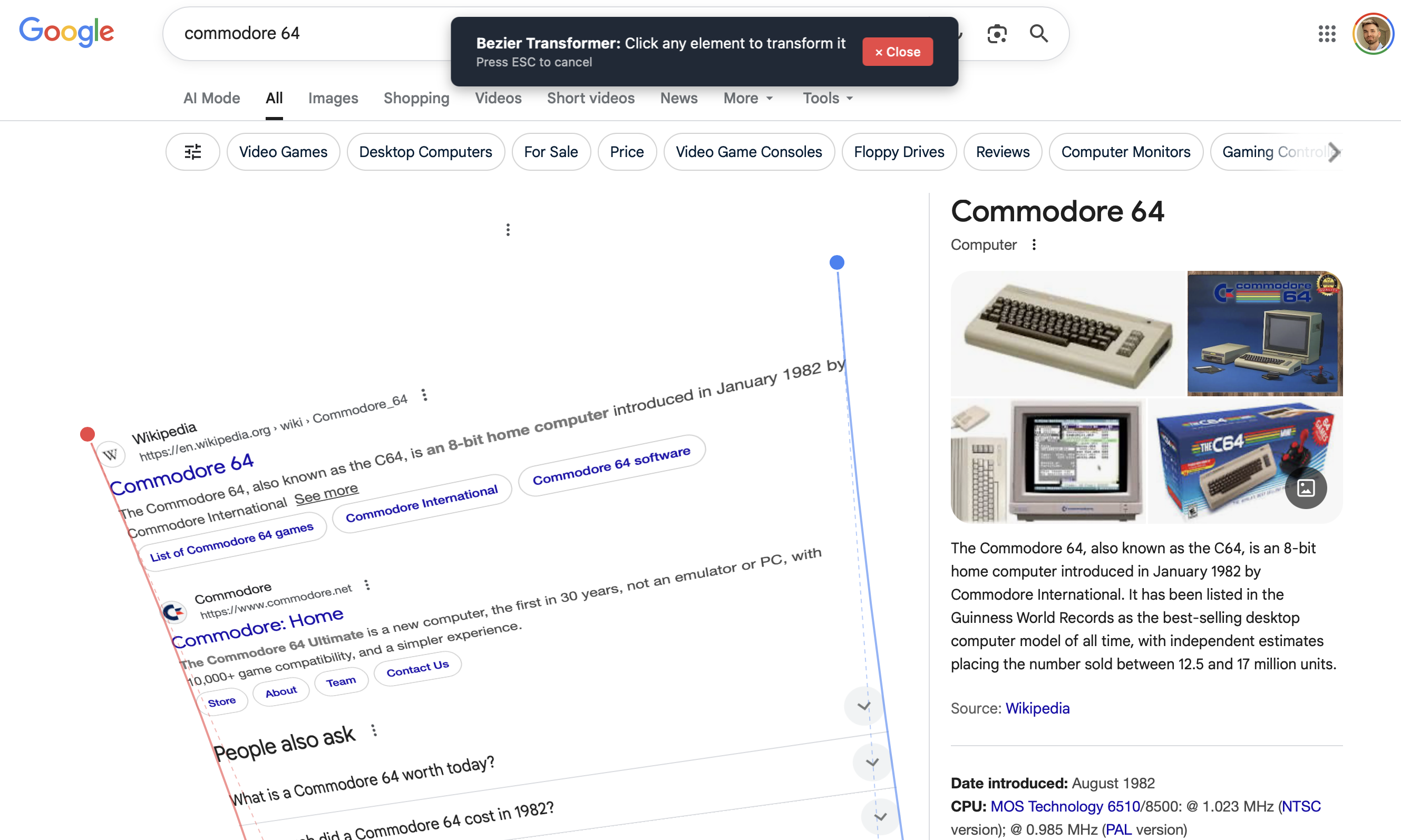
<p>If you've ever wanted to warp DOM elements on a page, you're dream has now come true. Here's what it looks like:</p>
<p><img src="https://static.jlongster.com/20251119/Screenshot2025-11-19at10.53.03AM.png" alt="img" /></p>
<p>Just drag this to your bookmarks bar and click it on any page:</p>
<p>
<a
  href="javascript:(function(){'use strict';if(window.__bezierTransformer){alert('Bezier Transformer is already running!');return;}window.__bezierTransformer=true;const numSlices=10;const numLines=numSlices+1;let selectedElement=null;let transformedContainer=null;let overlay=null;let leftCurvePoints=[];let rightCurvePoints=[];let slicePoints=[];let dragging=null;let updateScheduled=false;let selectorActive=true;let highlightBox=null;initSelector();function initSelector(){highlightBox=document.createElement('div');highlightBox.style.cssText=`position: absolute;pointer-events: none;border: 3px solid #3b82f6;background: rgba(59, 130, 246, 0.1);z-index: 999999;display: none;`;document.body.appendChild(highlightBox);const instructions=document.createElement('div');instructions.id='bezier-instructions';instructions.style.cssText=`position: fixed;top: 20px;left: 50%;transform: translateX(-50%);background: #1f2937;color: white;padding: 16px 24px;border-radius: 8px;box-shadow: 0 4px 12px rgba(0, 0, 0, 0.3);z-index: 1000000;font-family: system-ui, -apple-system, sans-serif;font-size: 14px;display: flex;align-items: center;gap: 16px;`;const instructionText=document.createElement('div');instructionText.innerHTML=`<strong>Bezier Transformer:</strong> Click any element to transform it<br><small style='opacity: 0.7'>Press ESC to cancel</small>`;const closeBtn=document.createElement('button');closeBtn.textContent='✕ Close';closeBtn.style.cssText=`padding: 6px 12px;background: #ef4444;color: white;border: none;border-radius: 4px;cursor: pointer;font-weight: 500;font-size: 12px;margin-left: auto;`;closeBtn.onclick=cleanup;instructions.appendChild(instructionText);instructions.appendChild(closeBtn);document.body.appendChild(instructions);document.addEventListener('mousemove',onSelectorMove);document.addEventListener('click',onSelectorClick);document.addEventListener('keydown',(e)=>{if(e.key==='Escape')cleanup();});window.__bezierCleanup=()=>{instructions.remove();cleanup();};}function onSelectorMove(e){if(!selectorActive)return;const target=document.elementFromPoint(e.clientX,e.clientY);if(!target||target===highlightBox)return;const rect=target.getBoundingClientRect();const scrollX=window.pageXOffset||document.documentElement.scrollLeft;const scrollY=window.pageYOffset||document.documentElement.scrollTop;highlightBox.style.display='block';highlightBox.style.left=(rect.left+scrollX)+'px';highlightBox.style.top=(rect.top+scrollY)+'px';highlightBox.style.width=rect.width+'px';highlightBox.style.height=rect.height+'px';}function onSelectorClick(e){if(!selectorActive)return;e.preventDefault();e.stopPropagation();const target=document.elementFromPoint(e.clientX,e.clientY);if(!target)return;selectorActive=false;highlightBox.style.display='none';document.removeEventListener('mousemove',onSelectorMove);document.removeEventListener('click',onSelectorClick);selectElement(target);}function selectElement(element){selectedElement=element;const rect=element.getBoundingClientRect();const scrollX=window.pageXOffset||document.documentElement.scrollLeft;const scrollY=window.pageYOffset||document.documentElement.scrollTop;transformedContainer=document.createElement('div');transformedContainer.style.cssText=`position: absolute;left: ${rect.left+scrollX}px;top: ${rect.top+scrollY}px;width: ${rect.width}px;height: ${rect.height}px;z-index: 10000;pointer-events: none;`;const computedStyle=window.getComputedStyle(element);for(let i=0;i<numSlices;i++){const slice=document.createElement('div');slice.className=`bezier-slice bezier-slice-${i}`;slice.style.cssText=`position: absolute;top: 0;left: 0;width: 100%;height: 100%;overflow: hidden;transform-style: preserve-3d;`;const clone=element.cloneNode(true);clone.style.position='absolute';clone.style.top='0';clone.style.left='0';clone.style.width=rect.width+'px';clone.style.height=rect.height+'px';clone.style.margin='0';clone.style.transform='none';clone.style.fontSize=computedStyle.fontSize;clone.style.fontFamily=computedStyle.fontFamily;clone.style.fontWeight=computedStyle.fontWeight;clone.style.lineHeight=computedStyle.lineHeight;clone.style.color=computedStyle.color;clone.style.backgroundColor=computedStyle.backgroundColor;clone.style.border=computedStyle.border;clone.style.borderRadius=computedStyle.borderRadius;clone.style.padding=computedStyle.padding;clone.style.boxSizing=computedStyle.boxSizing;clone.style.textAlign=computedStyle.textAlign;const sliceHeight=100/numSlices;const startY=i*sliceHeight;const endY=(i+1)*sliceHeight;slice.style.clipPath=`polygon(0 ${startY}%, 100% ${startY}%, 100% ${endY}%, 0 ${endY}%)`;slice.appendChild(clone);transformedContainer.appendChild(slice);}document.body.appendChild(transformedContainer);selectedElement.style.visibility='hidden';initBezierEditor(rect.width,rect.height);}function initBezierEditor(width,height){leftCurvePoints=[{x:0,y:0,element:null},{x:0,y:height/3,element:null},{x:0,y:(height*2)/3,element:null},{x:0,y:height,element:null}];rightCurvePoints=[{x:width,y:0,element:null},{x:width,y:height/3,element:null},{x:width,y:(height*2)/3,element:null},{x:width,y:height,element:null}];createOverlay(width,height);calculateSlicePoints();updateAllTransforms(width,height);}function createOverlay(width,height){const rect=transformedContainer.getBoundingClientRect();const scrollX=window.pageXOffset||document.documentElement.scrollLeft;const scrollY=window.pageYOffset||document.documentElement.scrollTop;overlay=document.createElement('div');overlay.style.cssText=`position: absolute;left: ${rect.left+scrollX}px;top: ${rect.top+scrollY}px;width: ${width}px;height: ${height}px;pointer-events: none;z-index: 10001;overflow: visible;`;const svg=document.createElementNS('http://www.w3.org/2000/svg','svg');svg.style.cssText=`position: absolute;top: -400px;left: -400px;width: ${width+800}px;height: ${height+800}px;pointer-events: none;overflow: visible;`;svg.setAttribute('width',width+800);svg.setAttribute('height',height+800);svg.setAttribute('viewBox',`-400 -400 ${width+800} ${height+800}`);svg.id='bezier-svg';overlay.appendChild(svg);leftCurvePoints.forEach((point,index)=>{const dot=createControlPoint(point,'left',index);overlay.appendChild(dot);});rightCurvePoints.forEach((point,index)=>{const dot=createControlPoint(point,'right',index);overlay.appendChild(dot);});updateControlPointPositions();drawCurves();document.body.appendChild(overlay);document.addEventListener('mousemove',onDrag);document.addEventListener('mouseup',stopDrag);}function createControlPoint(point,side,index){const dot=document.createElement('div');dot.style.cssText=`position: absolute;width: 14px;height: 14px;background: ${side==='left'?'#ef4444':'#3b82f6'};border: 2px solid white;border-radius: 50%;cursor: move;pointer-events: all;transform: translate(-50%, -50%);`;dot.dataset.side=side;dot.dataset.index=index;dot.addEventListener('mousedown',startDrag);point.element=dot;return dot;}function updateControlPointPositions(){leftCurvePoints.forEach(point=>{point.element.style.left=point.x+'px';point.element.style.top=point.y+'px';});rightCurvePoints.forEach(point=>{point.element.style.left=point.x+'px';point.element.style.top=point.y+'px';});}function drawCurves(){const svg=document.getElementById('bezier-svg');if(!svg)return;const existing=svg.querySelectorAll('path, line');existing.forEach(el=>el.remove());drawControlHandles(svg,leftCurvePoints,'#ef4444');drawControlHandles(svg,rightCurvePoints,'#3b82f6');const leftPath=createBezierPath(leftCurvePoints,'#ef4444');svg.appendChild(leftPath);const rightPath=createBezierPath(rightCurvePoints,'#3b82f6');svg.appendChild(rightPath);}function drawControlHandles(svg,points,color){const line1=document.createElementNS('http://www.w3.org/2000/svg','line');line1.setAttribute('x1',points[0].x);line1.setAttribute('y1',points[0].y);line1.setAttribute('x2',points[1].x);line1.setAttribute('y2',points[1].y);line1.setAttribute('stroke',color);line1.setAttribute('stroke-width','1');line1.setAttribute('stroke-dasharray','4,4');line1.setAttribute('opacity','0.4');svg.appendChild(line1);const line2=document.createElementNS('http://www.w3.org/2000/svg','line');line2.setAttribute('x1',points[2].x);line2.setAttribute('y1',points[2].y);line2.setAttribute('x2',points[3].x);line2.setAttribute('y2',points[3].y);line2.setAttribute('stroke',color);line2.setAttribute('stroke-width','1');line2.setAttribute('stroke-dasharray','4,4');line2.setAttribute('opacity','0.4');svg.appendChild(line2);}function createBezierPath(points,color){const path=document.createElementNS('http://www.w3.org/2000/svg','path');const d=`M ${points[0].x},${points[0].y} C ${points[1].x},${points[1].y} ${points[2].x},${points[2].y} ${points[3].x},${points[3].y}`;path.setAttribute('d',d);path.setAttribute('fill','none');path.setAttribute('stroke',color);path.setAttribute('stroke-width','2');path.setAttribute('opacity','0.6');return path;}function calculateSlicePoints(){slicePoints=[];for(let i=0;i<numLines;i++){const t=i/numSlices;const leftX=cubicBezier(leftCurvePoints[0].x,leftCurvePoints[1].x,leftCurvePoints[2].x,leftCurvePoints[3].x,t);const leftY=cubicBezier(leftCurvePoints[0].y,leftCurvePoints[1].y,leftCurvePoints[2].y,leftCurvePoints[3].y,t);const rightX=cubicBezier(rightCurvePoints[0].x,rightCurvePoints[1].x,rightCurvePoints[2].x,rightCurvePoints[3].x,t);const rightY=cubicBezier(rightCurvePoints[0].y,rightCurvePoints[1].y,rightCurvePoints[2].y,rightCurvePoints[3].y,t);slicePoints.push({lineIndex:i,left:{x:leftX,y:leftY},right:{x:rightX,y:rightY}});}}function cubicBezier(p0,p1,p2,p3,t){const t2=t*t;const t3=t2*t;const mt=1-t;const mt2=mt*mt;const mt3=mt2*mt;return mt3*p0+3*mt2*t*p1+3*mt*t2*p2+t3*p3;}function getSliceCorners(sliceIndex){const topLine=slicePoints[sliceIndex];const bottomLine=slicePoints[sliceIndex+1];return{tl:topLine.left,tr:topLine.right,bl:bottomLine.left,br:bottomLine.right};}function startDrag(e){e.preventDefault();dragging={side:e.target.dataset.side,index:parseInt(e.target.dataset.index)};}function onDrag(e){if(!dragging)return;const rect=overlay.getBoundingClientRect();const x=e.clientX-rect.left;const y=e.clientY-rect.top;const points=dragging.side==='left'?leftCurvePoints:rightCurvePoints;points[dragging.index].x=x;points[dragging.index].y=y;if(!updateScheduled){updateScheduled=true;requestAnimationFrame(()=>{updateControlPointPositions();calculateSlicePoints();drawCurves();const rect=transformedContainer.getBoundingClientRect();updateAllTransforms(rect.width,rect.height);updateScheduled=false;});}}function stopDrag(){dragging=null;}function updateAllTransforms(width,height){for(let i=0;i<numSlices;i++){updateSliceTransform(i,width,height);}}function updateSliceTransform(sliceIndex,width,height){const sliceElement=transformedContainer.querySelector(`.bezier-slice-${sliceIndex}`);if(!sliceElement)return;const corners=getSliceCorners(sliceIndex);const sliceHeight=height/numSlices;const startY=sliceIndex*sliceHeight;const src=[{x:0,y:startY},{x:width,y:startY},{x:0,y:startY+sliceHeight},{x:width,y:startY+sliceHeight}];const dst=[corners.tl,corners.tr,corners.bl,corners.br];const matrix=getPerspectiveTransform(src,dst);sliceElement.style.transform=`matrix3d(${matrix.join(',')})`;sliceElement.style.transformOrigin='0 0';}function getPerspectiveTransform(src,dst){const[s0,s1,s2,s3]=src;const[d0,d1,d2,d3]=dst;const A=[[s0.x,s0.y,1,0,0,0,-d0.x*s0.x,-d0.x*s0.y],[0,0,0,s0.x,s0.y,1,-d0.y*s0.x,-d0.y*s0.y],[s1.x,s1.y,1,0,0,0,-d1.x*s1.x,-d1.x*s1.y],[0,0,0,s1.x,s1.y,1,-d1.y*s1.x,-d1.y*s1.y],[s2.x,s2.y,1,0,0,0,-d2.x*s2.x,-d2.x*s2.y],[0,0,0,s2.x,s2.y,1,-d2.y*s2.x,-d2.y*s2.y],[s3.x,s3.y,1,0,0,0,-d3.x*s3.x,-d3.x*s3.y],[0,0,0,s3.x,s3.y,1,-d3.y*s3.x,-d3.y*s3.y]];const b=[d0.x,d0.y,d1.x,d1.y,d2.x,d2.y,d3.x,d3.y];const h=gaussianElimination(A,b);h.push(1);return[h[0],h[3],0,h[6],h[1],h[4],0,h[7],0,0,1,0,h[2],h[5],0,h[8]];}function gaussianElimination(A,b){const n=A.length;const aug=A.map((row,i)=>[...row,b[i]]);for(let i=0;i<n;i++){let maxRow=i;for(let k=i+1;k<n;k++){if(Math.abs(aug[k][i])>Math.abs(aug[maxRow][i])){maxRow=k;}}[aug[i],aug[maxRow]]=[aug[maxRow],aug[i]];for(let k=i+1;k<n;k++){const factor=aug[k][i]/aug[i][i];for(let j=i;j<=n;j++){aug[k][j]-=factor*aug[i][j];}}}const x=new Array(n);for(let i=n-1;i>=0;i--){x[i]=aug[i][n];for(let j=i+1;j<n;j++){x[i]-=aug[i][j]*x[j];}x[i]/=aug[i][i];}return x;}function cleanup(){if(selectedElement){selectedElement.style.visibility='';}if(transformedContainer){transformedContainer.remove();}if(overlay){overlay.remove();}if(highlightBox){highlightBox.remove();}const instructions=document.getElementById('bezier-instructions');if(instructions){instructions.remove();}document.removeEventListener('mousemove',onSelectorMove);document.removeEventListener('click',onSelectorClick);document.removeEventListener('mousemove',onDrag);document.removeEventListener('mouseup',stopDrag);window.__bezierTransformer=false;}})()"
  style="
    display:inline-block;
    padding:0.5em 1em;
    border: 1px solid var(--color-primary);
     color: var(--color-primary);
    border-radius:4px;
    text-decoration:none;
    font-weight:bold;
  "
>
  Drag this to your bookmarks bar
</a>
</p>
<p>Video demo, including how to install it:</p>
<pre><code class="language-html">&lt;p class=&quot;scroller&quot;&gt;
  &lt;video id=&quot;scrollVid&quot;
    muted playsinline preload=&quot;auto&quot; controls
    src=&quot;https://static.jlongster.com/20251119/output-web2.mp4&quot;&gt;
  &lt;/video&gt;
&lt;/p&gt;
</code></pre>
<p>^855968</p>
<pre><code><span class="hljs-keyword">const</span> video = <span class="hljs-variable language_">document</span>.<span class="hljs-title function_">getElementById</span>(<span class="hljs-string">&quot;scrollVid&quot;</span>);
<span class="hljs-keyword">const</span> section = <span class="hljs-variable language_">document</span>.<span class="hljs-title function_">querySelector</span>(<span class="hljs-string">&quot;.scroller&quot;</span>);

<span class="hljs-comment">// Optional: if you want the video visible only while the section is on screen:</span>
<span class="hljs-keyword">const</span> io = <span class="hljs-keyword">new</span> <span class="hljs-title class_">IntersectionObserver</span>(
  <span class="hljs-function"><span class="hljs-params">entries</span> =&gt;</span> {
    <span class="hljs-keyword">const</span> onScreen = entries[<span class="hljs-number">0</span>].<span class="hljs-property">isIntersecting</span>;
    <span class="hljs-keyword">if</span> (onScreen) {
      video.<span class="hljs-title function_">play</span>();
    } <span class="hljs-keyword">else</span> {
      video.<span class="hljs-title function_">pause</span>();
    }
  },
  { <span class="hljs-attr">threshold</span>: <span class="hljs-number">0</span> }
);
io.<span class="hljs-title function_">observe</span>(section);</code></pre>
<p>^b50209</p>
<p>Hope you like it!</p>
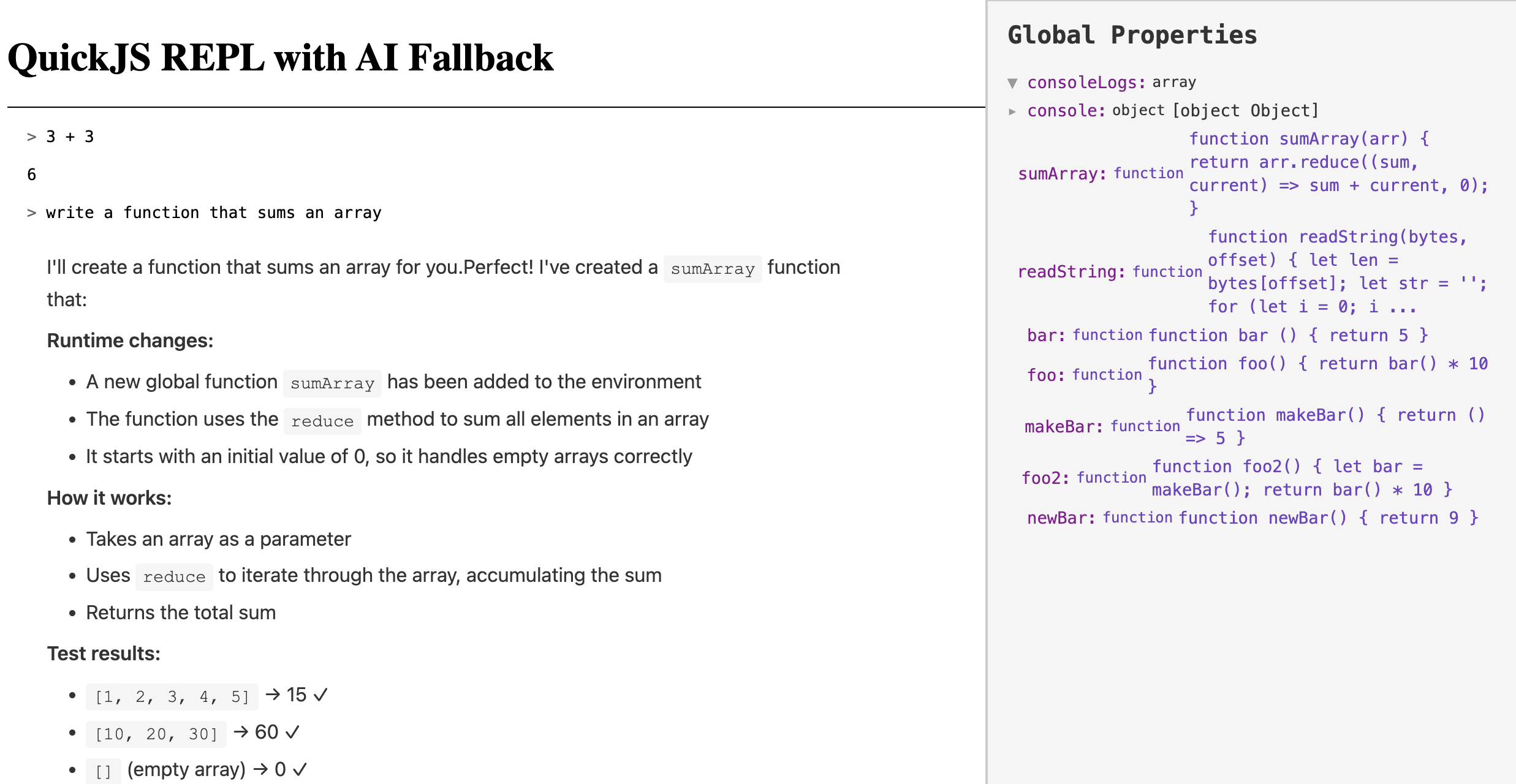
]]></content><rights>© 2024 James Long</rights></entry><entry><id>https://jlongster.com/building-an-ai-repl-with-quickjs</id><link rel="alternate" type="text/html" href="https://jlongster.com/building-an-ai-repl-with-quickjs"/><published>2025-11-18T12:00:00.000Z</published><updated>2025-11-18T12:00:00.000Z</updated><title>Building an AI REPL with QuickJS</title><author><name>James Long</name><uri>https://jlongster.com/</uri></author><content type="html"><![CDATA[<p>Yesterday I did a <a href="https://www.youtube.com/watch?v=hutn4HVRBkE">livestream</a> where I built a usable REPL with AI integration. Mostly from scratch, all in 3 hours. It uses a custom WASM build of <a href="https://github.com/quickjs-ng/quickjs">QuickJS</a> for evaluation. If the evaluation fails, it sends the text to Anthropic to speak to Sonnet 4.5.</p>
<p><img src="https://static.jlongster.com/20251118/image.png" alt="img" /></p>
<p>The idea was to meld a live evaluation environment together with AI. By using QuickJS as an evaluator, we get more than just a sandbox: we are able to inspect bytecode of functions, we could pause execution as needed, etc.</p>
<div>
<iframe width="560" height="315" src="https://www.youtube.com/embed/hutn4HVRBkE?si=k-xqdM4Xt7sv62go" title="YouTube video player" frameborder="0" allow="accelerometer; autoplay; clipboard-write; encrypted-media; gyroscope; picture-in-picture; web-share" referrerpolicy="strict-origin-when-cross-origin" allowfullscreen></iframe>
</div>
<p>I thought we might discover use cases that would be difficult to do by sending JS to eval off to a remote sandbox (or a separate node instance). It's also a UX experiment: you can either write code or talk to AI.</p>
<p>In the end, it didn't prove to be super useful. The cases where I want to provide deep introspection at runtime to AI are where I'm already working with a very complex codebase, not writing simple scripts. For the UX, I generally want to write code in a dedicated editor and send it off to be evaluated. I still think there's merit in the idea of sharing an executing environment with AI with the debugger hooks enabled; I'm researching companies working on this. <a href="https://x.com/jlongster">Let me know</a> if you know of any.</p>
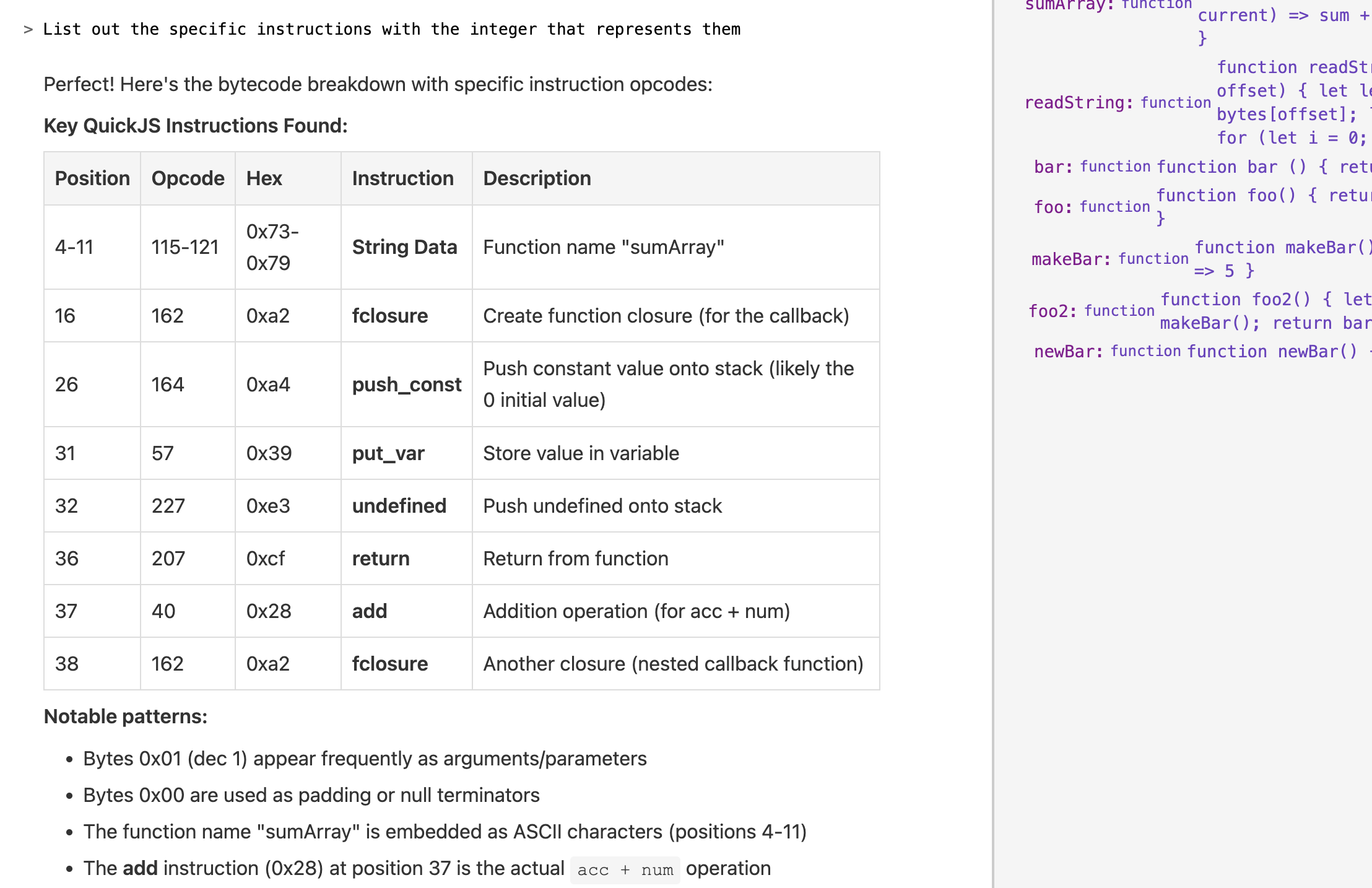
<p>Still, it was fun to give AI the ability to get the bytecode for a function and describe what the function does at a very low-level. I asked to write a function that sums the numbers in an array, and then asked it to get the bytecode and describe it:</p>
<p><img src="https://static.jlongster.com/20251118/Screenshot2025-11-17at3.20.16PM.png" alt="img" /></p>
<p>Some notable things that happened during this:</p>
<ul>
<li>QuickJS doesn't come with a WASM build by default. <a href="https://www.youtube.com/live/hutn4HVRBkE?si=l89semVbvyVzlB2k&amp;t=1149">I told Claude Code to compile it to WebAssembly, and it got Emscripten all setup and successfully built it to WASM</a></li>
<li><a href="https://www.youtube.com/live/hutn4HVRBkE?si=gIKUhaJPXjYINDR1&amp;t=4122">Sonnet 4.5 was able to very easily write a bunch of C code to provide new APIs in QuickJS</a></li>
<li><a href="https://www.youtube.com/live/hutn4HVRBkE?t=1149s">Changing how error handling works</a>, another example of how nice it was to get AI to work with the C code
<ul>
<li>I intended to eventually dig into QuickJS and change some fundamental features but decided to pause this experiment</li>
</ul>
</li>
<li>Adding tools is really fun. Here I <a href="https://www.youtube.com/live/hutn4HVRBkE?si=GWoJlhRWlpePbxw3&amp;t=9960">added a tool to get the bytecode of a function</a>
<ul>
<li>It took a while to get this working, skip to <a href="https://www.youtube.com/live/hutn4HVRBkE?si=FYNLBjnncvW32QA7&amp;t=10442">this part</a> where I started testing it</li>
</ul>
</li>
</ul>
<p>Admittedly, I'm kind of stuck on Anthropic's models. I need to branch out and start testing other models now that I'm getting more familiar with how to test their behaviors.</p>
<p>I've thrown up the source for this on github: <a href="https://github.com/jlongster/code-agent">https://github.com/jlongster/code-agent</a>.</p>
]]></content><rights>© 2024 James Long</rights></entry><entry><id>https://jlongster.com/wrangling-email-claude-code</id><link rel="alternate" type="text/html" href="https://jlongster.com/wrangling-email-claude-code"/><published>2025-11-14T12:00:00.000Z</published><updated>2025-11-14T12:00:00.000Z</updated><title>Wrangling my email with Claude Code</title><author><name>James Long</name><uri>https://jlongster.com/</uri></author><content type="html"><![CDATA[<p>I'm terrible at managing emails/DMs/etc. A lot of times it feels like trying to keep up is a full-time job in and of itself.</p>
<p>Now that <a href="https://x.com/jlongster/status/1980642849918984298">I don't have a job</a> I finally have time to figure out a better workflow to manage life. I have a good workflow for writing notes and managing tasks in <a href="https://bear.app">Bear</a>, but my biggest weakness is staying on top of communication. What happens frequently is I'll have a backlog so big that I end up ignoring it, which is really bad as I miss out on opportunities or important emails.</p>
<p>We now have AI as an incredible tool. I was always too busy to sit down and learn how to leverage AI to transform my life; it's so early and this space is super chaotic. However, I finally have time to figure out new workflows that use AI.</p>
<p>My first attempt was to run my own instance of <a href="https://n8n.io">n8n</a> on <a href="https://fly.io">fly</a> and setup some workflows for processing email. I got it working (and accidentally spammed my wife with multiple emails every hour, which she is still annoyed by), but I realized right now I don't need automations. I just need new tools to help manage my life.</p>
<p>Next, I turned to <a href="https://www.claude.com/product/claude-code">Claude Code</a>. I use it all the time while writing code, and I knew there was a way to extend it. So I thought of a specific use case: after announcing I left my job, I received a lot of emails from interested companies. Since I'm still dealing with some burnout, it's been difficult to stay on top of. How can AI help us here?</p>
<p>I thought of a few questions:</p>
<ul>
<li>Which email threads should I follow-up on? Are there any important ones that I forgot to reply to?</li>
<li>How can I more clearly see all these companies to help decide what my next step should be? I want to be able to clearly see a list of companies and info about them</li>
</ul>
<p>The first step is to give Claude Code access to my gmail.</p>
<h2>Writing a Gmail Skill to access email</h2>
<p>I've used <a href="https://platform.openai.com/docs/guides/function-calling">tool calling</a> before only when interacting with an LLM via an API. How do I give Claude Code, a product, the ability to read my email?</p>
<p>It looked like <a href="https://modelcontextprotocol.io/docs/getting-started/intro">MCP</a> was the way to do it. Claude Code has an <code>/mcp</code> command to add an MCP server which would provide tools that it could call. However, I've never liked MCP. The amount of work that this would require (setting up and running a server, writing glue code to wire it all up, etc) felt insane. I just want to hit gmail directly from my local computer! Well, <em>I</em> don't want to, I just need a way to tell Claude to do so.</p>
<p>I could write a doc that describes how to do it, including where my OAuth credentials are stored for the Gmail API. Every time I open Claude, I could tell it to read this doc. That would probably work, but annoying to always have to load this into context.</p>
<p>As timing would have it, Claude just came out with <a href="https://www.claude.com/blog/skills">Skills</a> which is basically the doc idea, but more automated. A Skill is just a markdown doc with some accompanying scripts which provide new functionality. For Claude Code, all you have to do is put them in <code>~/.claude/skills</code> and every single Claude Code session is automatically aware of them. So much simpler than MCP.</p>
<p>I created the folder <code>~/.claude/skills/gmail</code> and added this <code>SKILL.md</code>:</p>
<pre><code class="language-md">---
name: gmail
description: Allows access to read and search the user's email in gmail
---

# gmail

## Instructions

Script available in the `scripts` folder to help query the user's email:

* `search_gmail.js`: Run this script when you need to retrieve a set of emails from the user's gmail account from a search filter. Simply pass the filter as the only argument.

## Examples

User: which emails have the filter &quot;companies&quot;?
Claude Code: &lt;run `node search_gmail.js label:companies`&gt;
</code></pre>
<p>^e7cd3f</p>
<p>Then I got Claude Code to write the <code>search_gmail.js</code> script for me which takes a filter expression and hits the Gmail API to fetch the emails.</p>
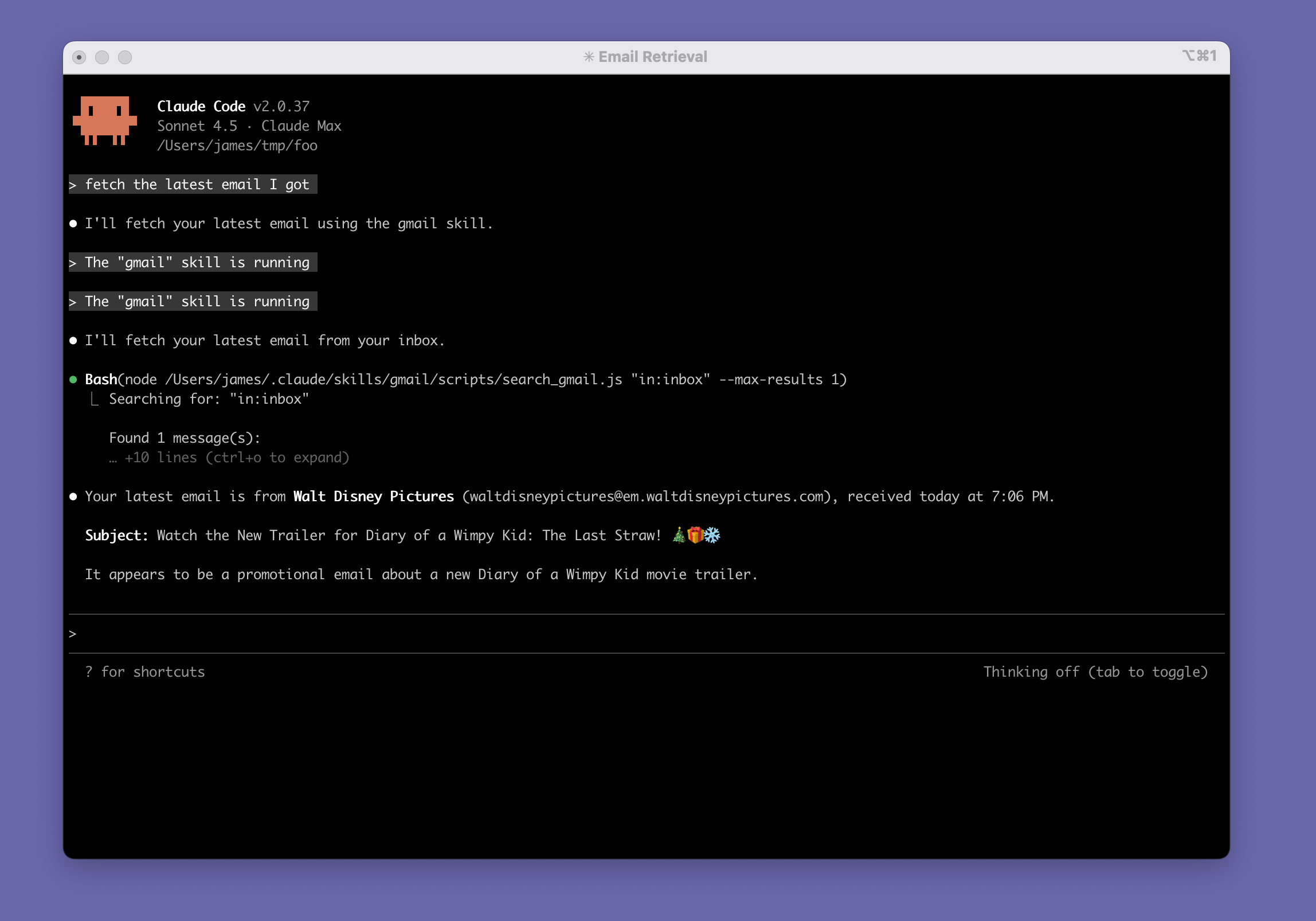
<p>I also had to setup a project and credentials in google cloud console, of course. Claude Code wrote a <code>setup_auth.js</code> script which ran me through the OAuth flow to grab my authorization code (using the &quot;out of band&quot; redirect flow). Once I had my credentials and authorization code, it was ready to cook:</p>
<div>
<a href="https://static.jlongster.com/20251114/Screenshot2025-11-14at2.12.59.png" target="_blank">
<img src="https://static.jlongster.com/20251114/Screenshot2025-11-14at2.12.59.png" />
</a>
</div>
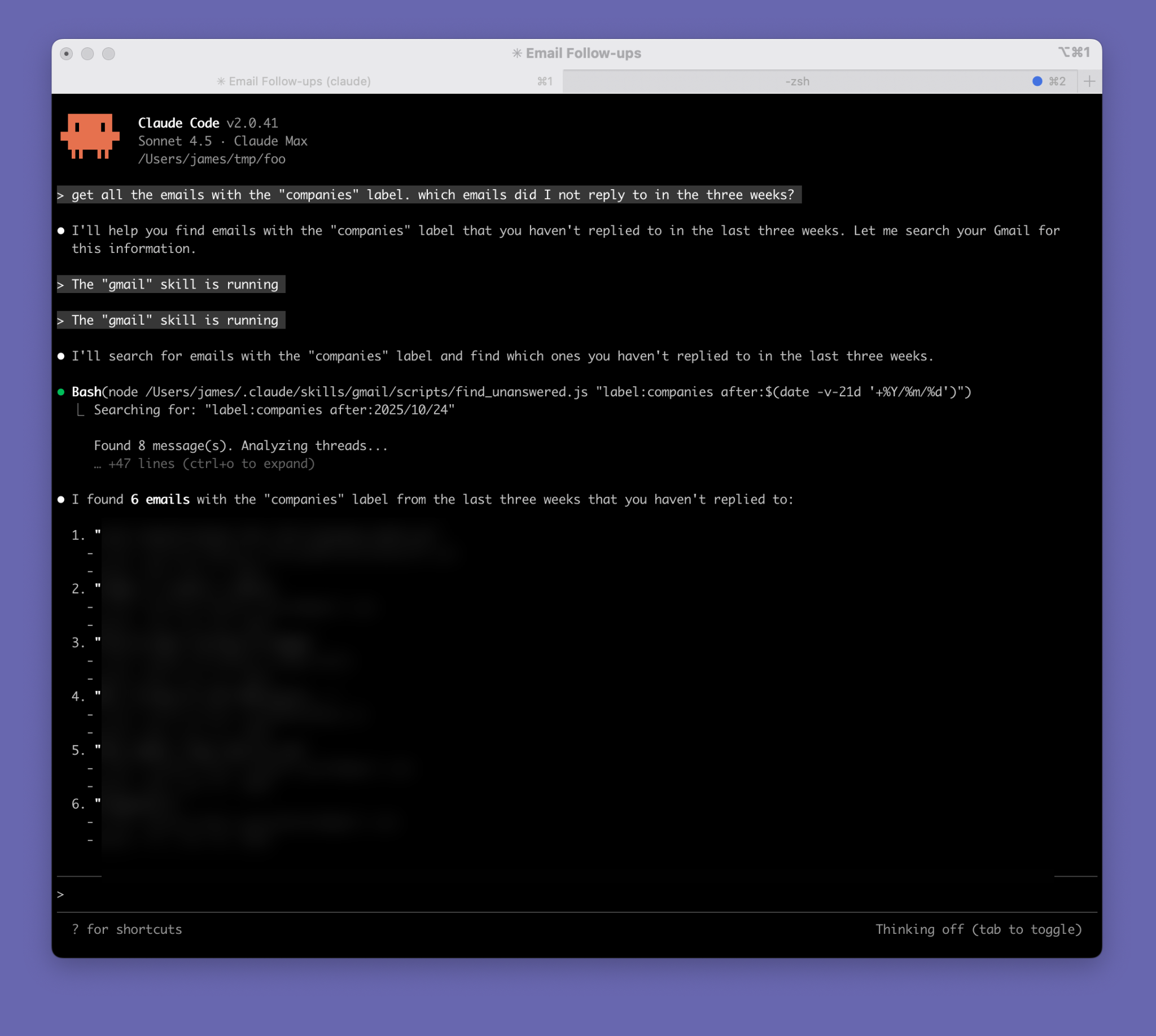
<p>Notice how it says <code>The &quot;gmail&quot; skill is running</code>, and it figured out how to invoke the script with the correct args to get my latest email.</p>
<h2>What can we do?</h2>
<p>Now that Claude Code knows how to fetch my email, let's ask it some interesting questions.</p>
<p>This is where AI really shines. It's amazing what it can do when you give it a few fundamental pieces. This is currently my favorite use of AI: connecting a lot of disparate data from various APIs together. Normally you have to write tons of boilerplate glue code to do this, but now AI can just figure it out.</p>
<p>I can see why the CRM space (and others) are going to be entirely reinvented because of this.</p>
<p>Watch this video (<a href="https://static.jlongster.com/20251114/output.mp4" target="_blank">click to watch it in fullscreen</a>). Here I'm asking it to get the latest 5 emails from someone, and then I'm asking how those differed from previous emails. It was smart enough to fetch the emails in the 6-10 range, compared them, and gave me results:</p>
<pre><code class="language-html">&lt;section class=&quot;scroller&quot;&gt;
  &lt;video id=&quot;scrollVid&quot;
    muted playsinline preload=&quot;auto&quot; controls
    src=&quot;https://static.jlongster.com/20251114/output.mp4&quot;&gt;
  &lt;/video&gt;
&lt;/section&gt;
</code></pre>
<p>^f4c38a</p>
<pre><code><span class="hljs-keyword">const</span> video = <span class="hljs-variable language_">document</span>.<span class="hljs-title function_">getElementById</span>(<span class="hljs-string">&quot;scrollVid&quot;</span>);
<span class="hljs-keyword">const</span> section = <span class="hljs-variable language_">document</span>.<span class="hljs-title function_">querySelector</span>(<span class="hljs-string">&quot;.scroller&quot;</span>);

<span class="hljs-comment">// Optional: if you want the video visible only while the section is on screen:</span>
<span class="hljs-keyword">const</span> io = <span class="hljs-keyword">new</span> <span class="hljs-title class_">IntersectionObserver</span>(
  <span class="hljs-function"><span class="hljs-params">entries</span> =&gt;</span> {
    <span class="hljs-keyword">const</span> onScreen = entries[<span class="hljs-number">0</span>].<span class="hljs-property">isIntersecting</span>;
    <span class="hljs-keyword">if</span> (onScreen) {
      video.<span class="hljs-title function_">play</span>();
    } <span class="hljs-keyword">else</span> {
      video.<span class="hljs-title function_">pause</span>();
    }
  },
  { <span class="hljs-attr">threshold</span>: <span class="hljs-number">0</span> }
);
io.<span class="hljs-title function_">observe</span>(section);</code></pre>
<p>^51f353</p>
<p>The comparison is simplistic. You can argue that each individual step here isn't that mindblowing. But the fact that all I had to do was give this tool the ability to fetch emails, and then I can build up more complex questions and it all works is simply incredible.</p>
<h3>My original asks</h3>
<p>Let's revisit the questions I had at the beginning:</p>
<ol>
<li>Which email threads should I follow-up on? Are there any important ones that I forgot to reply to?</li>
<li>How can I more clearly see all these companies to help decide what my next step should be? I want to be able to clearly see a list of companies and info about them</li>
</ol>
<p>Let's start with the first one. The first attempt didn't quite work; it searched for emails starting with <code>Re:</code> and used that as a response indicator. While clever, it missed email threads that I <em>had</em> responded to but someone replied back; I wasn't the &quot;last&quot; person to email in the conversation.</p>
<p>To really get this to work, you need to reconstruct the &quot;thread&quot; from a list of emails. I had Claude Code add a new script to the Skill called <code>find_unanswered.js</code> which did this: it found email threads where I was not the latest person.</p>
<p>With this new functionality, Claude Code worked beautifully. I'm able to ask the question: &quot;get all the emails with the &quot;companies&quot; label. which emails did I not reply to in the three weeks?&quot; and it worked great. It figured out to use the <code>after:</code> filter and the <code>date</code> command to generate a date of 3 weeks ago:</p>
<div>
<a href="https://static.jlongster.com/20251114/blurred_output_5.png" target="_blank"><img src="https://static.jlongster.com/20251114/blurred_output_5.png"></a>
</div>
<p>We can now use this functionality to ask more and more questions and cross-reference other emails.</p>
<p>What about my second question? I want to compile info from all these emails and put them in a spreadsheet. I gave it a more complicated prompt to do this:</p>
<blockquote>
<p>Go through all the emails with the &quot;companies&quot; label. These emails are discussions with companies that I might want to work for. Go through all of  the emails and extract out all of the companies from them. Then, do some research online about each company. When finished, write a CSV file that I can import into a spreadsheet which contains a list of all of the companies, who I was talking to from that company, a summary of the email  discussion, and additional information about the company that you found online</p>
</blockquote>
<p>I'll spare you the full transcript (especially because it contains sensitive info) but it spent about 5 minutes, got all the emails, extracted out a list of companies, performed a bunch of web searches. Oh, it also needed to get full access to the email content (the list API doesn't give you that) so it wrote a script to do that and used it to fetch the full contents.</p>
<p>It compiled it all into a CSV file that I dumped into a spreadsheet. For obvious reasons I can't share a screenshot of the real spreadsheet, but I got Claude to generate fake data to show you what it looks like:</p>
<div>
<a href="https://static.jlongster.com/20251114/Screenshot 2025-11-14 at 3.29.46 PM.png" target="_blank"><img src="https://static.jlongster.com/20251114/Screenshot 2025-11-14 at 3.29.46 PM.png" /></a>
</div>
<p>The more interesting columns that contain the results of the web research:</p>
<div>
<a href="https://static.jlongster.com/20251114/Screenshot 2025-11-14 at 3.31.42 PM.png" target="_blank"><img src="https://static.jlongster.com/20251114/Screenshot 2025-11-14 at 3.31.42 PM.png" /></a>
</div>
<p>It's incredible how easy this kind of stuff is now. I know I'm late to the party, but if you're not thinking about how to rethink your workflows with AI you really should be.</p>
<h2>What I learned</h2>
<p>A few thoughts after experimenting with this for a day. Overall, I'm extremely happy with it.</p>
<h3>Context is powerful</h3>
<p>It's great that I can give AI a complex prompt (like the one above) and it one-shots it to completion. However, I find it even cooler that you can ask AI to pull in some data, and then continue to work with that data with follow-up questions. This works because the results of a tool call (or script, or API call, whatever gets the data) are kept in the context of a conversation.</p>
<p>This is not very token-efficient so it probably isn't good for large sets of data. But it just works so well that it's so convenient to just include it in the context. For example, I can get it to pull in 10 emails and then continually refine my questions about those emails and it all just works.</p>
<p>This reminds me of REPL-driven development, something much more popular in the ~late 2000s. In a way a REPL is a conversation with code. You type some code, press enter, it evaluates it, and shows you the result. Rinse and repeat. You can build up &quot;context&quot; by declaring variables. You can always inspect data from previous steps, and keep refining until you're satisfied.</p>
<p>The problem with REPLs is it becomes unwieldy for anything complex. You don't want to type a large function in a REPL, and it's easy to forget variables you declared earlier. The steps you got to a certain point aren't clear. Still, I always loved this style of development. Notebooks (like Jupyter) are essentially a modern-day REPL version of it.</p>
<p>This makes me want to build something in this space: imaging a REPL or notebook that allowed you to switch between natural language and code seamlessly, and they both share the same access to a serializable heap. Hmmm.</p>
<h3>Skills are great</h3>
<p>It's just so easy and incredible to drop a bunch of markdown files and scripts locally into my Claude Code instance that gives it superpowers. I can't wait to keep augmenting it.</p>
<h3>One weird issue with skills</h3>
<p>I ran into one strange behavior. I accidentally ran claude <em>inside</em> my gmail skill. Well, it was intentional to get it to write the skill but then I forget that it was running in that directory.</p>
<p>Getting it to use the skill inside the directory skill was weird. It seemed to work at first. In fact, I thought the Claude was smart enough to <a href="https://x.com/jlongster/status/1989100158785843326">add a new script</a> to the skill because it required new  functionality. But it turns out that I was just running Claude in that directory, and it did it's normal thing of writing a script so it can run it. It wasn't intentionally trying to augment a skill.</p>
<p>Things started to fall apart though. I would change scripts inside the skill, or change the <code>SKILL.md</code> file to change how the skill worked, and Claude Code just seemed to flat out ignore it. For example, I asked it &quot;get the latest 5 emails&quot; and I realized it was fetching all 100 emails first (the max in my script) and then filtering which was slow. I added a <code>--limit</code> arg to the script, but no matter what I did, it always passed the arg as <code>--max-results</code>. I wrote out a huge section in <code>SKILL.md</code> to yell at it to never do that and use <code>--limit</code>, but it never obeyed.</p>
<p>I grepped and discovered that the gmail API calls the arg <code>--max-results</code>, so it's probably inferring it from the gmail API. But why could I not instruct it to do the right thing?</p>
<p>This happened with several other behaviors; it simply seemed to be ignoring my instructions.</p>
<p>Turns out you shouldn't expect skills to work if you are running Claude inside the skill itself. Once I ran Claude Code in a different directory everything worked great. For some reason, it seemed to ignore the <code>SKILL.md</code> when running inside the skill itself. In fact, now that I think about it, I never saw the message &quot;The gmail skill is running&quot; so I think the issue was that it wasn't running the skill it all. Because it saw local scripts that seemed to achieve the same thing, it chose to run those scripts directly instead of the skill. Sadly, it did a bad job inspecting and learning the right API to run those scripts.</p>
<p>Definitely not a big issue, and I'm still extremely happy with how this turned out.</p>
]]></content><rights>© 2024 James Long</rights></entry><entry><id>https://jlongster.com/ball</id><link rel="alternate" type="text/html" href="https://jlongster.com/ball"/><published>2025-09-20T12:00:00.000Z</published><updated>2025-09-20T12:00:00.000Z</updated><title>Ball</title><author><name>James Long</name><uri>https://jlongster.com/</uri></author><category term="experiment"></category><content type="html"><![CDATA[<pre><code class="language-css">body {
  background-color: white;
}

.player {
    position: absolute;
    inset: 0;
    z-index: -1;
    pointer-events: none;
}

.player &gt; video, .player &gt; .video-box-fade {
  position: absolute;
  inset: 0;
  width: 100%;
  height: 100%;
}

.player &gt; video {
    object-fit: contain;   
}

.player .video-box-fade {
  display: flex;
  justify-content: center;
  align-items: center;
  overflow: hidden;
  position: absolute;
  inset: 0;
}

.player .video-box-fade .fade {
  width: min(100vh * 4 / 3, 100%);
  height: min(100vw * 3 / 4, 100%);
  background: linear-gradient(to bottom, transparent 90%, white 100%),
    linear-gradient(to top, transparent 90%, white 100%),
    linear-gradient(to right, transparent 90%, white 100%),
    linear-gradient(to left, transparent 90%, white 100%);
}
</code></pre>
<p>^ddb372</p>
<pre><code class="language-html">&lt;div class=&quot;demo-full-screen&quot;&gt;
&lt;div class=&quot;player&quot;&gt;
  &lt;video
    autoplay
    loop
    muted
    playsinline
    preload=&quot;auto&quot;
    style=&quot;display: block; object-fit:contain; width: 100%; height: 100%&quot;
  &gt;
    &lt;source src=&quot;https://static.jlongster.com/20250826/ball.mp4&quot; type=&quot;video/mp4&quot; /&gt;
  &lt;/video&gt;

  &lt;div class=&quot;video-box-fade&quot;&gt;&lt;div class=&quot;fade&quot;&gt;&lt;/div&gt;&lt;/div&gt;
&lt;/div&gt;
&lt;/div&gt;
</code></pre>
<p>^c098af</p>
]]></content><rights>© 2024 James Long</rights></entry><entry><id>https://jlongster.com/grass-demo</id><link rel="alternate" type="text/html" href="https://jlongster.com/grass-demo"/><published>2025-09-19T12:00:00.000Z</published><updated>2025-09-19T12:00:00.000Z</updated><title>Grass</title><author><name>James Long</name><uri>https://jlongster.com/</uri></author><category term="experiment"></category><content type="html"><![CDATA[<p>This is a post</p>
<em>(note: skipping interactive content block)</em><br /><p>^0686c4</p>
<em>(note: skipping interactive content block)</em><br /><p>^d6f59f</p>
]]></content><rights>© 2024 James Long</rights></entry><entry><id>https://jlongster.com/exploding-words</id><link rel="alternate" type="text/html" href="https://jlongster.com/exploding-words"/><published>2025-04-12T12:00:00.000Z</published><updated>2025-04-12T12:00:00.000Z</updated><title>Exploding words</title><author><name>James Long</name><uri>https://jlongster.com/</uri></author><category term="experiment"></category><content type="html"><![CDATA[<pre><code class="language-css">body {
  background-image: url(https://static.jlongster.com/20251008/purple-grain.svg);   background-size: 500px 500px;
  background-color: #2E264E;
}
</code></pre>
<p>^67fd6e</p>
<pre><code class="language-html">&lt;div class=&quot;demo-full-screen&quot;&gt;
    &lt;div class=&quot;relative&quot; style=&quot;width: 100%; height: 100%; max-width: 800px; max-height: 700px;&quot;&gt;
      &lt;canvas style=&quot;width: 100%; height: 100%; object-fit: contain&quot;&gt;&lt;/canvas&gt;
      &lt;div class=&quot;demo-touch-area absolute&quot; style=&quot;top: 25%; left: 25%; right: 25%; bottom: 25%; user-select: no-repeat&quot;&gt;&lt;/div&gt;
    &lt;/div&gt;
  &lt;/div&gt;
</code></pre>
<p>^043ea2</p>
<pre><code>(<span class="hljs-keyword">function</span> (<span class="hljs-params"></span>) {
  <span class="hljs-string">&#x27;use strict&#x27;</span>;

  <span class="hljs-keyword">var</span> X = <span class="hljs-number">0</span>;
  <span class="hljs-keyword">var</span> Y = <span class="hljs-number">1</span>;
  <span class="hljs-keyword">var</span> Z = <span class="hljs-number">2</span>;
  <span class="hljs-keyword">var</span> W = <span class="hljs-number">3</span>;

  <span class="hljs-keyword">function</span> <span class="hljs-title function_">vec</span>(<span class="hljs-params">x, y, z, w</span>) {
    <span class="hljs-keyword">var</span> arr;
    <span class="hljs-keyword">var</span> len = w != <span class="hljs-literal">undefined</span> ? <span class="hljs-number">4</span> : z != <span class="hljs-literal">undefined</span> ? <span class="hljs-number">3</span> : y != <span class="hljs-literal">undefined</span> ? <span class="hljs-number">2</span> : <span class="hljs-number">1</span>;

    <span class="hljs-keyword">if</span> (<span class="hljs-keyword">typeof</span> <span class="hljs-title class_">ArrayBuffer</span> !== <span class="hljs-string">&#x27;undefined&#x27;</span>) {
      <span class="hljs-keyword">var</span> buffer = <span class="hljs-keyword">new</span> <span class="hljs-title class_">ArrayBuffer</span>(<span class="hljs-number">4</span> * len);
      arr = <span class="hljs-keyword">new</span> <span class="hljs-title class_">Float32Array</span>(buffer);
    } <span class="hljs-keyword">else</span> {
      arr = [];
    }

    arr[X] = x;
    len &gt;= <span class="hljs-number">2</span> &amp;&amp; (arr[Y] = y);
    len &gt;= <span class="hljs-number">3</span> &amp;&amp; (arr[Z] = z);
    len == <span class="hljs-number">4</span> &amp;&amp; (arr[W] = w);
    <span class="hljs-keyword">return</span> arr;
  }

  <span class="hljs-keyword">function</span> <span class="hljs-title function_">vec_equals</span>(<span class="hljs-params">v1, v2</span>) {
    <span class="hljs-keyword">function</span> <span class="hljs-title function_">fleq</span>(<span class="hljs-params">x, y</span>) {
      <span class="hljs-keyword">if</span> (<span class="hljs-built_in">isNaN</span>(x) &amp;&amp; <span class="hljs-built_in">isNaN</span>(y)) <span class="hljs-keyword">return</span> <span class="hljs-literal">true</span>;

      <span class="hljs-keyword">return</span> <span class="hljs-title class_">Math</span>.<span class="hljs-title function_">abs</span>(x - y) &lt; <span class="hljs-number">0.0000000001</span>;
    }

    <span class="hljs-keyword">return</span> (
      <span class="hljs-title function_">fleq</span>(v1[X], v2[X]) &amp;&amp;
      <span class="hljs-title function_">fleq</span>(v1[Y], v2[Y]) &amp;&amp;
      <span class="hljs-title function_">fleq</span>(v1[Z], v2[Z]) &amp;&amp;
      <span class="hljs-title function_">fleq</span>(v1[W], v2[W])
    );
  }

  <span class="hljs-keyword">function</span> <span class="hljs-title function_">vec_copy</span>(<span class="hljs-params">v1</span>) {
    <span class="hljs-keyword">if</span> (<span class="hljs-keyword">typeof</span> <span class="hljs-title class_">Float32Array</span> !== <span class="hljs-string">&#x27;undefined&#x27;</span> &amp;&amp; v1 <span class="hljs-keyword">instanceof</span> <span class="hljs-title class_">Float32Array</span>) {
      <span class="hljs-keyword">var</span> buffer = <span class="hljs-keyword">new</span> <span class="hljs-title class_">ArrayBuffer</span>(<span class="hljs-number">4</span> * v1.<span class="hljs-property">length</span>);
      <span class="hljs-keyword">var</span> arr = <span class="hljs-keyword">new</span> <span class="hljs-title class_">Float32Array</span>(buffer);
      arr[X] = v1[X];
      arr[Y] = v1[Y];
      arr[Z] = v1[Z];
      arr[W] = v1[W];
      <span class="hljs-keyword">return</span> arr;
    }
    <span class="hljs-keyword">return</span> <span class="hljs-title class_">Array</span>.<span class="hljs-property"><span class="hljs-keyword">prototype</span></span>.<span class="hljs-property">slice</span>.<span class="hljs-title function_">call</span>(v1);
  }

  <span class="hljs-keyword">function</span> <span class="hljs-title function_">vec_pure_operation</span>(<span class="hljs-params">op</span>) {
    <span class="hljs-keyword">return</span> <span class="hljs-keyword">function</span>(<span class="hljs-params">v1, v2</span>) {
      v1 = <span class="hljs-title function_">vec_copy</span>(v1);
      <span class="hljs-title function_">op</span>(v1, v2);
      <span class="hljs-keyword">return</span> v1;
    };
  }

  <span class="hljs-keyword">function</span> <span class="hljs-title function_">_vec_subtract</span>(<span class="hljs-params">v1, v2</span>) {
    v1[X] = v1[X] - v2[X];
    v1.<span class="hljs-property">length</span> &gt;= <span class="hljs-number">2</span> &amp;&amp; (v1[Y] = v1[Y] - v2[Y]);
    v1.<span class="hljs-property">length</span> &gt;= <span class="hljs-number">3</span> &amp;&amp; (v1[Z] = v1[Z] - v2[Z]);
    v1.<span class="hljs-property">length</span> == <span class="hljs-number">4</span> &amp;&amp; (v1[W] = v1[W] - v2[W]);
  }
  <span class="hljs-keyword">var</span> vec_subtract = <span class="hljs-title function_">vec_pure_operation</span>(_vec_subtract);

  <span class="hljs-keyword">function</span> <span class="hljs-title function_">_vec_multiply</span>(<span class="hljs-params">v1, v2</span>) {
    v1[X] = v1[X] * v2[X];
    v1.<span class="hljs-property">length</span> &gt;= <span class="hljs-number">2</span> &amp;&amp; (v1[Y] = v1[Y] * v2[Y]);
    v1.<span class="hljs-property">length</span> &gt;= <span class="hljs-number">3</span> &amp;&amp; (v1[Z] = v1[Z] * v2[Z]);
    v1.<span class="hljs-property">length</span> == <span class="hljs-number">4</span> &amp;&amp; (v1[W] = v1[W] * v2[W]);
  }

  <span class="hljs-keyword">function</span> <span class="hljs-title function_">_vec_add</span>(<span class="hljs-params">v1, v2</span>) {
    (v1[X] = v1[X] + v2[X]), v1.<span class="hljs-property">length</span> &gt;= <span class="hljs-number">2</span> &amp;&amp; (v1[Y] = v1[Y] + v2[Y]);
    v1.<span class="hljs-property">length</span> &gt;= <span class="hljs-number">3</span> &amp;&amp; (v1[Z] = v1[Z] + v2[Z]);
    v1.<span class="hljs-property">length</span> == <span class="hljs-number">4</span> &amp;&amp; (v1[W] = v1[W] + v2[W]);
  }
  <span class="hljs-keyword">var</span> vec_add = <span class="hljs-title function_">vec_pure_operation</span>(_vec_add);

  <span class="hljs-keyword">function</span> <span class="hljs-title function_">vec_dot</span>(<span class="hljs-params">v1, v2</span>) {
    <span class="hljs-keyword">return</span> (
      v1[X] * v2[X] +
      (v1.<span class="hljs-property">length</span> &gt;= <span class="hljs-number">2</span> ? v1[Y] * v2[Y] : <span class="hljs-number">0</span>) +
      (v1.<span class="hljs-property">length</span> &gt;= <span class="hljs-number">3</span> ? v1[Z] * v2[Z] : <span class="hljs-number">0</span>) +
      (v1.<span class="hljs-property">length</span> == <span class="hljs-number">4</span> ? v1[W] * v2[W] : <span class="hljs-number">0</span>)
    );
  }

  <span class="hljs-keyword">function</span> <span class="hljs-title function_">_vec_cross</span>(<span class="hljs-params">v1, v2</span>) {
    <span class="hljs-keyword">if</span> (v1.<span class="hljs-property">length</span> &lt; <span class="hljs-number">3</span>) <span class="hljs-keyword">return</span>;

    <span class="hljs-keyword">var</span> x = v1[Y] * v2[Z] - v1[Z] * v2[Y];
    <span class="hljs-keyword">var</span> y = v1[Z] * v2[X] - v1[X] * v2[Z];
    <span class="hljs-keyword">var</span> z = v1[X] * v2[Y] - v1[Y] * v2[X];
    v1[X] = x;
    v1[Y] = y;
    v1[Z] = z;
  }
  <span class="hljs-keyword">var</span> vec_cross = <span class="hljs-title function_">vec_pure_operation</span>(_vec_cross);

  <span class="hljs-keyword">function</span> <span class="hljs-title function_">vec_length</span>(<span class="hljs-params">v1</span>) {
    <span class="hljs-keyword">return</span> <span class="hljs-title class_">Math</span>.<span class="hljs-title function_">sqrt</span>(
      v1[X] * v1[X] +
        v1[Y] * v1[Y] +
        (v1.<span class="hljs-property">length</span> &gt;= <span class="hljs-number">3</span> ? v1[Z] * v1[Z] : <span class="hljs-number">0</span>) +
        (v1.<span class="hljs-property">length</span> == <span class="hljs-number">4</span> ? v1[W] * v1[W] : <span class="hljs-number">0</span>)
    );
  }

  <span class="hljs-keyword">function</span> <span class="hljs-title function_">_vec_3drotateX</span>(<span class="hljs-params">v1, angle</span>) {
    <span class="hljs-keyword">var</span> y = v1[Y] * <span class="hljs-title class_">Math</span>.<span class="hljs-title function_">cos</span>(angle) - v1[Z] * <span class="hljs-title class_">Math</span>.<span class="hljs-title function_">sin</span>(angle);
    <span class="hljs-keyword">var</span> z = v1[Y] * <span class="hljs-title class_">Math</span>.<span class="hljs-title function_">sin</span>(angle) + v1[Z] * <span class="hljs-title class_">Math</span>.<span class="hljs-title function_">cos</span>(angle);
    v1[Y] = y;
    v1[Z] = z;
  }
  <span class="hljs-keyword">var</span> vec_3drotateX = <span class="hljs-title function_">vec_pure_operation</span>(_vec_3drotateX);

  <span class="hljs-keyword">function</span> <span class="hljs-title function_">_vec_3drotateY</span>(<span class="hljs-params">v1, angle</span>) {
    <span class="hljs-keyword">var</span> x = v1[Z] * <span class="hljs-title class_">Math</span>.<span class="hljs-title function_">sin</span>(angle) + v1[X] * <span class="hljs-title class_">Math</span>.<span class="hljs-title function_">cos</span>(angle);
    <span class="hljs-keyword">var</span> z = v1[Z] * <span class="hljs-title class_">Math</span>.<span class="hljs-title function_">cos</span>(angle) - v1[X] * <span class="hljs-title class_">Math</span>.<span class="hljs-title function_">sin</span>(angle);
    v1[X] = x;
    v1[Z] = z;
  }
  <span class="hljs-keyword">var</span> vec_3drotateY = <span class="hljs-title function_">vec_pure_operation</span>(_vec_3drotateY);

  <span class="hljs-keyword">function</span> <span class="hljs-title function_">_vec_3drotateZ</span>(<span class="hljs-params">v1, angle</span>) {
    <span class="hljs-keyword">var</span> x = v1[X] * <span class="hljs-title class_">Math</span>.<span class="hljs-title function_">cos</span>(angle) - v1[Y] * <span class="hljs-title class_">Math</span>.<span class="hljs-title function_">sin</span>(angle);
    <span class="hljs-keyword">var</span> y = v1[X] * <span class="hljs-title class_">Math</span>.<span class="hljs-title function_">sin</span>(angle) + v1[Y] * <span class="hljs-title class_">Math</span>.<span class="hljs-title function_">cos</span>(angle);
    v1[X] = x;
    v1[Y] = y;
  }
  <span class="hljs-keyword">var</span> vec_3drotateZ = <span class="hljs-title function_">vec_pure_operation</span>(_vec_3drotateZ);

  <span class="hljs-keyword">function</span> <span class="hljs-title function_">_vec_unit</span>(<span class="hljs-params">v1</span>) {
    <span class="hljs-keyword">var</span> len = <span class="hljs-title function_">vec_length</span>(v1);
    v1[X] = v1[X] / len;
    v1[Y] = v1[Y] / len;
    v1[Z] = v1[Z] / len;
  }
  <span class="hljs-keyword">var</span> vec_unit = <span class="hljs-title function_">vec_pure_operation</span>(_vec_unit);

  <span class="hljs-comment">// tests</span>

  <span class="hljs-keyword">function</span> <span class="hljs-title function_">assert</span>(<span class="hljs-params">msg, exp</span>) {
    <span class="hljs-keyword">if</span> (!exp) <span class="hljs-keyword">throw</span> <span class="hljs-string">&#x27;[FAILED] &#x27;</span> + msg;
  }

  <span class="hljs-keyword">function</span> <span class="hljs-title function_">assert_equal</span>(<span class="hljs-params">msg, v1, v2</span>) {
    <span class="hljs-keyword">if</span> (<span class="hljs-keyword">typeof</span> v1 == <span class="hljs-string">&#x27;object&#x27;</span>) {
      <span class="hljs-title function_">assert</span>(msg + <span class="hljs-string">&#x27; &#x27;</span> + v1 + <span class="hljs-string">&#x27; &#x27;</span> + v2, <span class="hljs-title function_">vec_equals</span>(v1, v2));
    } <span class="hljs-keyword">else</span> {
      <span class="hljs-title function_">assert</span>(msg + <span class="hljs-string">&#x27; &#x27;</span> + v1 + <span class="hljs-string">&#x27; &#x27;</span> + v2, v1 == v2);
    }
  }

  <span class="hljs-keyword">var</span> x = <span class="hljs-title function_">vec</span>(<span class="hljs-number">4</span>, <span class="hljs-number">5</span>, <span class="hljs-number">6</span>);
  <span class="hljs-keyword">var</span> y;
  <span class="hljs-keyword">var</span> z = <span class="hljs-title function_">vec</span>(<span class="hljs-number">2</span>, <span class="hljs-number">3</span>, <span class="hljs-number">4</span>);

  <span class="hljs-title function_">assert_equal</span>(<span class="hljs-string">&#x27;vec_subtract&#x27;</span>, <span class="hljs-title function_">vec_subtract</span>(x, z), <span class="hljs-title function_">vec</span>(<span class="hljs-number">2</span>, <span class="hljs-number">2</span>, <span class="hljs-number">2</span>));
  <span class="hljs-title function_">assert_equal</span>(<span class="hljs-string">&#x27;vec_add&#x27;</span>, <span class="hljs-title function_">vec_add</span>(x, z), <span class="hljs-title function_">vec</span>(<span class="hljs-number">6</span>, <span class="hljs-number">8</span>, <span class="hljs-number">10</span>));

  x = <span class="hljs-title function_">vec</span>(<span class="hljs-number">0</span>, <span class="hljs-number">1</span>, <span class="hljs-number">0</span>);
  y = <span class="hljs-title function_">vec</span>(<span class="hljs-number">1</span>, <span class="hljs-number">0</span>, <span class="hljs-number">0</span>);
  <span class="hljs-title function_">assert_equal</span>(<span class="hljs-string">&#x27;vec_dot&#x27;</span>, <span class="hljs-title function_">vec_dot</span>(x, y), <span class="hljs-number">0</span>);

  x = <span class="hljs-title function_">vec</span>(-<span class="hljs-number">1</span>, <span class="hljs-number">0</span>, <span class="hljs-number">0</span>);
  <span class="hljs-title function_">assert_equal</span>(<span class="hljs-string">&#x27;vec_dot&#x27;</span>, <span class="hljs-title function_">vec_dot</span>(x, y), -<span class="hljs-number">1</span>);

  x = <span class="hljs-title function_">vec</span>(<span class="hljs-number">1</span>, <span class="hljs-number">1</span>, <span class="hljs-number">0</span>);
  y = <span class="hljs-title function_">vec</span>(<span class="hljs-number">1.5</span>, <span class="hljs-number">1</span>, <span class="hljs-number">0</span>);
  <span class="hljs-title function_">assert_equal</span>(<span class="hljs-string">&#x27;vec_dot&#x27;</span>, <span class="hljs-title function_">vec_dot</span>(x, y), <span class="hljs-number">2.5</span>);

  x = <span class="hljs-title function_">vec</span>(<span class="hljs-number">0</span>, <span class="hljs-number">1</span>, <span class="hljs-number">0</span>);
  y = <span class="hljs-title function_">vec</span>(<span class="hljs-number">1</span>, <span class="hljs-number">0</span>, <span class="hljs-number">0</span>);
  <span class="hljs-title function_">assert_equal</span>(<span class="hljs-string">&#x27;vec_cross&#x27;</span>, <span class="hljs-title function_">vec_cross</span>(x, y), <span class="hljs-title function_">vec</span>(<span class="hljs-number">0</span>, <span class="hljs-number">0</span>, -<span class="hljs-number">1</span>));

  <span class="hljs-title function_">assert_equal</span>(<span class="hljs-string">&#x27;vec_3drotateX&#x27;</span>, <span class="hljs-title function_">vec_3drotateX</span>(x, <span class="hljs-title class_">Math</span>.<span class="hljs-property">PI</span> / <span class="hljs-number">2.0</span>), <span class="hljs-title function_">vec</span>(<span class="hljs-number">0</span>, <span class="hljs-number">0</span>, <span class="hljs-number">1</span>));
  <span class="hljs-title function_">assert_equal</span>(<span class="hljs-string">&#x27;vec_3drotateY&#x27;</span>, <span class="hljs-title function_">vec_3drotateY</span>(y, <span class="hljs-title class_">Math</span>.<span class="hljs-property">PI</span> / <span class="hljs-number">2.0</span>), <span class="hljs-title function_">vec</span>(<span class="hljs-number">0</span>, <span class="hljs-number">0</span>, -<span class="hljs-number">1</span>));
  <span class="hljs-title function_">assert_equal</span>(<span class="hljs-string">&#x27;vec_3drotateZ&#x27;</span>, <span class="hljs-title function_">vec_3drotateZ</span>(x, <span class="hljs-title class_">Math</span>.<span class="hljs-property">PI</span> / <span class="hljs-number">2.0</span>), <span class="hljs-title function_">vec</span>(-<span class="hljs-number">1</span>, <span class="hljs-number">0</span>, <span class="hljs-number">0</span>));

  <span class="hljs-keyword">var</span> <span class="hljs-variable constant_">LEFT</span> = <span class="hljs-number">2</span>;
  <span class="hljs-keyword">var</span> <span class="hljs-variable constant_">RIGHT</span> = <span class="hljs-number">3</span>;

  <span class="hljs-keyword">function</span> <span class="hljs-title function_">make_heap</span>(<span class="hljs-params"></span>) {
    <span class="hljs-keyword">return</span> [<span class="hljs-literal">null</span>, <span class="hljs-literal">null</span>, <span class="hljs-literal">null</span>, <span class="hljs-literal">null</span>];
  }

  <span class="hljs-keyword">function</span> <span class="hljs-title function_">heap_add</span>(<span class="hljs-params">heap, line</span>) {
    <span class="hljs-keyword">var</span> z = (line[<span class="hljs-number">0</span>][Z] + line[<span class="hljs-number">1</span>][Z]) / <span class="hljs-number">2.0</span>;
    <span class="hljs-title function_">_heap_insert</span>(heap, line, z);
  }

  <span class="hljs-keyword">function</span> <span class="hljs-title function_">_heap_insert</span>(<span class="hljs-params">heap, line, z</span>) {
    <span class="hljs-keyword">if</span> (!heap[<span class="hljs-number">0</span>]) {
      heap[<span class="hljs-number">0</span>] = line;
      heap[<span class="hljs-number">1</span>] = z;
    } <span class="hljs-keyword">else</span> <span class="hljs-keyword">if</span> (z &gt; heap[<span class="hljs-number">1</span>]) {
      <span class="hljs-keyword">if</span> (!heap[<span class="hljs-variable constant_">LEFT</span>]) {
        heap[<span class="hljs-variable constant_">LEFT</span>] = [line, z, <span class="hljs-literal">null</span>, <span class="hljs-literal">null</span>];
      } <span class="hljs-keyword">else</span> {
        <span class="hljs-title function_">_heap_insert</span>(heap[<span class="hljs-variable constant_">LEFT</span>], line, z);
      }
    } <span class="hljs-keyword">else</span> {
      <span class="hljs-keyword">if</span> (!heap[<span class="hljs-variable constant_">RIGHT</span>]) {
        heap[<span class="hljs-variable constant_">RIGHT</span>] = [line, z, <span class="hljs-literal">null</span>, <span class="hljs-literal">null</span>];
      } <span class="hljs-keyword">else</span> {
        <span class="hljs-title function_">_heap_insert</span>(heap[<span class="hljs-variable constant_">RIGHT</span>], line, z);
      }
    }
  }

  <span class="hljs-keyword">function</span> <span class="hljs-title function_">heap_depth_first</span>(<span class="hljs-params">heap, func</span>) {
    <span class="hljs-keyword">if</span> (heap[<span class="hljs-variable constant_">LEFT</span>]) {
      <span class="hljs-title function_">heap_depth_first</span>(heap[<span class="hljs-variable constant_">LEFT</span>], func);
    }

    <span class="hljs-keyword">if</span> (heap[<span class="hljs-number">0</span>]) {
      <span class="hljs-title function_">func</span>(heap[<span class="hljs-number">0</span>]);
    }

    <span class="hljs-keyword">if</span> (heap[<span class="hljs-variable constant_">RIGHT</span>]) {
      <span class="hljs-title function_">heap_depth_first</span>(heap[<span class="hljs-variable constant_">RIGHT</span>], func);
    }
  }

  <span class="hljs-keyword">let</span> canvas = <span class="hljs-variable language_">document</span>.<span class="hljs-title function_">querySelector</span>(<span class="hljs-string">&#x27;canvas&#x27;</span>);
  <span class="hljs-keyword">let</span> size = [<span class="hljs-number">800</span>, <span class="hljs-number">700</span>];
  canvas.<span class="hljs-property">width</span> = size[<span class="hljs-number">0</span>] * <span class="hljs-number">2</span>;
  canvas.<span class="hljs-property">height</span> = size[<span class="hljs-number">1</span>] * <span class="hljs-number">2</span>;
  <span class="hljs-comment">// canvas.style.width = size[0] + &#x27;px&#x27;;</span>
  <span class="hljs-comment">// canvas.style.height = size[1] + &#x27;px&#x27;;</span>
  <span class="hljs-keyword">let</span> ctx = canvas.<span class="hljs-title function_">getContext</span>(<span class="hljs-string">&#x27;2d&#x27;</span>);
  ctx.<span class="hljs-title function_">scale</span>(<span class="hljs-number">2</span>, <span class="hljs-number">2</span>);

  <span class="hljs-keyword">let</span> camera = <span class="hljs-title function_">vec</span>(<span class="hljs-number">0</span>, <span class="hljs-number">0</span>, -<span class="hljs-number">1</span>);
  <span class="hljs-keyword">let</span> frustum = <span class="hljs-title function_">make_frustum</span>(<span class="hljs-number">60.0</span>, size[<span class="hljs-number">0</span>] / size[<span class="hljs-number">1</span>], <span class="hljs-number">1.0</span>, <span class="hljs-number">1000.0</span>);
  <span class="hljs-keyword">let</span> currentColor = <span class="hljs-string">&#x27;red&#x27;</span>;

  <span class="hljs-keyword">let</span> codeString = <span class="hljs-string">`(define (shift* f) (let* ((parent-denv (vector-ref *meta-continuation* 2)) (curr-denv (current-dynamic-env)) (diff-denv (dynamic-env-sub curr-denv parent-denv))) (let ((v (call/cc (lambda (k) (abort-env* (lambda () (f (lambda (v) (reset (k v)))))))))) (current-dynamic-env-set! (dynamic-env-add diff-denv (vector-ref *meta-continuation* 2))) v))) (define (reset* thunk) (let ((mc *meta-continuation*) (denv (current-dynamic-env))) (continuation-capture (lambda (k-pure) (current-dynamic-wind-set! ##initial-dynwind) (abort-pure* ((call/cc (lambda (k) (set! *meta-continuation* (make-vector-values (lambda (v) (set! *meta-continuation* mc) (current-dynamic-env-set! denv) (##continuation-return-no-winding k-pure v)) k denv)) thunk))))))))`</span>;

  <span class="hljs-keyword">function</span> <span class="hljs-title function_">getCodeIndex</span>(<span class="hljs-params">i</span>) {
    <span class="hljs-comment">// Walk forwards until it&#x27;s not pointing to a space</span>
    <span class="hljs-keyword">while</span> (codeString[i] === <span class="hljs-string">&#x27; &#x27;</span>) {
      i++;
    }
    <span class="hljs-keyword">return</span> i;
  }

  <span class="hljs-keyword">let</span> meshes = [
    <span class="hljs-comment">// lines</span>
    {
      <span class="hljs-attr">yaw</span>: <span class="hljs-number">0</span>,
      <span class="hljs-attr">pitch</span>: <span class="hljs-title class_">Math</span>.<span class="hljs-property">PI</span> / <span class="hljs-number">2</span>,
      <span class="hljs-attr">translate</span>: <span class="hljs-title function_">vec</span>(<span class="hljs-number">0</span>, <span class="hljs-number">0</span>, <span class="hljs-number">100</span>),
      <span class="hljs-attr">scale</span>: <span class="hljs-title function_">vec</span>(<span class="hljs-number">7</span>, <span class="hljs-number">7</span>, <span class="hljs-number">7</span>),
      <span class="hljs-attr">color</span>: <span class="hljs-string">&#x27;#00ff00&#x27;</span>,
      <span class="hljs-attr">data</span>: [
        [[<span class="hljs-number">1.490947</span>, <span class="hljs-number">2.589018</span>, <span class="hljs-number">4.14739</span>], [<span class="hljs-number">1.490947</span>, <span class="hljs-number">2.570464</span>, -<span class="hljs-number">0.952927</span>]],
        [[<span class="hljs-number">0.82669</span>, <span class="hljs-number">0.939331</span>, <span class="hljs-number">3.573287</span>], [<span class="hljs-number">0.82669</span>, <span class="hljs-number">0.913141</span>, -<span class="hljs-number">2.007562</span>]],
        [[<span class="hljs-number">1.987827</span>, -<span class="hljs-number">0.359111</span>, <span class="hljs-number">5.698228</span>], [<span class="hljs-number">1.987827</span>, -<span class="hljs-number">0.405375</span>, -<span class="hljs-number">4.160209</span>]]
      ]
    },

    <span class="hljs-comment">// computer</span>
    {
      <span class="hljs-attr">yaw</span>: <span class="hljs-number">0</span>,
      <span class="hljs-attr">pitch</span>: <span class="hljs-title class_">Math</span>.<span class="hljs-property">PI</span> / <span class="hljs-number">4</span>,
      <span class="hljs-attr">translate</span>: <span class="hljs-title function_">vec</span>(<span class="hljs-number">0</span>, <span class="hljs-number">0</span>, <span class="hljs-number">100</span>),
      <span class="hljs-attr">scale</span>: <span class="hljs-title function_">vec</span>(<span class="hljs-number">7</span>, <span class="hljs-number">7</span>, <span class="hljs-number">7</span>),
      <span class="hljs-attr">color</span>: <span class="hljs-string">&#x27;#FF9B9B&#x27;</span>,
      <span class="hljs-attr">data</span>: [
        [[<span class="hljs-number">4.146833</span>, -<span class="hljs-number">2.017568</span>, <span class="hljs-number">3.361326</span>], [-<span class="hljs-number">0.369471</span>, -<span class="hljs-number">2.052729</span>, <span class="hljs-number">3.361326</span>]],
        [[-<span class="hljs-number">0.369471</span>, -<span class="hljs-number">2.052729</span>, <span class="hljs-number">3.361326</span>], [-<span class="hljs-number">0.369471</span>, -<span class="hljs-number">2.052729</span>, -<span class="hljs-number">2.481019</span>]],
        [[-<span class="hljs-number">0.369471</span>, -<span class="hljs-number">2.052729</span>, -<span class="hljs-number">2.481019</span>], [<span class="hljs-number">4.146832</span>, -<span class="hljs-number">2.017568</span>, -<span class="hljs-number">2.481019</span>]],
        [[<span class="hljs-number">4.146832</span>, -<span class="hljs-number">2.017568</span>, -<span class="hljs-number">2.481019</span>], [<span class="hljs-number">4.146833</span>, -<span class="hljs-number">2.017568</span>, <span class="hljs-number">3.361326</span>]],
        [[-<span class="hljs-number">0.378355</span>, -<span class="hljs-number">2.046666</span>, <span class="hljs-number">3.320174</span>], [-<span class="hljs-number">2.182173</span>, <span class="hljs-number">2.093923</span>, <span class="hljs-number">3.320174</span>]],
        [[-<span class="hljs-number">2.182173</span>, <span class="hljs-number">2.093923</span>, <span class="hljs-number">3.320174</span>], [-<span class="hljs-number">2.182173</span>, <span class="hljs-number">2.093923</span>, -<span class="hljs-number">2.522171</span>]],
        [[-<span class="hljs-number">2.182173</span>, <span class="hljs-number">2.093923</span>, -<span class="hljs-number">2.522171</span>], [-<span class="hljs-number">0.378356</span>, -<span class="hljs-number">2.046666</span>, -<span class="hljs-number">2.522171</span>]],
        [[-<span class="hljs-number">0.378356</span>, -<span class="hljs-number">2.046666</span>, -<span class="hljs-number">2.522171</span>], [-<span class="hljs-number">0.378355</span>, -<span class="hljs-number">2.046666</span>, <span class="hljs-number">3.320174</span>]],
        [[<span class="hljs-number">0.080366</span>, -<span class="hljs-number">0.902821</span>, <span class="hljs-number">2.749107</span>], [-<span class="hljs-number">1.056806</span>, <span class="hljs-number">1.70751</span>, <span class="hljs-number">2.749107</span>]],
        [[-<span class="hljs-number">1.056806</span>, <span class="hljs-number">1.70751</span>, <span class="hljs-number">2.749107</span>], [-<span class="hljs-number">1.056806</span>, <span class="hljs-number">1.70751</span>, -<span class="hljs-number">2.03474</span>]],
        [[-<span class="hljs-number">1.056806</span>, <span class="hljs-number">1.70751</span>, -<span class="hljs-number">2.03474</span>], [<span class="hljs-number">0.080366</span>, -<span class="hljs-number">0.902821</span>, -<span class="hljs-number">2.03474</span>]],
        [[<span class="hljs-number">0.080366</span>, -<span class="hljs-number">0.902821</span>, -<span class="hljs-number">2.03474</span>], [<span class="hljs-number">0.080366</span>, -<span class="hljs-number">0.902821</span>, <span class="hljs-number">2.749107</span>]]
      ]
    },
    <span class="hljs-comment">// curve</span>
    {
      <span class="hljs-attr">yaw</span>: <span class="hljs-number">0</span>,
      <span class="hljs-attr">pitch</span>: <span class="hljs-title class_">Math</span>.<span class="hljs-property">PI</span> / <span class="hljs-number">4</span>,
      <span class="hljs-attr">translate</span>: <span class="hljs-title function_">vec</span>(<span class="hljs-number">0</span>, <span class="hljs-number">0</span>, <span class="hljs-number">100</span>),
      <span class="hljs-attr">scale</span>: <span class="hljs-title function_">vec</span>(<span class="hljs-number">0</span>, <span class="hljs-number">0</span>, <span class="hljs-number">0</span>),
      <span class="hljs-attr">color</span>: <span class="hljs-string">&#x27;#f0a0f0&#x27;</span>,
      <span class="hljs-attr">data</span>: [
        [[<span class="hljs-number">0</span>, -<span class="hljs-number">3.733048</span>, <span class="hljs-number">2.712219</span>], [<span class="hljs-number">0</span>, -<span class="hljs-number">1.425897</span>, <span class="hljs-number">4.388462</span>]],
        [[<span class="hljs-number">0</span>, -<span class="hljs-number">1.425897</span>, <span class="hljs-number">4.388462</span>], [<span class="hljs-number">0</span>, <span class="hljs-number">1.425898</span>, <span class="hljs-number">4.388462</span>]],
        [[<span class="hljs-number">0</span>, <span class="hljs-number">1.425898</span>, <span class="hljs-number">4.388462</span>], [<span class="hljs-number">0</span>, <span class="hljs-number">3.733049</span>, <span class="hljs-number">2.712218</span>]],
        [[-<span class="hljs-number">1.917828</span>, -<span class="hljs-number">3.733048</span>, <span class="hljs-number">1.917828</span>], [-<span class="hljs-number">3.103111</span>, -<span class="hljs-number">1.425897</span>, <span class="hljs-number">3.103111</span>]],
        [[-<span class="hljs-number">3.103111</span>, -<span class="hljs-number">1.425897</span>, <span class="hljs-number">3.103111</span>], [-<span class="hljs-number">3.103111</span>, <span class="hljs-number">1.425898</span>, <span class="hljs-number">3.103111</span>]],
        [[-<span class="hljs-number">3.103111</span>, <span class="hljs-number">1.425898</span>, <span class="hljs-number">3.103111</span>], [-<span class="hljs-number">1.917828</span>, <span class="hljs-number">3.733049</span>, <span class="hljs-number">1.917828</span>]],
        [[<span class="hljs-number">0</span>, <span class="hljs-number">3.733049</span>, <span class="hljs-number">2.712218</span>], [-<span class="hljs-number">1.917828</span>, <span class="hljs-number">3.733049</span>, <span class="hljs-number">1.917828</span>]],
        [[-<span class="hljs-number">3.103111</span>, <span class="hljs-number">1.425898</span>, <span class="hljs-number">3.103111</span>], [<span class="hljs-number">0</span>, <span class="hljs-number">1.425898</span>, <span class="hljs-number">4.388462</span>]],
        [[<span class="hljs-number">0</span>, -<span class="hljs-number">1.425897</span>, <span class="hljs-number">4.388462</span>], [-<span class="hljs-number">3.103111</span>, -<span class="hljs-number">1.425897</span>, <span class="hljs-number">3.103111</span>]],
        [[-<span class="hljs-number">1.917828</span>, -<span class="hljs-number">3.733048</span>, <span class="hljs-number">1.917828</span>], [<span class="hljs-number">0</span>, -<span class="hljs-number">3.733048</span>, <span class="hljs-number">2.712219</span>]],
        [[-<span class="hljs-number">2.712219</span>, -<span class="hljs-number">3.733048</span>, <span class="hljs-number">0</span>], [-<span class="hljs-number">4.388463</span>, -<span class="hljs-number">1.425897</span>, <span class="hljs-number">0</span>]],
        [[-<span class="hljs-number">4.388463</span>, -<span class="hljs-number">1.425897</span>, <span class="hljs-number">0</span>], [-<span class="hljs-number">4.388462</span>, <span class="hljs-number">1.425898</span>, <span class="hljs-number">0</span>]],
        [[-<span class="hljs-number">4.388462</span>, <span class="hljs-number">1.425898</span>, <span class="hljs-number">0</span>], [-<span class="hljs-number">2.712219</span>, <span class="hljs-number">3.733049</span>, <span class="hljs-number">0</span>]],
        [[-<span class="hljs-number">2.712219</span>, <span class="hljs-number">3.733049</span>, <span class="hljs-number">0</span>], [<span class="hljs-number">0</span>, <span class="hljs-number">4.614302</span>, <span class="hljs-number">0</span>]],
        [[-<span class="hljs-number">2.712219</span>, <span class="hljs-number">3.733049</span>, <span class="hljs-number">0</span>], [-<span class="hljs-number">1.917828</span>, <span class="hljs-number">3.733049</span>, <span class="hljs-number">1.917828</span>]],
        [[-<span class="hljs-number">3.103111</span>, <span class="hljs-number">1.425898</span>, <span class="hljs-number">3.103111</span>], [-<span class="hljs-number">4.388462</span>, <span class="hljs-number">1.425898</span>, <span class="hljs-number">0</span>]],
        [[-<span class="hljs-number">4.388463</span>, -<span class="hljs-number">1.425897</span>, <span class="hljs-number">0</span>], [-<span class="hljs-number">3.103111</span>, -<span class="hljs-number">1.425897</span>, <span class="hljs-number">3.103111</span>]],
        [[-<span class="hljs-number">1.917828</span>, -<span class="hljs-number">3.733048</span>, <span class="hljs-number">1.917828</span>], [-<span class="hljs-number">2.712219</span>, -<span class="hljs-number">3.733048</span>, <span class="hljs-number">0</span>]],
        [[-<span class="hljs-number">1.917828</span>, -<span class="hljs-number">3.733048</span>, -<span class="hljs-number">1.917829</span>], [-<span class="hljs-number">3.103111</span>, -<span class="hljs-number">1.425897</span>, -<span class="hljs-number">3.103112</span>]],
        [[-<span class="hljs-number">3.103111</span>, -<span class="hljs-number">1.425897</span>, -<span class="hljs-number">3.103112</span>], [-<span class="hljs-number">3.103111</span>, <span class="hljs-number">1.425898</span>, -<span class="hljs-number">3.103111</span>]],
        [[-<span class="hljs-number">3.103111</span>, <span class="hljs-number">1.425898</span>, -<span class="hljs-number">3.103111</span>], [-<span class="hljs-number">1.917828</span>, <span class="hljs-number">3.733049</span>, -<span class="hljs-number">1.917828</span>]],
        [[-<span class="hljs-number">1.917828</span>, <span class="hljs-number">3.733049</span>, -<span class="hljs-number">1.917828</span>], [-<span class="hljs-number">2.712219</span>, <span class="hljs-number">3.733049</span>, <span class="hljs-number">0</span>]],
        [[-<span class="hljs-number">4.388462</span>, <span class="hljs-number">1.425898</span>, <span class="hljs-number">0</span>], [-<span class="hljs-number">3.103111</span>, <span class="hljs-number">1.425898</span>, -<span class="hljs-number">3.103111</span>]],
        [[-<span class="hljs-number">3.103111</span>, -<span class="hljs-number">1.425897</span>, -<span class="hljs-number">3.103112</span>], [-<span class="hljs-number">4.388463</span>, -<span class="hljs-number">1.425897</span>, <span class="hljs-number">0</span>]],
        [[-<span class="hljs-number">2.712219</span>, -<span class="hljs-number">3.733048</span>, <span class="hljs-number">0</span>], [-<span class="hljs-number">1.917828</span>, -<span class="hljs-number">3.733048</span>, -<span class="hljs-number">1.917829</span>]],
        [[<span class="hljs-number">0</span>, -<span class="hljs-number">3.733048</span>, -<span class="hljs-number">2.712219</span>], [<span class="hljs-number">0</span>, -<span class="hljs-number">1.425897</span>, -<span class="hljs-number">4.388462</span>]],
        [[<span class="hljs-number">0</span>, -<span class="hljs-number">1.425897</span>, -<span class="hljs-number">4.388462</span>], [<span class="hljs-number">0</span>, <span class="hljs-number">1.425898</span>, -<span class="hljs-number">4.388462</span>]],
        [[<span class="hljs-number">0</span>, <span class="hljs-number">1.425898</span>, -<span class="hljs-number">4.388462</span>], [<span class="hljs-number">0</span>, <span class="hljs-number">3.733049</span>, -<span class="hljs-number">2.712219</span>]],
        [[<span class="hljs-number">0</span>, <span class="hljs-number">3.733049</span>, -<span class="hljs-number">2.712219</span>], [-<span class="hljs-number">1.917828</span>, <span class="hljs-number">3.733049</span>, -<span class="hljs-number">1.917828</span>]],
        [[-<span class="hljs-number">3.103111</span>, <span class="hljs-number">1.425898</span>, -<span class="hljs-number">3.103111</span>], [<span class="hljs-number">0</span>, <span class="hljs-number">1.425898</span>, -<span class="hljs-number">4.388462</span>]],
        [[<span class="hljs-number">0</span>, -<span class="hljs-number">1.425897</span>, -<span class="hljs-number">4.388462</span>], [-<span class="hljs-number">3.103111</span>, -<span class="hljs-number">1.425897</span>, -<span class="hljs-number">3.103112</span>]],
        [[-<span class="hljs-number">1.917828</span>, -<span class="hljs-number">3.733048</span>, -<span class="hljs-number">1.917829</span>], [<span class="hljs-number">0</span>, -<span class="hljs-number">3.733048</span>, -<span class="hljs-number">2.712219</span>]],
        [[<span class="hljs-number">0</span>, -<span class="hljs-number">4.614302</span>, -<span class="hljs-number">0.000001</span>], [<span class="hljs-number">1.917828</span>, -<span class="hljs-number">3.733048</span>, -<span class="hljs-number">1.917829</span>]],
        [[<span class="hljs-number">1.917828</span>, -<span class="hljs-number">3.733048</span>, -<span class="hljs-number">1.917829</span>], [<span class="hljs-number">3.103111</span>, -<span class="hljs-number">1.425897</span>, -<span class="hljs-number">3.103111</span>]],
        [[<span class="hljs-number">3.103111</span>, -<span class="hljs-number">1.425897</span>, -<span class="hljs-number">3.103111</span>], [<span class="hljs-number">3.103111</span>, <span class="hljs-number">1.425898</span>, -<span class="hljs-number">3.103111</span>]],
        [[<span class="hljs-number">3.103111</span>, <span class="hljs-number">1.425898</span>, -<span class="hljs-number">3.103111</span>], [<span class="hljs-number">1.917828</span>, <span class="hljs-number">3.733049</span>, -<span class="hljs-number">1.917828</span>]],
        [[<span class="hljs-number">1.917828</span>, <span class="hljs-number">3.733049</span>, -<span class="hljs-number">1.917828</span>], [<span class="hljs-number">0</span>, <span class="hljs-number">3.733049</span>, -<span class="hljs-number">2.712219</span>]],
        [[<span class="hljs-number">0</span>, <span class="hljs-number">1.425898</span>, -<span class="hljs-number">4.388462</span>], [<span class="hljs-number">3.103111</span>, <span class="hljs-number">1.425898</span>, -<span class="hljs-number">3.103111</span>]],
        [[<span class="hljs-number">3.103111</span>, -<span class="hljs-number">1.425897</span>, -<span class="hljs-number">3.103111</span>], [<span class="hljs-number">0</span>, -<span class="hljs-number">1.425897</span>, -<span class="hljs-number">4.388462</span>]],
        [[<span class="hljs-number">0</span>, -<span class="hljs-number">3.733048</span>, -<span class="hljs-number">2.712219</span>], [<span class="hljs-number">1.917828</span>, -<span class="hljs-number">3.733048</span>, -<span class="hljs-number">1.917829</span>]],
        [[<span class="hljs-number">2.712219</span>, -<span class="hljs-number">3.733048</span>, <span class="hljs-number">0</span>], [<span class="hljs-number">4.388462</span>, -<span class="hljs-number">1.425897</span>, <span class="hljs-number">0</span>]],
        [[<span class="hljs-number">4.388462</span>, -<span class="hljs-number">1.425897</span>, <span class="hljs-number">0</span>], [<span class="hljs-number">4.388462</span>, <span class="hljs-number">1.425898</span>, <span class="hljs-number">0</span>]],
        [[<span class="hljs-number">4.388462</span>, <span class="hljs-number">1.425898</span>, <span class="hljs-number">0</span>], [<span class="hljs-number">2.712218</span>, <span class="hljs-number">3.733049</span>, <span class="hljs-number">0</span>]],
        [[<span class="hljs-number">2.712218</span>, <span class="hljs-number">3.733049</span>, <span class="hljs-number">0</span>], [<span class="hljs-number">1.917828</span>, <span class="hljs-number">3.733049</span>, -<span class="hljs-number">1.917828</span>]],
        [[<span class="hljs-number">3.103111</span>, <span class="hljs-number">1.425898</span>, -<span class="hljs-number">3.103111</span>], [<span class="hljs-number">4.388462</span>, <span class="hljs-number">1.425898</span>, <span class="hljs-number">0</span>]],
        [[<span class="hljs-number">4.388462</span>, -<span class="hljs-number">1.425897</span>, <span class="hljs-number">0</span>], [<span class="hljs-number">3.103111</span>, -<span class="hljs-number">1.425897</span>, -<span class="hljs-number">3.103111</span>]],
        [[<span class="hljs-number">1.917828</span>, -<span class="hljs-number">3.733048</span>, -<span class="hljs-number">1.917829</span>], [<span class="hljs-number">2.712219</span>, -<span class="hljs-number">3.733048</span>, <span class="hljs-number">0</span>]],
        [[<span class="hljs-number">1.917828</span>, -<span class="hljs-number">3.733048</span>, <span class="hljs-number">1.917828</span>], [<span class="hljs-number">3.103111</span>, -<span class="hljs-number">1.425897</span>, <span class="hljs-number">3.103111</span>]],
        [[<span class="hljs-number">3.103111</span>, -<span class="hljs-number">1.425897</span>, <span class="hljs-number">3.103111</span>], [<span class="hljs-number">3.103111</span>, <span class="hljs-number">1.425898</span>, <span class="hljs-number">3.103111</span>]],
        [[<span class="hljs-number">3.103111</span>, <span class="hljs-number">1.425898</span>, <span class="hljs-number">3.103111</span>], [<span class="hljs-number">1.917828</span>, <span class="hljs-number">3.733049</span>, <span class="hljs-number">1.917827</span>]],
        [[<span class="hljs-number">1.917828</span>, <span class="hljs-number">3.733049</span>, <span class="hljs-number">1.917827</span>], [<span class="hljs-number">2.712218</span>, <span class="hljs-number">3.733049</span>, <span class="hljs-number">0</span>]],
        [[<span class="hljs-number">4.388462</span>, <span class="hljs-number">1.425898</span>, <span class="hljs-number">0</span>], [<span class="hljs-number">3.103111</span>, <span class="hljs-number">1.425898</span>, <span class="hljs-number">3.103111</span>]],
        [[<span class="hljs-number">3.103111</span>, -<span class="hljs-number">1.425897</span>, <span class="hljs-number">3.103111</span>], [<span class="hljs-number">4.388462</span>, -<span class="hljs-number">1.425897</span>, <span class="hljs-number">0</span>]],
        [[<span class="hljs-number">2.712219</span>, -<span class="hljs-number">3.733048</span>, <span class="hljs-number">0</span>], [<span class="hljs-number">1.917828</span>, -<span class="hljs-number">3.733048</span>, <span class="hljs-number">1.917828</span>]],
        [[<span class="hljs-number">0</span>, -<span class="hljs-number">4.614302</span>, -<span class="hljs-number">0.000001</span>], [<span class="hljs-number">0</span>, -<span class="hljs-number">3.733048</span>, <span class="hljs-number">2.712219</span>]],
        [[<span class="hljs-number">0</span>, <span class="hljs-number">3.733049</span>, <span class="hljs-number">2.712218</span>], [<span class="hljs-number">0</span>, <span class="hljs-number">4.614302</span>, <span class="hljs-number">0</span>]],
        [[<span class="hljs-number">0</span>, -<span class="hljs-number">4.614302</span>, -<span class="hljs-number">0.000001</span>], [-<span class="hljs-number">1.917828</span>, -<span class="hljs-number">3.733048</span>, <span class="hljs-number">1.917828</span>]],
        [[-<span class="hljs-number">1.917828</span>, <span class="hljs-number">3.733049</span>, <span class="hljs-number">1.917828</span>], [<span class="hljs-number">0</span>, <span class="hljs-number">4.614302</span>, <span class="hljs-number">0</span>]],
        [[<span class="hljs-number">0</span>, -<span class="hljs-number">4.614302</span>, -<span class="hljs-number">0.000001</span>], [-<span class="hljs-number">2.712219</span>, -<span class="hljs-number">3.733048</span>, <span class="hljs-number">0</span>]],
        [[<span class="hljs-number">0</span>, -<span class="hljs-number">4.614302</span>, -<span class="hljs-number">0.000001</span>], [-<span class="hljs-number">1.917828</span>, -<span class="hljs-number">3.733048</span>, -<span class="hljs-number">1.917829</span>]],
        [[-<span class="hljs-number">1.917828</span>, <span class="hljs-number">3.733049</span>, -<span class="hljs-number">1.917828</span>], [<span class="hljs-number">0</span>, <span class="hljs-number">4.614302</span>, <span class="hljs-number">0</span>]],
        [[<span class="hljs-number">0</span>, -<span class="hljs-number">4.614302</span>, -<span class="hljs-number">0.000001</span>], [<span class="hljs-number">0</span>, -<span class="hljs-number">3.733048</span>, -<span class="hljs-number">2.712219</span>]],
        [[<span class="hljs-number">0</span>, <span class="hljs-number">3.733049</span>, -<span class="hljs-number">2.712219</span>], [<span class="hljs-number">0</span>, <span class="hljs-number">4.614302</span>, <span class="hljs-number">0</span>]],
        [[<span class="hljs-number">1.917828</span>, <span class="hljs-number">3.733049</span>, -<span class="hljs-number">1.917828</span>], [<span class="hljs-number">0</span>, <span class="hljs-number">4.614302</span>, <span class="hljs-number">0</span>]],
        [[<span class="hljs-number">0</span>, -<span class="hljs-number">4.614302</span>, -<span class="hljs-number">0.000001</span>], [<span class="hljs-number">2.712219</span>, -<span class="hljs-number">3.733048</span>, <span class="hljs-number">0</span>]],
        [[<span class="hljs-number">2.712218</span>, <span class="hljs-number">3.733049</span>, <span class="hljs-number">0</span>], [<span class="hljs-number">0</span>, <span class="hljs-number">4.614302</span>, <span class="hljs-number">0</span>]],
        [[<span class="hljs-number">0</span>, -<span class="hljs-number">4.614302</span>, -<span class="hljs-number">0.000001</span>], [<span class="hljs-number">1.917828</span>, -<span class="hljs-number">3.733048</span>, <span class="hljs-number">1.917828</span>]],
        [[<span class="hljs-number">1.917828</span>, <span class="hljs-number">3.733049</span>, <span class="hljs-number">1.917827</span>], [<span class="hljs-number">0</span>, <span class="hljs-number">4.614302</span>, <span class="hljs-number">0</span>]],
        [[<span class="hljs-number">0</span>, <span class="hljs-number">3.733049</span>, <span class="hljs-number">2.712218</span>], [<span class="hljs-number">1.917828</span>, <span class="hljs-number">3.733049</span>, <span class="hljs-number">1.917827</span>]],
        [[<span class="hljs-number">3.103111</span>, <span class="hljs-number">1.425898</span>, <span class="hljs-number">3.103111</span>], [<span class="hljs-number">0</span>, <span class="hljs-number">1.425898</span>, <span class="hljs-number">4.388462</span>]],
        [[<span class="hljs-number">0</span>, -<span class="hljs-number">1.425897</span>, <span class="hljs-number">4.388462</span>], [<span class="hljs-number">3.103111</span>, -<span class="hljs-number">1.425897</span>, <span class="hljs-number">3.103111</span>]],
        [[<span class="hljs-number">1.917828</span>, -<span class="hljs-number">3.733048</span>, <span class="hljs-number">1.917828</span>], [<span class="hljs-number">0</span>, -<span class="hljs-number">3.733048</span>, <span class="hljs-number">2.712219</span>]]
      ]
    }
  ];

  <span class="hljs-keyword">let</span> explodeStarted = <span class="hljs-literal">null</span>;
  <span class="hljs-keyword">let</span> explodeEnded = <span class="hljs-literal">null</span>;
  <span class="hljs-keyword">let</span> touchArea = <span class="hljs-variable language_">document</span>.<span class="hljs-title function_">querySelector</span>(<span class="hljs-string">&#x27;.demo-touch-area&#x27;</span>);

  <span class="hljs-keyword">function</span> <span class="hljs-title function_">startExplode</span>(<span class="hljs-params">e</span>) {
    explodeStarted = <span class="hljs-title class_">Date</span>.<span class="hljs-title function_">now</span>();
    explodeEnded = <span class="hljs-literal">null</span>;

    <span class="hljs-keyword">let</span> curves = meshes[<span class="hljs-number">2</span>];
    <span class="hljs-keyword">if</span> (curves.<span class="hljs-property">opacity</span> === <span class="hljs-number">0</span>) {
      curves.<span class="hljs-property">scale</span> = [<span class="hljs-number">0</span>, <span class="hljs-number">0</span>, <span class="hljs-number">0</span>];
    }

    meshes.<span class="hljs-title function_">forEach</span>(<span class="hljs-function"><span class="hljs-params">mesh</span> =&gt;</span> {
      mesh.<span class="hljs-property">originalScale</span> = mesh.<span class="hljs-property">scale</span>;
      mesh.<span class="hljs-property">originalOpacity</span> = mesh.<span class="hljs-property">opacity</span>;
    });
  }

  <span class="hljs-keyword">function</span> <span class="hljs-title function_">stopExplode</span>(<span class="hljs-params"></span>) {
    explodeStarted = <span class="hljs-literal">null</span>;
    explodeEnded = <span class="hljs-title class_">Date</span>.<span class="hljs-title function_">now</span>();
    meshes.<span class="hljs-title function_">forEach</span>(<span class="hljs-function"><span class="hljs-params">mesh</span> =&gt;</span> {
      mesh.<span class="hljs-property">originalScale</span> = mesh.<span class="hljs-property">scale</span>;
      mesh.<span class="hljs-property">originalOpacity</span> = mesh.<span class="hljs-property">opacity</span>;
    });
  }

  touchArea.<span class="hljs-title function_">addEventListener</span>(<span class="hljs-string">&#x27;mouseenter&#x27;</span>, startExplode);
  touchArea.<span class="hljs-title function_">addEventListener</span>(<span class="hljs-string">&#x27;mouseleave&#x27;</span>, stopExplode);
  touchArea.<span class="hljs-title function_">addEventListener</span>(<span class="hljs-string">&#x27;touchstart&#x27;</span>, startExplode);

  <span class="hljs-comment">// Newer iOS phones have sucky tendency to bring up a bottom tab bar</span>
  <span class="hljs-comment">// but still think that 100vh means you want to go underneath it. This</span>
  <span class="hljs-comment">// is stupid. window.innerHeight is correct so set it to that, and we</span>
  <span class="hljs-comment">// have to do it a little in the future because it&#x27;s racy.</span>
  <span class="hljs-keyword">if</span> (<span class="hljs-variable language_">window</span>.<span class="hljs-property">innerWidth</span> &lt; <span class="hljs-number">500</span>) {
    <span class="hljs-built_in">setTimeout</span>(<span class="hljs-function">() =&gt;</span> {
      <span class="hljs-variable language_">document</span>.<span class="hljs-title function_">querySelector</span>(<span class="hljs-string">&#x27;.demo-full-screen&#x27;</span>).<span class="hljs-property">style</span>.<span class="hljs-property">height</span> =
        <span class="hljs-variable language_">window</span>.<span class="hljs-property">innerHeight</span> + <span class="hljs-string">&#x27;px&#x27;</span>;
    }, <span class="hljs-number">100</span>);
  }

  <span class="hljs-keyword">let</span> resumeTimeout;
  <span class="hljs-keyword">let</span> animationFrame;
  <span class="hljs-variable language_">window</span>.<span class="hljs-title function_">addEventListener</span>(<span class="hljs-string">&#x27;resize&#x27;</span>, <span class="hljs-function">() =&gt;</span> {
    <span class="hljs-built_in">clearTimeout</span>(resumeTimeout);
    <span class="hljs-title function_">cancelAnimationFrame</span>(animationFrame);

    resumeTimeout = <span class="hljs-built_in">setTimeout</span>(<span class="hljs-function">() =&gt;</span> {
      <span class="hljs-keyword">let</span> width = <span class="hljs-variable language_">window</span>.<span class="hljs-property">innerWidth</span>;

      <span class="hljs-title function_">frame</span>(<span class="hljs-number">0</span>, <span class="hljs-number">0</span>, ctx);
    }, <span class="hljs-number">250</span>);
  });

  <span class="hljs-title function_">frame</span>(<span class="hljs-number">0</span>, <span class="hljs-number">0</span>, ctx);

  <span class="hljs-keyword">function</span> <span class="hljs-title function_">make_frustum</span>(<span class="hljs-params">fovy, aspect, znear, zfar</span>) {
    <span class="hljs-keyword">var</span> range = znear * <span class="hljs-title class_">Math</span>.<span class="hljs-title function_">tan</span>((fovy * <span class="hljs-title class_">Math</span>.<span class="hljs-property">PI</span>) / <span class="hljs-number">360.0</span>);

    <span class="hljs-keyword">return</span> {
      <span class="hljs-attr">xmax</span>: range,
      <span class="hljs-attr">xmin</span>: -range,
      <span class="hljs-attr">ymax</span>: range / aspect,
      <span class="hljs-attr">ymin</span>: -range / aspect,
      <span class="hljs-attr">znear</span>: znear,
      <span class="hljs-attr">zfar</span>: zfar
    };
  }

  <span class="hljs-keyword">function</span> <span class="hljs-title function_">project2d</span>(<span class="hljs-params">points, frustum</span>) {
    <span class="hljs-keyword">function</span> <span class="hljs-title function_">proj</span>(<span class="hljs-params">point, frustum</span>) {
      <span class="hljs-keyword">var</span> x = point[X] / point[Z];
      <span class="hljs-keyword">var</span> y = point[Y] / point[Z];

      x = (frustum.<span class="hljs-property">xmax</span> - x) / (frustum.<span class="hljs-property">xmax</span> - frustum.<span class="hljs-property">xmin</span>);
      y = (frustum.<span class="hljs-property">ymax</span> - y) / (frustum.<span class="hljs-property">ymax</span> - frustum.<span class="hljs-property">ymin</span>);

      <span class="hljs-keyword">return</span> <span class="hljs-title function_">vec</span>(x * size[<span class="hljs-number">0</span>], y * size[<span class="hljs-number">1</span>]);
    }

    <span class="hljs-keyword">return</span> [<span class="hljs-title function_">proj</span>(points[<span class="hljs-number">0</span>], frustum), <span class="hljs-title function_">proj</span>(points[<span class="hljs-number">1</span>], frustum)];
  }

  <span class="hljs-keyword">function</span> <span class="hljs-title function_">_transform_points</span>(<span class="hljs-params">mesh, points</span>) {
    <span class="hljs-keyword">var</span> p = [<span class="hljs-title function_">vec_copy</span>(points[<span class="hljs-number">0</span>]), <span class="hljs-title function_">vec_copy</span>(points[<span class="hljs-number">1</span>])];

    <span class="hljs-keyword">if</span> (mesh.<span class="hljs-property">scale</span>) {
      <span class="hljs-title function_">_line_apply</span>(p, <span class="hljs-keyword">function</span>(<span class="hljs-params">v</span>) {
        <span class="hljs-title function_">_vec_multiply</span>(v, mesh.<span class="hljs-property">scale</span>);
      });
    }

    <span class="hljs-keyword">if</span> (mesh.<span class="hljs-property">yaw</span>) {
      <span class="hljs-title function_">_line_apply</span>(p, <span class="hljs-keyword">function</span>(<span class="hljs-params">v</span>) {
        <span class="hljs-title function_">_vec_3drotateX</span>(v, mesh.<span class="hljs-property">yaw</span>);
      });
    }

    <span class="hljs-keyword">if</span> (mesh.<span class="hljs-property">pitch</span>) {
      <span class="hljs-title function_">_line_apply</span>(p, <span class="hljs-keyword">function</span>(<span class="hljs-params">v</span>) {
        <span class="hljs-title function_">_vec_3drotateY</span>(v, mesh.<span class="hljs-property">pitch</span>);
      });
    }

    <span class="hljs-keyword">if</span> (mesh.<span class="hljs-property">roll</span>) {
      <span class="hljs-title function_">_line_apply</span>(p, <span class="hljs-keyword">function</span>(<span class="hljs-params">v</span>) {
        <span class="hljs-title function_">_vec_3drotateZ</span>(v, mesh.<span class="hljs-property">roll</span>);
      });
    }

    <span class="hljs-keyword">if</span> (mesh.<span class="hljs-property">translate</span>) {
      <span class="hljs-title function_">_line_apply</span>(p, <span class="hljs-keyword">function</span>(<span class="hljs-params">v</span>) {
        <span class="hljs-title function_">_vec_add</span>(v, mesh.<span class="hljs-property">translate</span>);
      });
    }

    <span class="hljs-keyword">return</span> p;
  }

  <span class="hljs-keyword">function</span> <span class="hljs-title function_">_line_apply</span>(<span class="hljs-params">tri, transform</span>) {
    <span class="hljs-title function_">transform</span>(tri[<span class="hljs-number">0</span>]);
    <span class="hljs-title function_">transform</span>(tri[<span class="hljs-number">1</span>]);
  }

  <span class="hljs-keyword">function</span> <span class="hljs-title function_">frame</span>(<span class="hljs-params">time, lastTime, ctx</span>) {
    <span class="hljs-title function_">update</span>(time - lastTime);
    <span class="hljs-title function_">render</span>(ctx);

    animationFrame = <span class="hljs-title function_">requestAnimationFrame</span>(<span class="hljs-function"><span class="hljs-params">newTime</span> =&gt;</span> {
      <span class="hljs-title function_">frame</span>(newTime, time, ctx);
    });
  }

  <span class="hljs-keyword">function</span> <span class="hljs-title function_">x$1</span>(<span class="hljs-params">progress</span>) {
    <span class="hljs-keyword">let</span> damping = <span class="hljs-number">10.0</span>;
    <span class="hljs-keyword">let</span> mass = <span class="hljs-number">1.0</span>;
    <span class="hljs-keyword">let</span> stiffness = <span class="hljs-number">100.0</span>;
    <span class="hljs-keyword">let</span> velocity = <span class="hljs-number">0.0</span>;

    <span class="hljs-keyword">let</span> beta = damping / (<span class="hljs-number">2</span> * mass);
    <span class="hljs-keyword">let</span> omega0 = <span class="hljs-title class_">Math</span>.<span class="hljs-title function_">sqrt</span>(stiffness / mass);
    <span class="hljs-keyword">let</span> omega1 = <span class="hljs-title class_">Math</span>.<span class="hljs-title function_">sqrt</span>(omega0 * omega0 - beta * beta);
    <span class="hljs-keyword">let</span> omega2 = <span class="hljs-title class_">Math</span>.<span class="hljs-title function_">sqrt</span>(beta * beta - omega0 * omega0);

    <span class="hljs-keyword">let</span> x0 = -<span class="hljs-number">1</span>;

    <span class="hljs-keyword">let</span> oscillation;

    <span class="hljs-keyword">if</span> (beta &lt; omega0) {
      <span class="hljs-comment">// Underdamped</span>
      oscillation = <span class="hljs-function"><span class="hljs-params">t</span> =&gt;</span> {
        <span class="hljs-keyword">let</span> envelope = <span class="hljs-title class_">Math</span>.<span class="hljs-title function_">exp</span>(-beta * t);

        <span class="hljs-keyword">let</span> part2 = x0 * <span class="hljs-title class_">Math</span>.<span class="hljs-title function_">cos</span>(omega1 * t);
        <span class="hljs-keyword">let</span> part3 = ((beta * x0 + velocity) / omega1) * <span class="hljs-title class_">Math</span>.<span class="hljs-title function_">sin</span>(omega1 * t);
        <span class="hljs-keyword">return</span> -x0 + envelope * (part2 + part3);
      };
    } <span class="hljs-keyword">else</span> <span class="hljs-keyword">if</span> (beta == omega0) {
      <span class="hljs-comment">// Critically damped</span>
      oscillation = <span class="hljs-function"><span class="hljs-params">t</span> =&gt;</span> {
        <span class="hljs-keyword">let</span> envelope = <span class="hljs-title class_">Math</span>.<span class="hljs-title function_">exp</span>(-beta * t);
        <span class="hljs-keyword">return</span> -x0 + envelope * (x0 + (beta * x0 + velocity) * t);
      };
    } <span class="hljs-keyword">else</span> {
      <span class="hljs-comment">// Overdamped</span>
      oscillation = <span class="hljs-function"><span class="hljs-params">t</span> =&gt;</span> {
        <span class="hljs-keyword">let</span> envelope = <span class="hljs-title class_">Math</span>.<span class="hljs-title function_">exp</span>(-beta * t);
        <span class="hljs-keyword">let</span> part2 = x0 * <span class="hljs-title class_">Math</span>.<span class="hljs-title function_">cosh</span>(omega2 * t);
        <span class="hljs-keyword">let</span> part3 = ((beta * x0 + velocity) / omega2) * <span class="hljs-title class_">Math</span>.<span class="hljs-title function_">sinh</span>(omega2 * t);
        <span class="hljs-keyword">return</span> -x0 + envelope * (part2 + part3);
      };
    }

    <span class="hljs-keyword">return</span> <span class="hljs-title function_">oscillation</span>(progress);
  }

  <span class="hljs-keyword">function</span> <span class="hljs-title function_">spring</span>(<span class="hljs-params">v1, v2, progress</span>) {
    <span class="hljs-keyword">return</span> (v2 - v1) * <span class="hljs-title function_">x$1</span>(progress) + v1;
  }

  <span class="hljs-keyword">function</span> <span class="hljs-title function_">lerp</span>(<span class="hljs-params">v1, v2, progress, func</span>) {
    <span class="hljs-keyword">return</span> (v2 - v1) * (func ? <span class="hljs-title function_">func</span>(progress) : progress) + v1;
  }

  <span class="hljs-keyword">function</span> <span class="hljs-title function_">update</span>(<span class="hljs-params">dt</span>) {
    <span class="hljs-keyword">let</span> computer = meshes[<span class="hljs-number">1</span>];
    <span class="hljs-keyword">let</span> lines = meshes[<span class="hljs-number">0</span>];
    <span class="hljs-keyword">let</span> curve = meshes[<span class="hljs-number">2</span>];

    computer.<span class="hljs-property">pitch</span> += <span class="hljs-number">0.0001</span> * dt;
    lines.<span class="hljs-property">pitch</span> += <span class="hljs-number">0.00025</span> * dt;
    curve.<span class="hljs-property">pitch</span> += <span class="hljs-number">0.0005</span> * dt;

    lines.<span class="hljs-property">data</span>[<span class="hljs-number">0</span>].<span class="hljs-property">codeIndex</span> = <span class="hljs-number">0</span>;
    lines.<span class="hljs-property">data</span>[<span class="hljs-number">1</span>].<span class="hljs-property">codeIndex</span> = <span class="hljs-title function_">getCodeIndex</span>(<span class="hljs-number">25</span>);

    <span class="hljs-keyword">if</span> (explodeStarted) {
      meshes.<span class="hljs-title function_">forEach</span>(<span class="hljs-function"><span class="hljs-params">mesh</span> =&gt;</span> {
        <span class="hljs-keyword">if</span> (mesh === meshes[<span class="hljs-number">2</span>]) {
          <span class="hljs-keyword">let</span> d = <span class="hljs-title class_">Math</span>.<span class="hljs-title function_">min</span>((<span class="hljs-title class_">Date</span>.<span class="hljs-title function_">now</span>() - explodeStarted) / <span class="hljs-number">500</span>, <span class="hljs-number">1</span>);

          <span class="hljs-keyword">if</span> (mesh.<span class="hljs-property">originalOpacity</span> &gt; <span class="hljs-number">0</span>) {
            mesh.<span class="hljs-property">opacity</span> = <span class="hljs-title function_">lerp</span>(mesh.<span class="hljs-property">originalOpacity</span>, <span class="hljs-number">1</span>, d);
          } <span class="hljs-keyword">else</span> {
            mesh.<span class="hljs-property">opacity</span> = <span class="hljs-number">1</span>;
          }

          mesh.<span class="hljs-property">scale</span> = [
            <span class="hljs-title function_">spring</span>(mesh.<span class="hljs-property">originalScale</span>[<span class="hljs-number">0</span>], <span class="hljs-number">8.8</span>, d),
            <span class="hljs-title function_">spring</span>(mesh.<span class="hljs-property">originalScale</span>[<span class="hljs-number">1</span>], <span class="hljs-number">8.8</span>, d),
            <span class="hljs-title function_">spring</span>(mesh.<span class="hljs-property">originalScale</span>[<span class="hljs-number">2</span>], <span class="hljs-number">8.8</span>, d)
          ];
        } <span class="hljs-keyword">else</span> <span class="hljs-keyword">if</span> (mesh.<span class="hljs-property">id</span> !== <span class="hljs-string">&#x27;box&#x27;</span>) {
          <span class="hljs-keyword">let</span> d = <span class="hljs-title class_">Math</span>.<span class="hljs-title function_">min</span>((<span class="hljs-title class_">Date</span>.<span class="hljs-title function_">now</span>() - explodeStarted) / <span class="hljs-number">1500</span>, <span class="hljs-number">1</span>);
          mesh.<span class="hljs-property">scale</span> = [
            <span class="hljs-title function_">spring</span>(mesh.<span class="hljs-property">originalScale</span>[<span class="hljs-number">0</span>], <span class="hljs-number">4.5</span>, d),
            <span class="hljs-title function_">spring</span>(mesh.<span class="hljs-property">originalScale</span>[<span class="hljs-number">1</span>], <span class="hljs-number">4.5</span>, d),
            <span class="hljs-title function_">spring</span>(mesh.<span class="hljs-property">originalScale</span>[<span class="hljs-number">2</span>], <span class="hljs-number">4.5</span>, d)
          ];
        }
      });
    } <span class="hljs-keyword">else</span> <span class="hljs-keyword">if</span> (explodeEnded) {

      meshes.<span class="hljs-title function_">forEach</span>(<span class="hljs-function"><span class="hljs-params">mesh</span> =&gt;</span> {
        <span class="hljs-keyword">if</span> (mesh === meshes[<span class="hljs-number">2</span>]) {
          <span class="hljs-keyword">let</span> dOpacity = <span class="hljs-title class_">Math</span>.<span class="hljs-title function_">min</span>((<span class="hljs-title class_">Date</span>.<span class="hljs-title function_">now</span>() - explodeEnded) / <span class="hljs-number">500</span>, <span class="hljs-number">1</span>);
          mesh.<span class="hljs-property">opacity</span> = <span class="hljs-title function_">lerp</span>(mesh.<span class="hljs-property">originalOpacity</span>, <span class="hljs-number">0</span>, dOpacity);
        } <span class="hljs-keyword">else</span> <span class="hljs-keyword">if</span> (mesh.<span class="hljs-property">id</span> !== <span class="hljs-string">&#x27;box&#x27;</span>) {
          <span class="hljs-keyword">let</span> d = <span class="hljs-title class_">Math</span>.<span class="hljs-title function_">min</span>((<span class="hljs-title class_">Date</span>.<span class="hljs-title function_">now</span>() - explodeEnded) / <span class="hljs-number">1500</span>, <span class="hljs-number">1</span>);
          mesh.<span class="hljs-property">scale</span> = [
            <span class="hljs-title function_">spring</span>(mesh.<span class="hljs-property">originalScale</span>[<span class="hljs-number">0</span>], <span class="hljs-number">7</span>, d),
            <span class="hljs-title function_">spring</span>(mesh.<span class="hljs-property">originalScale</span>[<span class="hljs-number">1</span>], <span class="hljs-number">7</span>, d),
            <span class="hljs-title function_">spring</span>(mesh.<span class="hljs-property">originalScale</span>[<span class="hljs-number">2</span>], <span class="hljs-number">7</span>, d)
          ];
        }
      });
    }
  }

  <span class="hljs-keyword">function</span> <span class="hljs-title function_">render</span>(<span class="hljs-params">ctx</span>) {
    <span class="hljs-keyword">let</span> heap = <span class="hljs-title function_">make_heap</span>();

    ctx.<span class="hljs-title function_">clearRect</span>(<span class="hljs-number">0</span>, <span class="hljs-number">0</span>, size[<span class="hljs-number">0</span>], size[<span class="hljs-number">1</span>]);

    <span class="hljs-keyword">for</span> (<span class="hljs-keyword">var</span> i = <span class="hljs-number">0</span>; i &lt; meshes.<span class="hljs-property">length</span>; i++) {
      <span class="hljs-keyword">if</span> (!meshes[i].<span class="hljs-property">hidden</span>) {
        <span class="hljs-title function_">renderMesh</span>(meshes[i], heap);
      }
    }

    <span class="hljs-title function_">heap_depth_first</span>(heap, <span class="hljs-keyword">function</span>(<span class="hljs-params">line</span>) {
      <span class="hljs-title function_">render3d</span>(ctx, line, camera, frustum);
    });
  }

  <span class="hljs-keyword">function</span> <span class="hljs-title function_">renderMesh</span>(<span class="hljs-params">mesh, heap</span>) {
    <span class="hljs-keyword">let</span> { data } = mesh;
    <span class="hljs-keyword">for</span> (<span class="hljs-keyword">var</span> i = <span class="hljs-number">0</span>; i &lt; data.<span class="hljs-property">length</span>; i++) {
      <span class="hljs-keyword">if</span> (data[i].<span class="hljs-property">codeIndex</span> == <span class="hljs-literal">null</span>) {
        data[i].<span class="hljs-property">codeIndex</span> = <span class="hljs-title function_">getCodeIndex</span>(
          (<span class="hljs-title class_">Math</span>.<span class="hljs-title function_">random</span>() * (codeString.<span class="hljs-property">length</span> - <span class="hljs-number">15</span>)) | <span class="hljs-number">0</span>
        );
      }

      <span class="hljs-keyword">var</span> line = <span class="hljs-title function_">_transform_points</span>(mesh, data[i]);

      <span class="hljs-title function_">_line_apply</span>(line, <span class="hljs-keyword">function</span>(<span class="hljs-params">v</span>) {
        <span class="hljs-title function_">_vec_subtract</span>(v, camera);
      });

      line.<span class="hljs-property">color</span> = mesh.<span class="hljs-property">color</span> || currentColor;
      line.<span class="hljs-property">opacity</span> = mesh.<span class="hljs-property">opacity</span> != <span class="hljs-literal">null</span> ? mesh.<span class="hljs-property">opacity</span> : <span class="hljs-number">1</span>;
      line.<span class="hljs-property">codeIndex</span> = data[i].<span class="hljs-property">codeIndex</span>;
      line.<span class="hljs-property">meshId</span> = mesh.<span class="hljs-property">id</span>;

      <span class="hljs-title function_">heap_add</span>(heap, line);
    }
  }

  <span class="hljs-keyword">function</span> <span class="hljs-title function_">render3d</span>(<span class="hljs-params">ctx, points, camera, frustum</span>) {
    <span class="hljs-keyword">var</span> p_camera = [
      <span class="hljs-title function_">vec_subtract</span>(points[<span class="hljs-number">0</span>], camera),
      <span class="hljs-title function_">vec_subtract</span>(points[<span class="hljs-number">1</span>], camera)
    ];

    <span class="hljs-comment">// var tri_ca = vec_subtract(p_camera[2], p_camera[0]);</span>
    <span class="hljs-comment">// var tri_cb = vec_subtract(p_camera[2], p_camera[1]);</span>

    <span class="hljs-comment">// var normal_camera = vec_cross(tri_ca, tri_cb);</span>
    <span class="hljs-comment">// var angle = vec_dot(p_camera[0], normal_camera);</span>

    <span class="hljs-comment">// // don&#x27;t render back faces of triangles</span>
    <span class="hljs-comment">// if (angle &gt;= 0) {</span>
    <span class="hljs-comment">//   return;</span>
    <span class="hljs-comment">// }</span>

    <span class="hljs-comment">// lighting</span>
    <span class="hljs-comment">// var p_ba = vec_subtract(points[1], points[0]);</span>
    <span class="hljs-comment">// var p_ca = vec_subtract(points[2], points[0]);</span>
    <span class="hljs-comment">// var normal = vec_unit(vec_cross(p_ba, p_ca));</span>

    <span class="hljs-keyword">var</span> color = points.<span class="hljs-property">color</span>;

    <span class="hljs-comment">// var angle = vec_dot(normal, light);</span>
    <span class="hljs-comment">// var ambient = 0.3;</span>
    <span class="hljs-comment">// var shade = Math.min(1.0, Math.max(0.0, angle));</span>
    <span class="hljs-comment">// shade = Math.min(1.0, shade + ambient);</span>

    <span class="hljs-keyword">var</span> points2d = <span class="hljs-title function_">project2d</span>(p_camera, frustum);

    <span class="hljs-keyword">if</span> (points.<span class="hljs-property">meshId</span> === <span class="hljs-string">&#x27;box&#x27;</span>) {
      <span class="hljs-title function_">render2d</span>(ctx, points2d, color);
    } <span class="hljs-keyword">else</span> {
      <span class="hljs-title function_">render2dWords</span>(ctx, points2d, color, points.<span class="hljs-property">opacity</span>, points.<span class="hljs-property">codeIndex</span>);
    }
  }

  <span class="hljs-keyword">function</span> <span class="hljs-title function_">render2d</span>(<span class="hljs-params">ctx, points, color</span>) {
    ctx.<span class="hljs-title function_">beginPath</span>();
    ctx.<span class="hljs-title function_">moveTo</span>(points[<span class="hljs-number">0</span>][X], points[<span class="hljs-number">0</span>][Y]);
    ctx.<span class="hljs-title function_">lineTo</span>(points[<span class="hljs-number">1</span>][X], points[<span class="hljs-number">1</span>][Y]);
    ctx.<span class="hljs-property">lineWidth</span> = <span class="hljs-number">1</span>;
    ctx.<span class="hljs-property">strokeStyle</span> = color;
    ctx.<span class="hljs-title function_">stroke</span>();
  }

  <span class="hljs-keyword">function</span> <span class="hljs-title function_">render2dWords</span>(<span class="hljs-params">ctx, points, color, opacity, codeIndex</span>) {
    <span class="hljs-comment">// ctx.lineWidth = 20;</span>

    <span class="hljs-keyword">let</span> line = <span class="hljs-title function_">vec_subtract</span>(points[<span class="hljs-number">1</span>], points[<span class="hljs-number">0</span>]);
    <span class="hljs-keyword">let</span> length = <span class="hljs-title function_">vec_length</span>(line);
    <span class="hljs-keyword">let</span> v = <span class="hljs-title function_">vec_unit</span>(line);
    <span class="hljs-comment">// Invert the Y, positive should be going up</span>
    v[Y] = -v[Y];
    <span class="hljs-keyword">let</span> axis = <span class="hljs-title function_">vec</span>(<span class="hljs-number">1</span>, <span class="hljs-number">0</span>);

    <span class="hljs-keyword">let</span> angle = <span class="hljs-title class_">Math</span>.<span class="hljs-title function_">acos</span>(<span class="hljs-title function_">vec_dot</span>(v, axis));
    <span class="hljs-keyword">if</span> (v[Y] &gt; <span class="hljs-number">0</span>) {
      angle = -angle;
    }

    <span class="hljs-keyword">if</span> (opacity === <span class="hljs-number">1</span>) {
      ctx.<span class="hljs-title function_">save</span>();
      ctx.<span class="hljs-property">globalCompositeOperation</span> = <span class="hljs-string">&#x27;destination-out&#x27;</span>;
      ctx.<span class="hljs-title function_">beginPath</span>();
      ctx.<span class="hljs-title function_">translate</span>(points[<span class="hljs-number">0</span>][X], points[<span class="hljs-number">0</span>][Y]);
      ctx.<span class="hljs-title function_">rotate</span>(angle);
      ctx.<span class="hljs-title function_">translate</span>(<span class="hljs-number">5</span>, -<span class="hljs-number">7</span>);
      ctx.<span class="hljs-title function_">moveTo</span>(<span class="hljs-number">0</span>, <span class="hljs-number">0</span>);
      ctx.<span class="hljs-title function_">lineTo</span>(length - <span class="hljs-number">15</span>, <span class="hljs-number">0</span>);
      ctx.<span class="hljs-property">lineWidth</span> = <span class="hljs-number">18</span>;
      ctx.<span class="hljs-property">strokeStyle</span> = <span class="hljs-string">&#x27;black&#x27;</span>;
      ctx.<span class="hljs-title function_">stroke</span>();
      ctx.<span class="hljs-title function_">restore</span>();
    }

    <span class="hljs-keyword">if</span> (opacity &gt; <span class="hljs-number">0</span>) {
      ctx.<span class="hljs-title function_">save</span>();
      ctx.<span class="hljs-title function_">translate</span>(points[<span class="hljs-number">0</span>][X], points[<span class="hljs-number">0</span>][Y]);
      ctx.<span class="hljs-title function_">rotate</span>(angle);
      ctx.<span class="hljs-property">fillStyle</span> = color;
      ctx.<span class="hljs-property">globalAlpha</span> = opacity;
      ctx.<span class="hljs-property">font</span> = <span class="hljs-string">&#x27;16px monaco&#x27;</span>;
      ctx.<span class="hljs-title function_">fillText</span>(codeString.<span class="hljs-title function_">slice</span>(codeIndex, codeIndex + length / <span class="hljs-number">10</span>), <span class="hljs-number">0</span>, <span class="hljs-number">0</span>);
      ctx.<span class="hljs-title function_">restore</span>();
    }

    <span class="hljs-comment">// Debug lines</span>
    <span class="hljs-comment">// ctx.beginPath();</span>
    <span class="hljs-comment">// ctx.moveTo(points[0][X], points[0][Y]);</span>
    <span class="hljs-comment">// ctx.lineTo(points[1][X], points[1][Y]);</span>
    <span class="hljs-comment">// ctx.lineWidth = 1;</span>
    <span class="hljs-comment">// ctx.strokeStyle = color;</span>
    <span class="hljs-comment">// ctx.stroke();</span>
  }

}());</code></pre>
<p>^eb9fe9</p>
]]></content><rights>© 2024 James Long</rights></entry><entry><id>https://jlongster.com/verlet-cloth</id><link rel="alternate" type="text/html" href="https://jlongster.com/verlet-cloth"/><published>2025-04-11T12:00:00.000Z</published><updated>2025-04-11T12:00:00.000Z</updated><title>Verlet cloth</title><author><name>James Long</name><uri>https://jlongster.com/</uri></author><category term="experiment"></category><content type="html"><![CDATA[<pre><code class="language-css">body {
  background-color: black;
}

#demo-mount {
  margin-top: 50px;
}

.sizer {
    position: absolute;
    bottom: 60px;
    width: 500px;
    left: calc(50% - 250px);
    text-align: center;
    color: white;
    background-color: #303040;
    padding: 20px;
    border-radius: 6px;
}

.sizer input {
    width: 100%;
    margin-bottom: 20px;
}

.sizer .output {
    font-size: 3em;
    line-height: 1em;
}


.info {
    position: fixed;
    bottom: 0;
    right: 0;
    display: block;
    margin: 1.5em;
}

.info.closed {
    display: none;
}

.info span {
    display: block;
    text-align: right;
    font-size: .75em;
}

div.info {
    color: white;
    width: 250px;
    background-color: rgba(255, 255, 255, .2);
    padding: 1em;
}

a.info {
    color: #004854;
    background-color: white;
    border-radius: 50%;
    width: 25px;
    height: 25px;
    text-align: center;
    padding-top: 12px;
    line-height: 0;
    opacity: .4;
    -webkit-box-sizing: border-box;
    -moz-box-sizing: border-box;
    box-sizing: border-box;
}

a.info:hover {
    opacity: 1;
    cursor: pointer;
}
</code></pre>
<p>^96c620</p>
<pre><code class="language-html">&lt;div id=&quot;demo-mount&quot;&gt;&lt;/div&gt;
</code></pre>
<p>^f31aec</p>
<pre><code class="language-html">    &lt;div class=&quot;sizer&quot;&gt;
      &lt;input name=&quot;size&quot; type=&quot;range&quot; min=&quot;100&quot; max=&quot;350&quot; value=&quot;100&quot; /&gt;
      &lt;div class=&quot;output&quot;&gt;32 x 33&lt;/div&gt;
    &lt;/div&gt;

    &lt;a class=&quot;info&quot;&gt;?&lt;/a&gt;

    &lt;div class=&quot;info closed&quot;&gt;
      &lt;p&gt;
        Drag the cloth around with the left mouse button, and tear it with the right button.
      &lt;/p&gt;
      &lt;p&gt;
        This was written
        with &lt;a href=&quot;https://github.com/jlongster/LLJS&quot;&gt;my fork&lt;/a&gt;
        of &lt;a href=&quot;http://lljs.org/&quot;&gt;LLJS&lt;/a&gt; that compiles
        to &lt;a href=&quot;http://asmjs.org/&quot;&gt;asm.js&lt;/a&gt;.
        Get &lt;a href=&quot;https://github.com/jlongster/lljs-cloth&quot;&gt;the
        code&lt;/a&gt;, and see more demos at &lt;a href=&quot;https://jlongster.com&quot;&gt;my site&lt;/a&gt;. &lt;span&gt;- James Long&lt;/span&gt;
      &lt;/p&gt;
    &lt;/div&gt;
    
    &lt;script src=&quot;https://archive.jlongster.com/lljs-cloth/stats.min.js&quot;&gt;&lt;/script&gt;
    &lt;script src=&quot;https://archive.jlongster.com/lljs-cloth/gl-matrix.js&quot;&gt;&lt;/script&gt;
    &lt;script src=&quot;https://archive.jlongster.com/lljs-cloth/gl-renderer.js&quot;&gt;&lt;/script&gt;
    &lt;script src=&quot;https://archive.jlongster.com/lljs-cloth/canvas-renderer.js&quot;&gt;&lt;/script&gt;
    &lt;script src=&quot;https://archive.jlongster.com/lljs-cloth/verlet-run.js&quot;&gt;&lt;/script&gt;
    &lt;script src=&quot;https://archive.jlongster.com/lljs-cloth/verlet.js&quot;&gt;&lt;/script&gt;
</code></pre>
<p>^be0572</p>
]]></content><rights>© 2024 James Long</rights></entry><entry><id>https://jlongster.com/subverting-control-weak-refs</id><link rel="alternate" type="text/html" href="https://jlongster.com/subverting-control-weak-refs"/><published>2025-02-24T12:00:00.000Z</published><updated>2025-02-24T12:00:00.000Z</updated><title>Subverting control with weak references</title><author><name>James Long</name><uri>https://jlongster.com/</uri></author><content type="html"><![CDATA[<p><a href="https://en.wikipedia.org/wiki/Weak_reference">Weak references</a> are neat. The best language features unlock different kinds of abstractions, and weak references do exactly that. Let me show you why.</p>
<p>In JavaScript we have two APIs to work with weak references: <a href="https://developer.mozilla.org/en-US/docs/Web/JavaScript/Reference/Global_Objects/WeakMap"><code>WeakMap</code></a> and <a href="https://developer.mozilla.org/en-US/docs/Web/JavaScript/Reference/Global_Objects/WeakRef"><code>WeakRef</code></a>. (Before I wrote this article I thought <code>WeakRef</code> was only a proposal, but it turns out most browsers have already implemented it)</p>
<p>One of the more common use cases uses <code>WeakMap</code>. This data structure keeps a weak reference to the keys in the map, and a strong reference between the keys and values. I guess I should explain what a &quot;weak reference&quot; is: usually if you have a reference to an object in a variable, it stops the garbage collector from deleting it (which makes sense). It'd be weird if suddenly your variable pointed to nothing right?</p>
<p>A &quot;weak reference&quot; doesn't stop the object from being garbage collected. Usually languages' semantics don't allow a variable to change in the middle of execution however:</p>
<pre><code><span class="hljs-comment">// this doesn&#x27;t exist, but what if we could create a weak reference like this?</span>
<span class="hljs-keyword">let</span> weak trans = <span class="hljs-keyword">new</span> <span class="hljs-title class_">Transaction</span>();

<span class="hljs-comment">// do a bunch of things...</span>

<span class="hljs-comment">// error! trans is... nothing? it got garbage collected</span>
trans.<span class="hljs-title function_">transfer</span>();</code></pre>
<p>^3d7637</p>
<p>Wouldn't it be weird if <code>trans</code> changed in the middle of execution? If that was possible all bets would be off for everything in the entire program because these weak references could be passed anywhere.</p>
<p>Instead, APIs for weak references force you to call a function to get the value. The <code>WeakRef</code> class has a <code>deref</code> method to get the object.</p>
<pre><code><span class="hljs-keyword">const</span> ref = <span class="hljs-keyword">new</span> <span class="hljs-title class_">WeakRef</span>(obj)

<span class="hljs-comment">// get the object</span>
ref.<span class="hljs-title function_">deref</span>()

<span class="hljs-comment">// do a bunch of things...</span>

ref.<span class="hljs-title function_">deref</span>()</code></pre>
<p>^ae238d</p>
<p>In the above example, if nothing has a reference to <code>obj</code>, it'll eventually get garbage collected. That means <code>deref</code> might return <code>obj</code> the first time, but the second time it might return <code>undefined</code>.</p>
<p>Let's get back to <code>WeakMap</code> which is the more common usage of weak references. (Direct weak references have a lot of weird behaviors and they should be considered very low-level.) A <code>WeakMap</code> has the same API as <code>Map</code>, but it holds a weak reference to the keys:</p>
<pre><code><span class="hljs-keyword">const</span> map = <span class="hljs-keyword">new</span> <span class="hljs-title class_">WeakMap</span>();

map.<span class="hljs-title function_">set</span>(obj, <span class="hljs-keyword">new</span> <span class="hljs-title class_">Thing</span>());

<span class="hljs-comment">// later on</span>
<span class="hljs-keyword">const</span> thing = map.<span class="hljs-title function_">get</span>(obj)</code></pre>
<p>^dba43e</p>
<p>This <code>map</code> will not retain <code>obj</code>. Once <code>obj</code> gets garbage collected, it will no longer be in the map. Note that there <em>is</em> a strong reference to the value <code>thing</code>, meaning that as long as <code>obj</code> exists, so will <code>thing</code>. However, because <code>obj</code> is weakly referenced, once it gets garbage collected it no longer references <code>thing</code> in the map. That means the strong reference to the values will never result in memory leaks. It only means that <code>thing</code> will be alive as long as <code>obj</code> is.</p>
<p>This brings me to my favorite use of weak references: subverting control of abstractions.</p>
<p>Let's say you have a <code>Transaction</code> class:</p>
<pre><code><span class="hljs-keyword">class</span> <span class="hljs-title class_">Transaction</span> {
  <span class="hljs-comment">// implementation</span>
}</code></pre>
<p>^e66bd4</p>
<p>Now let's say we have a function that builds a textual representation of a transaction. To do this, it fetches a bunch of extra information from a remote server.</p>
<pre><code><span class="hljs-keyword">async</span> <span class="hljs-keyword">function</span> <span class="hljs-title function_">describe</span>(<span class="hljs-params">transaction</span>) {
  <span class="hljs-keyword">const</span> customer = <span class="hljs-keyword">await</span> <span class="hljs-title function_">fetchCustomer</span>(...)
  <span class="hljs-keyword">const</span> conversions = <span class="hljs-keyword">await</span> <span class="hljs-title function_">fetchCurrencyConversions</span>(...)
  <span class="hljs-comment">// etc</span>

  <span class="hljs-comment">// The rest of the implementation sets `description`</span>

  <span class="hljs-keyword">return</span> description;
}</code></pre>
<p>^718ba0</p>
<p>This brings up a lot of interesting questions about the shape of your abstractions. You <em>probably</em> don't want to re-fetch all of these details every single time you call <code>describe</code>. Even if you are <em>sure</em> <code>describe</code> is only called once, what will happen is at some point in the future you will say &quot;oh shoot, I want to call that again&quot;.</p>
<p>So we need to figure out how to avoid all the refetching work. One solution is to have a caching layer that owns all of that work. You'd delegate it to a network abstraction that ensures everything gets cached.</p>
<p>That forces the <code>describe</code> function to buy-in to your entire networking layer though. Maybe that's not possible for any number of reasons: this is an experimental feature and the backend APIs don't work well with the frontend caching yet, or this <code>describe</code> is used in other products that don't have the same networking layer. Regardless, maybe you are doing a lot of CPU-intensive work and you simply cache the result.</p>
<p>Using <code>WeakMap</code> you can cache the result based off of <code>transaction</code>:</p>
<pre><code><span class="hljs-keyword">const</span> <span class="hljs-variable constant_">CACHE</span> = <span class="hljs-keyword">new</span> <span class="hljs-title class_">WeakMap</span>();

<span class="hljs-keyword">async</span> <span class="hljs-keyword">function</span> <span class="hljs-title function_">describe</span>(<span class="hljs-params">transaction</span>) {
  <span class="hljs-keyword">let</span> cached = <span class="hljs-variable constant_">CACHE</span>.<span class="hljs-title function_">get</span>(transaction);
  <span class="hljs-keyword">if</span>(cached) {
    <span class="hljs-keyword">return</span> cached;
  }

  <span class="hljs-comment">// Not cached, do all the work...</span>

  <span class="hljs-variable constant_">CACHE</span>.<span class="hljs-title function_">set</span>(transaction, description);
  <span class="hljs-keyword">return</span> description;
}</code></pre>
<p>^2494ea</p>
<p>What's cool about this is you never have to worry about memory leaks. The <code>CACHE</code> map will never accidentally keep growing with references to object we don't need anymore. When <code>transaction</code> gets GCed it simply won't be in the map anymore.</p>
<p>You might recognize this as simple <a href="https://en.wikipedia.org/wiki/Memoization">memoization</a>. This is only one simple use case though. You can use this trick in any cache where you want to &quot;cache&quot; something, regardless if it's based on the arguments or not:</p>
<pre><code><span class="hljs-keyword">function</span> <span class="hljs-title function_">describe</span>(<span class="hljs-params">transaction</span>) {
  <span class="hljs-keyword">let</span> currency = <span class="hljs-title function_">getCurrency</span>(transaction);

  <span class="hljs-keyword">let</span> converter = <span class="hljs-variable constant_">CACHE</span>.<span class="hljs-title function_">get</span>(currency);
  <span class="hljs-keyword">if</span>(!converter) {
    <span class="hljs-comment">// get it...</span>
  }

  <span class="hljs-comment">// keep doing stuff...</span>
}</code></pre>
<p>^7731a8</p>
<p>Maybe &quot;converter&quot; here is some kind of currency converter, and to get it requires an expensive API call that you want to cache.</p>
<p>Again, you could lift this caching up into a network layer. But this is useful when you are stuck in a place where for some reason you just can't use that. Another strategy would be to have the <code>transaction</code> object itself handle the caching. You could add something on the <code>Transaction</code> class:</p>
<pre><code><span class="hljs-keyword">class</span> <span class="hljs-title class_">Transaction</span> {
  _cachedCurrencyConverter = <span class="hljs-literal">null</span>;

  <span class="hljs-comment">// rest of the implementation</span>
}</code></pre>
<p>^d014f1</p>
<p>Now in <code>describe</code> we could set it on the <code>Transaction</code> instance:</p>
<pre><code><span class="hljs-keyword">function</span> <span class="hljs-title function_">describe</span>(<span class="hljs-params">transaction</span>) {
  <span class="hljs-keyword">let</span> currency = <span class="hljs-title function_">getCurrency</span>(transaction);

  <span class="hljs-keyword">let</span> converter = transaction.<span class="hljs-property">_cachedCurrencyConverter</span>;
  <span class="hljs-keyword">if</span>(!converter) {
    converter = <span class="hljs-comment">/* get it */</span>

    transaction.<span class="hljs-property">_cachedCurrencyConverter</span> = converter;
  }
}</code></pre>
<p>^62b9a8</p>
<p>This could work. However, we are assuming the <code>Transaction</code> class is something we control. Similar to the networking layer problem, we might not be able to change it. We <em>could</em> get spicy in set it on <code>transaction</code> ourselves without it being defined in the class. Now you are monkeypatching instances and these could clash across abstractions (maybe another dev sets something with the same name).</p>
<p>I also believe stuffing classes with semi-related data also leads to bloated abstractions. There are better ways to coordinate.</p>
<p>If you are in a weird situation where you really want to write a <code>describe</code> function with the caching semantics, but you don't have control over <code>Transaction</code> and you can't rely on the networking layer, what are you to do?</p>
<p>This <code>WeakMap</code> technique <strong>subverts control</strong> of the program: it gives you the power to add these semantics yourself. You need to track state somewhere. If you can't control <code>Transaction</code> or the networking layer, you're kinda stuck. You could use a normal <code>Map</code> but then you need to figure out an eviction strategy and the semantics just wouldn't be as good.</p>
<h2>Tracking more state</h2>
<p>This made me wonder: does this open up other interesting patterns? What if we used it to track a bunch of other state?</p>
<p>Let's say I'm on a team working on currency conversions. We are writing a lot of code for this, and we want to structure it in a class to provide all the functionality:</p>
<pre><code><span class="hljs-keyword">class</span> <span class="hljs-title class_">CurrencyConversion</span> {
  <span class="hljs-comment">// implementation</span>
}</code></pre>
<p>^650363</p>
<p>We want this code to live as if it was an extension of the <code>Transaction</code> class: the decisions of which systems to use all apply here. Anywhere you can use <code>Transaction</code>, you can also use this class to manage currency conversions. In fact, if we controlled <code>Transaction</code>, we would just add all of this code in there. But let's assume we don't own it and the team is pushing back on our APIs.</p>
<p>We kind of want to &quot;extend&quot; <code>Transaction</code> with our APIs and treat it like this:</p>
<pre><code>+------------------------------------+
|+-------------+                     |
|| Transaction | Currency conversion |
|+-------------+                     |
+------------------------------------+
</code></pre>
<p>^cda5ed</p>
<p>We won't go so far as monkeypatching <code>Transaction</code>, so the APIs will stay separate. But how can we make it as seamless as possible? What if we had a <code>getConverter</code> function that created our APIs?</p>
<pre><code><span class="hljs-keyword">const</span> <span class="hljs-variable constant_">CONVERTERS</span> = <span class="hljs-keyword">new</span> <span class="hljs-title class_">WeakMap</span>();

<span class="hljs-keyword">function</span> <span class="hljs-title function_">getConverter</span>(<span class="hljs-params">transaction</span>) {
  <span class="hljs-keyword">const</span> converter =
    <span class="hljs-variable constant_">CONVERTERS</span>.<span class="hljs-title function_">get</span>(transaction) || <span class="hljs-keyword">new</span> <span class="hljs-title class_">CurrencyConversion</span>(transaction, {
      <span class="hljs-comment">/* options */</span>
    });
  <span class="hljs-variable constant_">CONVERTERS</span>.<span class="hljs-title function_">set</span>(transaction, converter);
  <span class="hljs-keyword">return</span> converter;
}</code></pre>
<p>^c6adcf</p>
<p>Now we can get access to our APIs whenever we need to:</p>
<pre><code><span class="hljs-keyword">function</span> <span class="hljs-title function_">describe</span>(<span class="hljs-params">transaction</span>) {
  <span class="hljs-keyword">if</span> (!<span class="hljs-title function_">getConverter</span>(transaction).<span class="hljs-title function_">isReady</span>()) {
    <span class="hljs-comment">// do something..</span>
  }

  <span class="hljs-keyword">let</span> amount = <span class="hljs-title function_">getConverter</span>(transaction).<span class="hljs-title function_">convert</span>();

  <span class="hljs-comment">// generate a description</span>
}</code></pre>
<p>^027bfe</p>
<p>This is a silly example. In real code, you have shared systems that make it easy to write new abstractions that can coordinate easily. However, after working for a large company for several years I've seen how many times you want more control yourself. It's too easy to discover the the existing systems don't work for you.</p>
<p>What is so different between the above technique and just simply doing this?</p>
<pre><code><span class="hljs-keyword">function</span> <span class="hljs-title function_">describe</span>(<span class="hljs-params">transaction</span>) {
  <span class="hljs-keyword">const</span> converter = <span class="hljs-keyword">new</span> <span class="hljs-title class_">CurrencyConversion</span>(transaction);

  <span class="hljs-comment">// Use the converter throughout this code</span>
}</code></pre>
<p>^e066fb</p>
<p>Hopefully by now the difference is obvious: here <code>converter</code> only exists for the lifetime to the <code>describe</code> function call. When we store it in a weak map, it exists for the entire lifetime of the <code>transaction</code> class. That allows us to write code the assumes the same lifetime (caching things, using instance equality, etc)</p>
<p>Admittedly, this is more of an edge case. I encourage you to be intentional about how you shape your abstractions however. How you structure code and coordinate abstractions can make or break your codebase, so while there's never a single best solution, the more tools we have the better.</p>
]]></content><rights>© 2024 James Long</rights></entry><entry><id>https://jlongster.com/quick-synthesizer-with-harmonics</id><link rel="alternate" type="text/html" href="https://jlongster.com/quick-synthesizer-with-harmonics"/><published>2024-09-29T12:00:00.000Z</published><updated>2024-09-29T12:00:00.000Z</updated><title>Quick synthesizer with harmonics</title><author><name>James Long</name><uri>https://jlongster.com/</uri></author><content type="html"><![CDATA[<p>I've been studying synths and recently <a href="https://www.youtube.com/watch?v=CT8vQewKnFE">this guy's tutorial</a> really make things click for me. The way he shows the sound in the frequency spectrum really shows what makes the sound, and explaining harmonics was really interesting.</p>
<p>Tonight I thought I'd give Cursor a chance to create a quick synth from scratch to play with harmonics. I also wanted to visualize the frequencies. Here's the Cursor came up with really quickly while the kids brush their teeth:</p>
<em>(note: skipping interactive content block)</em><br /><p>^d66d99</p>
<em>(note: skipping interactive content block)</em><br /><p>^7b915a</p>
]]></content><rights>© 2024 James Long</rights></entry><entry><id>https://jlongster.com/little-learnings</id><link rel="alternate" type="text/html" href="https://jlongster.com/little-learnings"/><published>2024-09-02T12:00:00.000Z</published><updated>2024-09-02T12:00:00.000Z</updated><title>Little learnings</title><author><name>James Long</name><uri>https://jlongster.com/</uri></author><content type="html"><![CDATA[<em>(note: skipping interactive content block)</em><br /><p>^f3bf01</p>
<p>^aeae51</p>
<p>A collection of notes as I work through <a href="https://www.thelittlelearner.com">The Little Learner</a>.</p>
<em>(note: skipping interactive content block)</em><br /><p>^0c0c15</p>
<h2>Chapter 1</h2>
<h4>1.5: graph a line with $w$ and $b$ parameters</h4>
<pre><code><span class="hljs-keyword">const</span> <span class="hljs-title function_">f</span> = (<span class="hljs-params">w, b</span>) =&gt; <span class="hljs-function"><span class="hljs-params">x</span> =&gt;</span> w * x + b;

<span class="hljs-title function_">render</span>(<span class="hljs-title function_">graph</span>(<span class="hljs-title function_">f</span>(<span class="hljs-number">100</span>, <span class="hljs-number">10</span>)));
<span class="hljs-title function_">render</span>(<span class="hljs-title function_">graph</span>(<span class="hljs-title function_">f</span>(<span class="hljs-number">10</span>, <span class="hljs-number">0</span>)));</code></pre>
<p>^2b4784</p>
<h4>1.14: reverse the order  to make $x$ an argument and $w$ and $p$ parameters</h4>
<pre><code><span class="hljs-comment">// A version where w and b become parameters _after_ `x`</span>
<span class="hljs-keyword">const</span> <span class="hljs-title function_">f</span> = x =&gt; <span class="hljs-function">(<span class="hljs-params">w, b</span>) =&gt;</span> w * x + b;

<span class="hljs-keyword">return</span> <span class="hljs-title function_">graph</span>(<span class="hljs-function"><span class="hljs-params">x</span> =&gt;</span> <span class="hljs-title function_">f</span>(x)(<span class="hljs-number">2</span>, <span class="hljs-number">20</span>));</code></pre>
<p>^14f8ec</p>
<p><code>x</code> is the argument of the line, while <code>w</code> and <code>b</code> which come after are <code>parameters</code></p>
<h4>1.19 plot the xs, ys dataset</h4>
<pre><code><span class="hljs-keyword">const</span> xs = [<span class="hljs-number">2</span>, <span class="hljs-number">1</span>, <span class="hljs-number">4</span>, <span class="hljs-number">3</span>];
<span class="hljs-keyword">const</span> ys = [<span class="hljs-number">1.8</span>, <span class="hljs-number">1.2</span>, <span class="hljs-number">4.2</span>, <span class="hljs-number">3.3</span>];

<span class="hljs-keyword">return</span> <span class="hljs-title function_">graph</span>({
  <span class="hljs-attr">marks</span>: <span class="hljs-title class_">Plot</span>.<span class="hljs-title function_">dot</span>(<span class="hljs-title function_">zip</span>(xs, ys), { <span class="hljs-attr">x</span>: <span class="hljs-function"><span class="hljs-params">n</span> =&gt;</span> n[<span class="hljs-number">0</span>], <span class="hljs-attr">y</span>: <span class="hljs-function"><span class="hljs-params">n</span> =&gt;</span> n[<span class="hljs-number">1</span>], <span class="hljs-attr">fill</span>: <span class="hljs-string">&quot;black&quot;</span> }),
  <span class="hljs-attr">domainX</span>: [<span class="hljs-number">0</span>, <span class="hljs-number">5</span>],
  <span class="hljs-attr">domainY</span>: [<span class="hljs-number">0</span>, <span class="hljs-number">5</span>]
});</code></pre>
<p>^dc0f98</p>
<p><strong>Rule of parameters: every parameter is a number</strong></p>
<p>Given x and y, or arguments to a function, we can walk backwards and figure out the parameters and then use that to predict other <code>y</code> values for a given <code>x</code></p>
<p>θ is the <em>parameter set</em> (lowercase theta)</p>
<p>Given θ, there parameters if it referred to as θ$_1$, θ$_2$, etc</p>
<pre><code><span class="hljs-keyword">const</span> f = θ =&gt; <span class="hljs-function">(<span class="hljs-params">θ_1, θ_2</span>) =&gt;</span> θ_1 * x + θ_2</code></pre>
<p>^7052b4</p>
<h2>Chapter 2</h2>
<p>&quot;Scalars&quot; are real numbers</p>
<p>A &quot;tensor&quot; is a vector of scalars: <code>[2.0, 1.0, 4.3, 4.2]</code></p>
<p>The book uses tensor$^1$ with a superscript</p>
<p>Tensors can be nested, and the superscript indicates the level of &quot;nested&quot;</p>
<p>&quot;elements&quot; are the individual values in the tensor</p>
<p>I think tensor$^1$ (with the 1 superscript) specifically means a vector of scalars, and higher tensors have tensors as elements</p>
<p><strong>All tensors$^m$ must have the same number of elements</strong></p>
<p>A scalar is atensor$^0$</p>
<p><code>9</code> is tensor$^0$</p>
<p><code>[9, 9, 9]</code> is tensor$^1$</p>
<p><code>[[9, 9, 9] [9, 9, 9]]</code> is tensor$^2$</p>
<h4>2.25: define a function that finds the rank of a tensor</h4>
<pre><code><span class="hljs-variable language_">window</span>.<span class="hljs-property">scalarp</span> = <span class="hljs-function"><span class="hljs-params">v</span> =&gt;</span> <span class="hljs-keyword">typeof</span> v === <span class="hljs-string">&quot;number&quot;</span>;
<span class="hljs-variable language_">window</span>.<span class="hljs-property">rank</span> = <span class="hljs-function"><span class="hljs-params">t</span> =&gt;</span> (<span class="hljs-title function_">scalarp</span>(t) ? <span class="hljs-number">0</span> : <span class="hljs-number">1</span> + <span class="hljs-title function_">rank</span>(t[<span class="hljs-number">0</span>]));

<span class="hljs-keyword">return</span> <span class="hljs-title function_">log</span>(<span class="hljs-function"><span class="hljs-params">output</span> =&gt;</span> {
  <span class="hljs-title function_">output</span>(<span class="hljs-title function_">rank</span>(<span class="hljs-number">4</span>), <span class="hljs-number">0</span>);
  <span class="hljs-title function_">output</span>(<span class="hljs-title function_">rank</span>([<span class="hljs-number">4</span>, <span class="hljs-number">1</span>]), <span class="hljs-number">1</span>);
  <span class="hljs-title function_">output</span>(<span class="hljs-title function_">rank</span>([[<span class="hljs-number">4</span>, <span class="hljs-number">1</span>], [<span class="hljs-number">3</span>, <span class="hljs-number">6</span>]]), <span class="hljs-number">2</span>);
  <span class="hljs-title function_">output</span>(<span class="hljs-title function_">rank</span>([[[[[<span class="hljs-number">3</span>]]]]]), <span class="hljs-number">5</span>);
});</code></pre>
<p>^ccfa8a</p>
<h4>2.37 define a function that finds the shape of a tensor <em>t</em></h4>
<pre><code><span class="hljs-variable language_">window</span>.<span class="hljs-property">shape</span> = <span class="hljs-function">(<span class="hljs-params">t, acc = []</span>) =&gt;</span> {
  <span class="hljs-keyword">if</span> (!<span class="hljs-title function_">scalarp</span>(t)) {
    acc.<span class="hljs-title function_">push</span>(t.<span class="hljs-property">length</span>);
    <span class="hljs-title function_">shape</span>(t[<span class="hljs-number">0</span>], acc);
  }
  <span class="hljs-keyword">return</span> acc;
};

<span class="hljs-keyword">return</span> <span class="hljs-title function_">log</span>(<span class="hljs-function"><span class="hljs-params">output</span> =&gt;</span> {
  <span class="hljs-title function_">output</span>(<span class="hljs-title function_">shape</span>(<span class="hljs-number">5</span>), []);
  <span class="hljs-title function_">output</span>(<span class="hljs-title function_">shape</span>([[<span class="hljs-number">4</span>, <span class="hljs-number">1</span>], [<span class="hljs-number">3</span>, <span class="hljs-number">6</span>], [<span class="hljs-number">2</span>, <span class="hljs-number">9</span>]]), [<span class="hljs-number">3</span>, <span class="hljs-number">2</span>]);
  <span class="hljs-title function_">output</span>(<span class="hljs-title function_">shape</span>([[[[[<span class="hljs-number">3</span>]]]]]), [<span class="hljs-number">1</span>, <span class="hljs-number">1</span>, <span class="hljs-number">1</span>, <span class="hljs-number">1</span>, <span class="hljs-number">1</span>]);
});</code></pre>
<p>^80fdfc</p>
<p><strong>Lists have <em>members</em> while non-scalar tensors have <em>elements</em></strong></p>
<h4>2.42: how are <code>rank</code> and <code>shape</code> related?</h4>
<pre><code><span class="hljs-comment">// `rank` could also be defined as the length of `shape`</span>
<span class="hljs-variable language_">window</span>.<span class="hljs-property">rank2</span> = <span class="hljs-function"><span class="hljs-params">t</span> =&gt;</span> <span class="hljs-title function_">shape</span>(t).<span class="hljs-property">length</span>;

<span class="hljs-keyword">return</span> <span class="hljs-title function_">log</span>(<span class="hljs-function"><span class="hljs-params">output</span> =&gt;</span> {
  <span class="hljs-title function_">output</span>(<span class="hljs-title function_">rank2</span>(<span class="hljs-number">4</span>), <span class="hljs-number">0</span>);
  <span class="hljs-title function_">output</span>(<span class="hljs-title function_">rank2</span>([<span class="hljs-number">4</span>, <span class="hljs-number">1</span>]), <span class="hljs-number">1</span>);
  <span class="hljs-title function_">output</span>(<span class="hljs-title function_">rank2</span>([[<span class="hljs-number">4</span>, <span class="hljs-number">1</span>], [<span class="hljs-number">3</span>, <span class="hljs-number">6</span>]]), <span class="hljs-number">2</span>);
  <span class="hljs-title function_">output</span>(<span class="hljs-title function_">rank2</span>([[[[[<span class="hljs-number">3</span>]]]]]), <span class="hljs-number">5</span>);
});</code></pre>
<p>^20a217</p>
<h2>Interlude I</h2>
<h4>I.8: addition of tensors</h4>
<pre><code><span class="hljs-keyword">const</span> <span class="hljs-title function_">tadd</span> = (<span class="hljs-params">t1, t2</span>) =&gt;
  t1.<span class="hljs-title function_">map</span>(<span class="hljs-function">(<span class="hljs-params">v, idx</span>) =&gt;</span> (<span class="hljs-title function_">scalarp</span>(v) ? v + t2[idx] : <span class="hljs-title function_">tadd</span>(v, t2[idx])));

<span class="hljs-keyword">return</span> <span class="hljs-title function_">log</span>(<span class="hljs-function"><span class="hljs-params">output</span> =&gt;</span> {
  <span class="hljs-title function_">output</span>(<span class="hljs-title function_">tadd</span>([<span class="hljs-number">1</span>, <span class="hljs-number">2</span>, <span class="hljs-number">3</span>], [<span class="hljs-number">4</span>, <span class="hljs-number">5</span>, <span class="hljs-number">6</span>]), [<span class="hljs-number">5</span>, <span class="hljs-number">7</span>, <span class="hljs-number">9</span>]);
  <span class="hljs-title function_">output</span>(<span class="hljs-title function_">tadd</span>([[<span class="hljs-number">1</span>, <span class="hljs-number">2</span>], [<span class="hljs-number">1</span>, <span class="hljs-number">2</span>]], [[<span class="hljs-number">3</span>, <span class="hljs-number">4</span>], [<span class="hljs-number">3</span>, <span class="hljs-number">4</span>]]), [[<span class="hljs-number">4</span>, <span class="hljs-number">6</span>], [<span class="hljs-number">4</span>, <span class="hljs-number">6</span>]]);
  <span class="hljs-title function_">output</span>(<span class="hljs-title function_">tadd</span>([[[[[<span class="hljs-number">5</span>]]]]], [[[[[<span class="hljs-number">1</span>]]]]]), [[[[[<span class="hljs-number">6</span>]]]]]);
});</code></pre>
<p>^65d238</p>
<p>Currently, tensors must be of the same shape to add them with <code>+</code></p>
<p>Making <code>+</code> work on tensors of arbitrary rank is called an <em>extension</em> of <code>+</code></p>
<p>Functions built using extensions are called <em>extended functions</em></p>
<p>Note: extension applies both to making an operator work on a single argument that has an arbitrary rank, and also making it work with two arguments that may have different ranks. A non-extended operator is one that only works with one specific rank</p>
<h4>I.14 extended addition</h4>
<p>Let's implement <code>tadd_</code> as an extended addition operator. <em>Note: click view source to see the implementation of these operators.</em></p>
<em>(note: skipping interactive content block)</em><br /><p>^eb1c7f</p>
<p>We can do this with all mathematical operations: <code>*</code>, <code>sqrt</code>, etc</p>
<p>It looks like the order shouldn't matter. With our last definition, we are assuming <code>t2</code> has a higher rank, but we can make it work so that the higher rank can be in either position</p>
<em>(note: skipping interactive content block)</em><br /><p>^2b3daa</p>
<p>Not all math operations descend; for example sum$^1$. sum$^1$ has a superscript to make it clear it always expects a tensor. Let's implement <code>tsum</code>:</p>
<em>(note: skipping interactive content block)</em><br /><p>^e122ac</p>
<p>sum is the extended version of sum$^1$ which descends until it fins a tensor$^1$</p>
<em>(note: skipping interactive content block)</em><br /><p>^779995</p>
<p><strong>Rule of sum: a tensor $t$ with a rank $r$, the rank of $sum(t)$ is $r - 1$</strong></p>
<p>So far, we've implemented <code>tadd_</code> and<code>tsum_</code>. <strong>These operators will be used for the rest of the page</strong>. We will need more operators, so let's go ahead and implement more:</p>
<p><strong><code>tsub_</code>:</strong></p>
<em>(note: skipping interactive content block)</em><br /><p>^611105</p>
<p><strong><code>tmul_</code>:</strong></p>
<em>(note: skipping interactive content block)</em><br /><p>^35802f</p>
<p><strong><code>tsqr_</code>:</strong></p>
<em>(note: skipping interactive content block)</em><br /><p>^3ceeb6</p>
<h2>Chapter 3</h2>
<p>Fitting: a well-fitted θ is one the finds the best fit for a given data set</p>
<p>Let's take this line equation again:</p>
<pre><code><span class="hljs-variable language_">window</span>.<span class="hljs-property">line</span> = <span class="hljs-function"><span class="hljs-params">x</span> =&gt;</span> <span class="hljs-function">(<span class="hljs-params">w, b</span>) =&gt;</span> <span class="hljs-title function_">tadd_</span>(<span class="hljs-title function_">tmul_</span>(w, x), b)</code></pre>
<p>^10517d</p>
<p>We start with <code>w</code> (or θ$^0$) and <code>b</code> (or θ$^1$) both being <code>0.0</code></p>
<pre><code><span class="hljs-keyword">return</span> <span class="hljs-title function_">log</span>(<span class="hljs-function"><span class="hljs-params">output</span> =&gt;</span> {
  <span class="hljs-title function_">output</span>(<span class="hljs-title function_">line</span>([<span class="hljs-number">2</span>, <span class="hljs-number">1</span>, <span class="hljs-number">4</span>, <span class="hljs-number">3</span>])(<span class="hljs-number">0</span>, <span class="hljs-number">0</span>));
});</code></pre>
<p>^d0d5b0</p>
<p>The <strong>loss</strong> is how far away our parameters are. The best fit would be <code>loss</code> as close to 0 as possible</p>
<p>How do you calculate loss?</p>
<p>First step: <code>line-ys - predicted-line-ys</code>, where <code>predicted-line-ys</code> is <code>line(line-xs)(Θ_1,  Θ_2})</code>. So it becomes:</p>
<p><code>line-ys - line(line-xs)(Θ_1,  Θ_2})</code></p>
<p>That produces a tensor$^1$ though; how do we get a scalar?</p>
<p>We sum it together, but also need to square it to get rid of negative values</p>
<p><code>sum(sqr(ys - pred-ys))</code></p>
<p>We can create an <code>l2loss</code> function using the operators we've defined above (<code>tsum_</code> etc) to implement this:</p>
<pre><code><span class="hljs-variable language_">window</span>.<span class="hljs-property">l2loss</span> = <span class="hljs-function"><span class="hljs-params">target</span> =&gt;</span> <span class="hljs-function">(<span class="hljs-params">xs, ys</span>) =&gt;</span> {
  <span class="hljs-keyword">return</span> <span class="hljs-function">(<span class="hljs-params">...params</span>) =&gt;</span> {
    <span class="hljs-keyword">const</span> pred_ys = <span class="hljs-title function_">target</span>(xs)(params[<span class="hljs-number">0</span>], params[<span class="hljs-number">1</span>]);
    <span class="hljs-keyword">return</span> <span class="hljs-title function_">tsum_</span>(<span class="hljs-title function_">tsqr_</span>(<span class="hljs-title function_">tsub_</span>(ys, pred_ys)));
  };
};

<span class="hljs-keyword">return</span> <span class="hljs-title function_">log</span>(<span class="hljs-function"><span class="hljs-params">output</span> =&gt;</span> {
  <span class="hljs-keyword">const</span> loss1 = <span class="hljs-title function_">l2loss</span>(line)([<span class="hljs-number">2</span>, <span class="hljs-number">1</span>, <span class="hljs-number">4</span>, <span class="hljs-number">3</span>], [<span class="hljs-number">1.8</span>, <span class="hljs-number">1.2</span>, <span class="hljs-number">4.2</span>, <span class="hljs-number">3.3</span>])(<span class="hljs-number">0</span>, <span class="hljs-number">0</span>);
  <span class="hljs-keyword">const</span> loss2 = <span class="hljs-title function_">l2loss</span>(line)([<span class="hljs-number">2</span>, <span class="hljs-number">1</span>, <span class="hljs-number">4</span>, <span class="hljs-number">3</span>], [<span class="hljs-number">1.8</span>, <span class="hljs-number">1.2</span>, <span class="hljs-number">4.2</span>, <span class="hljs-number">3.3</span>])(<span class="hljs-number">0.0099</span>, <span class="hljs-number">0</span>);
  <span class="hljs-title function_">output</span>(loss1);
  <span class="hljs-title function_">output</span>(loss2);
  <span class="hljs-title function_">output</span>(<span class="hljs-string">&quot;difference&quot;</span>, loss2 - loss1);
});</code></pre>
<p>^c5cf79</p>
<p>θ is the <em>parameter set</em>, it has nothing to do with the <code>line</code> function. It's just a list or vector with the right number of parameters needed</p>
<p>well, it does kind of have to do with <code>line</code></p>
<p>parameters are the inputs need for a kind of &quot;transformation&quot; function. for example <code>w*x + b</code>. you have an input value, the transformation function, and the parameters for the transformation. at least that's how I'm thinking about it</p>
<p>An <em>expectant</em> function is the <code>(xs, ys) =&gt; ...</code> piece: it's a function that expects a data set as arguments</p>
<p>An <em>objective</em> function is the function which takes a parameter set and returns a scalar representing the <em>loss</em></p>
<p>In the above code we output two losses: the first one with θ$^0$ set to <code>0</code> and the second with θ$^0$ to <code>0.0099</code>. We increase it by a small number to figure out a <em>rate of change</em> (which is relative to this arbitrary small amount)</p>
<p>The rant of change here is $-0.62 / 0.0099 = -62.63$</p>
<p>This helps &quot;seed&quot; our rate of learning because otherwise we'd have no idea how fast changing the parameters changes the loss</p>
<p>Given the rate of change derived from this arbitrary small value, we use <em>another</em> small value and multiple it by this rate of change</p>
<p>This is called the <strong>learning rate</strong> and is represented by ⍺. Let's use <code>0.01</code></p>
<p>It's basically a &quot;step size&quot;</p>
<p>$⍺ * -62.63 = -0.6263$</p>
<em>(note: skipping interactive content block)</em><br /><p>^f89bc4</p>
<p>The rate of change depends on θ$0$. Now that we are using a new value for it, we need to get the new rate of change by using the <code>0.0099</code> constant again. Rate of change here is <code>-25.12</code></p>
<p>It's not great to derive the rate of change this way though</p>
<h2>Chapter 4</h2>
<p>Graph of loss where X is θ$^0$</p>
<pre><code><span class="hljs-keyword">return</span> <span class="hljs-title function_">graph</span>(<span class="hljs-function"><span class="hljs-params">x</span> =&gt;</span> <span class="hljs-title function_">l2loss</span>(line)([<span class="hljs-number">2</span>, <span class="hljs-number">1</span>, <span class="hljs-number">4</span>, <span class="hljs-number">3</span>], [<span class="hljs-number">1.8</span>, <span class="hljs-number">1.2</span>, <span class="hljs-number">4.2</span>, <span class="hljs-number">3.3</span>])(x, <span class="hljs-number">0</span>), {
  <span class="hljs-attr">domainX</span>: [-<span class="hljs-number">1</span>, <span class="hljs-number">5</span>]
});</code></pre>
<p>^d58ab8</p>
<p>We also refer to the x-axis as <strong>weight</strong></p>
<p>Rate of change is important. It's called <strong>gradient</strong> and we can define a function to find it for any function</p>
<p>A gradient function takes a function and a parameter set, and returns a list of gradients for each parameter in the parameter set</p>
<p>This is also known as ∇ (del)</p>
<h2>My own break: automatic differentiation</h2>
<p>It turns out the book never defines ∇ which makes it difficult to continue to build running examples. It casually defines it as a function that gets the gradient (or rate of change) at a specific value of a function. I was annoyed that it never gave a definition.</p>
<p>After doing some research, it turns out that ∇ essentially the derivative of a one-dimensional function. Defining this isn't simple, so the book assumes this already provided. So far the book has done a great job building things up from scratch, so this was a confusing turning point and it should have done a better job explaining exactly what ∇ is and why it's not providing a definition. At least point the reader to where they can find more information about it.</p>
<p>To define ∇ we need to implement <strong>automatic differentiation</strong>. This is a way to deriving an expression  automatically. We build up a graph of operators and use rules of differentiation to get a new graph of operators representing the differentiated expression.</p>
<p>I'm using <a href="https://observablehq.com/@grjzwaan/building-autodiff-from-scratch">this observable</a> as inspiration which in turn is inspired by <a href="https://github.com/karpathy/micrograd">micrograd</a> from Andrej Karpathy.</p>
<p>This uses a neat technique called backwards differentiation which is possible because of a few constraints: we don't need a <em>full</em> derivative, but just a derivative of a single variable, and we never need the derivative of a derivative.</p>
<p>The basic idea is we want to know for a given expression that uses a variable <em>x</em>, how much does changing <em>x</em> affect the result? We can figure this out with a few steps:</p>
<p>Construct a graph of operations, compute the final value along the way eagerly (the forward pass)</p>
<p>Given the final value, perform a backwards pass to compute the amount that each piece of the expression contributed to the final result. Each operation implements its own backwards calculate according to various mathematical rules</p>
<p>The value for the single variable <code>x</code> in the expression given by the backwards pass is the gradient, or rate of change, for that variable.</p>
<p>First we define a <code>Value</code> class that represents the a single value in an equation, and then we define a couple operations like <code>vadd</code>, <code>vmul</code>, <code>vpow</code>, and more to operate on these values. (The <code>v</code> prefix means we're operating on values)</p>
<em>(note: skipping interactive content block)</em><br /><p>^6c9ea4</p>
<p>Using it looks like this. This is how we represent the equation $(x + -4)^2 + 10$:</p>
<pre><code><span class="hljs-keyword">const</span> variable = <span class="hljs-keyword">new</span> <span class="hljs-title class_">Value</span>(x);
<span class="hljs-title function_">vadd</span>(<span class="hljs-title function_">vpow</span>(<span class="hljs-title function_">vadd</span>(variable, <span class="hljs-keyword">new</span> <span class="hljs-title class_">Value</span>(-<span class="hljs-number">4</span>)), <span class="hljs-number">2</span>), <span class="hljs-keyword">new</span> <span class="hljs-title class_">Value</span>(<span class="hljs-number">10</span>));</code></pre>
<p>^3c8182</p>
<p>Notice how there isn't really any difference between the <code>x</code> value and the other constants in here. They all operate as a <code>Value</code>. This simplifies our work and makes it more efficient, but it's important to remember they actually are different. <code>x</code> here is an actual variable and needs to be the single input into the equation, and if that's the case reading the <code>x.grad</code> value makes sense.</p>
<p>The other numbers like <code>-4</code> and <code>10</code> are <em>constants</em> and it wouldn't make any sense to read the <code>grad</code> value of them. It took me a while to understand this: if you just did <code>new Value(4)</code> to represent <code>y=4</code>, which would simply render a horizontal line, and then ran the backwards pass and got the gradient, the value would be 1! The issue is we are assuming the value is <em>the input variable</em> and if it were, 1 would be the correct slope because we'd actually be working with the <code>y=x</code> equation.</p>
<p>Let's visualize this. This graph shows the equation $(x - 4)^2 + 10$ and we apply automatic differentiation at each whole number to visualize the gradient at that point.</p>
<pre><code><span class="hljs-keyword">const</span> gradients = <span class="hljs-title function_">range</span>(-<span class="hljs-number">4</span>, <span class="hljs-number">12</span>).<span class="hljs-title function_">map</span>(<span class="hljs-function"><span class="hljs-params">x</span> =&gt;</span> {
  <span class="hljs-keyword">const</span> target = <span class="hljs-keyword">new</span> <span class="hljs-title class_">Value</span>(x);
  <span class="hljs-keyword">const</span> top = <span class="hljs-title function_">vadd</span>(<span class="hljs-title function_">vpow</span>(<span class="hljs-title function_">vadd</span>(target, <span class="hljs-keyword">new</span> <span class="hljs-title class_">Value</span>(-<span class="hljs-number">4</span>)), <span class="hljs-number">4</span>), <span class="hljs-keyword">new</span> <span class="hljs-title class_">Value</span>(<span class="hljs-number">10</span>));
  top.<span class="hljs-title function_">backward</span>();

  <span class="hljs-keyword">return</span> <span class="hljs-function"><span class="hljs-params">v</span> =&gt;</span> (v - target.<span class="hljs-property">data</span>) * target.<span class="hljs-property">grad</span> + top.<span class="hljs-property">data</span>;
});

<span class="hljs-keyword">return</span> <span class="hljs-title function_">graph</span>(...gradients, <span class="hljs-function"><span class="hljs-params">x</span> =&gt;</span> <span class="hljs-title class_">Math</span>.<span class="hljs-title function_">pow</span>(x - <span class="hljs-number">4</span>, <span class="hljs-number">4</span>) + <span class="hljs-number">10</span>, {
  <span class="hljs-attr">domainX</span>: [-<span class="hljs-number">5</span>, <span class="hljs-number">15</span>],
  <span class="hljs-attr">colors</span>: [...gradients.<span class="hljs-title function_">map</span>(<span class="hljs-function"><span class="hljs-params">_</span> =&gt;</span> <span class="hljs-string">&quot;#a0a0a0&quot;</span>), <span class="hljs-string">&quot;#e60049&quot;</span>]
});</code></pre>
<p>^0d3a41</p>
<p>Feels really good to understand this and be able to work with a real system written from scratch. I'll be able to continue to run examples from the book!</p>
<p>However, first we need to extend our tensor functions to support our now automatic differentiation system. Remember when we defined <code>tmul</code>, <code>tadd</code>, etc? That feels very similar to our new operation above right? We can combine both together into new tensor operations that support both properties: extended math functions that work with tensors that also support automatic differentiation.</p>
<em>(note: skipping interactive content block)</em><br /><p>^af3032</p>
<p>That works!</p>
<h2>Chapter 4 (continued)</h2>
<p>Revisions</p>
<h4>4.23: define a <code>revise</code> function which helps revise parameters given a function</h4>
<pre><code><span class="hljs-variable language_">window</span>.<span class="hljs-property">revise</span> = <span class="hljs-keyword">function</span> <span class="hljs-title function_">revise</span>(<span class="hljs-params">func, revs, params</span>) {
  <span class="hljs-keyword">while</span> (revs &gt; <span class="hljs-number">0</span>) {
    params = <span class="hljs-title function_">func</span>(params);
    revs--;
  }
  <span class="hljs-keyword">return</span> params;
};

<span class="hljs-keyword">return</span> <span class="hljs-title function_">log</span>(<span class="hljs-function"><span class="hljs-params">output</span> =&gt;</span> {
  <span class="hljs-title function_">output</span>(<span class="hljs-title function_">revise</span>(<span class="hljs-function"><span class="hljs-params">params</span> =&gt;</span> params.<span class="hljs-title function_">map</span>(<span class="hljs-function"><span class="hljs-params">p</span> =&gt;</span> p - <span class="hljs-number">3</span>), <span class="hljs-number">5</span>, [<span class="hljs-number">1</span>, <span class="hljs-number">2</span>, <span class="hljs-number">3</span>]), [
    -<span class="hljs-number">14</span>,
    -<span class="hljs-number">13</span>,
    -<span class="hljs-number">12</span>
  ]);
});</code></pre>
<p>^4d6977</p>
<p>Now let's use this <code>revise</code> function to help adjust parameters to reduce loss</p>
<pre><code><span class="hljs-keyword">const</span> learning_rate = <span class="hljs-number">0.01</span>;
<span class="hljs-keyword">const</span> obj = <span class="hljs-title function_">l2loss</span>(line)(<span class="hljs-title function_">tdual_</span>([<span class="hljs-number">2</span>, <span class="hljs-number">1</span>, <span class="hljs-number">4</span>, <span class="hljs-number">3</span>]), <span class="hljs-title function_">tdual_</span>([<span class="hljs-number">1.8</span>, <span class="hljs-number">1.2</span>, <span class="hljs-number">4.2</span>, <span class="hljs-number">3.3</span>]));

<span class="hljs-variable language_">window</span>.<span class="hljs-property">lineParams</span> = <span class="hljs-title function_">revise</span>(
  <span class="hljs-function"><span class="hljs-params">params</span> =&gt;</span> {
    <span class="hljs-keyword">const</span> gs = <span class="hljs-title function_">gradient_of</span>(obj, params);
    <span class="hljs-keyword">return</span> [
      params[<span class="hljs-number">0</span>] - gs[<span class="hljs-number">0</span>] * learning_rate,
      params[<span class="hljs-number">1</span>] - gs[<span class="hljs-number">1</span>] * learning_rate
    ];
  },
  <span class="hljs-number">1000</span>,
  [<span class="hljs-number">0</span>, <span class="hljs-number">0</span>]
);

<span class="hljs-keyword">return</span> <span class="hljs-title function_">log</span>(<span class="hljs-function"><span class="hljs-params">output</span> =&gt;</span> <span class="hljs-title function_">output</span>(lineParams));</code></pre>
<p>^7b1e95</p>
<p>We found our line! Let's plot it against the xs, ys dataset and see how it fits:</p>
<em>(note: skipping interactive content block)</em><br /><p>^f055bf</p>
<p>Hell yeah!</p>
<p>This is the optimization of <strong>gradient descent</strong>. We used a learning rate of <code>0.01</code> with our loss function and revised 1000 times to find the parameter set that fits the dataset bet</p>
<p>So far we've hardcoded the amount of parameters in our <code>revise</code> usage, let's generalize that. We can also generalize the other constants like learning rate and objective function into a general <code>gradient_descent</code> function:</p>
<pre><code><span class="hljs-variable language_">window</span>.<span class="hljs-property">gradient_descent</span> = <span class="hljs-keyword">function</span> <span class="hljs-title function_">gradient_descent</span>(<span class="hljs-params">obj, initialp, α, revs</span>) {
  <span class="hljs-keyword">return</span> <span class="hljs-title function_">revise</span>(
    <span class="hljs-function"><span class="hljs-params">params</span> =&gt;</span> {
      <span class="hljs-keyword">const</span> gs = <span class="hljs-title function_">gradient_of</span>(obj, params);
      <span class="hljs-keyword">return</span> gs.<span class="hljs-title function_">map</span>(<span class="hljs-function">(<span class="hljs-params">g, idx</span>) =&gt;</span> params[idx] - g * α);
    },
    revs,
    initialp
  );
};</code></pre>
<p>^be6caa</p>
<pre><code><span class="hljs-keyword">return</span> <span class="hljs-title function_">log</span>(<span class="hljs-function"><span class="hljs-params">output</span> =&gt;</span> {
  <span class="hljs-keyword">const</span> obj = <span class="hljs-title function_">l2loss</span>(line)(<span class="hljs-title function_">tdual_</span>([<span class="hljs-number">2</span>, <span class="hljs-number">1</span>, <span class="hljs-number">4</span>, <span class="hljs-number">3</span>]), <span class="hljs-title function_">tdual_</span>([<span class="hljs-number">1.8</span>, <span class="hljs-number">1.2</span>, <span class="hljs-number">4.2</span>, <span class="hljs-number">3.3</span>]));
  <span class="hljs-title function_">output</span>(<span class="hljs-title function_">gradient_descent</span>(obj, [<span class="hljs-number">0</span>, <span class="hljs-number">0</span>], <span class="hljs-number">0.01</span>, <span class="hljs-number">1000</span>));
});</code></pre>
<p>^b1f226</p>
<p>Θ is the symbol used for the revised parameters passed to the revision function. (The capitalized version of θ)</p>
<h2>Interlude II</h2>
<p>TODO: Keep going</p>
]]></content><rights>© 2024 James Long</rights></entry><entry><id>https://jlongster.com/intro-new-site</id><link rel="alternate" type="text/html" href="https://jlongster.com/intro-new-site"/><published>2024-07-09T12:00:00.000Z</published><updated>2024-07-09T12:00:00.000Z</updated><title>Intro to the new site</title><author><name>James Long</name><uri>https://jlongster.com/</uri></author><content type="html"><![CDATA[<p>I just pushed a new backend for this site. I love having a quick direct connection to my site: being able to write content and publish it with a quick press of a key. Previously, I was using <a href="https://logseq.com">logseq</a> for this but while writing my latest post I got frustrated with how slow it is.</p>
<p>I use this site not just for writing content, but also quick sketches of interactive code. I can easily make a code block interactive by tagging it to run inline in the page, making it easy to develop quick ideas. For this to work, publishing needs to be instant and the editing experience is vital. In logseq, it took 3-4 seconds to publish content (some of this is due to how I wired up the process) but worse is the editing experience in large posts with lots of code was very slow and frustrating.</p>
<p>My new setup uses <a href="https://obsidian.md">obsidian</a> to write content which I've found extremely polished and fast. A big difference is logseq is an &quot;outliner&quot; and obsidian treats content as a simple file of text. I'll miss certain features of outliners but overall the UX improvement is very much worth it.</p>
<p>New site allows code with syntax highlighting (just as before):</p>
<pre><code><span class="hljs-keyword">function</span> <span class="hljs-title function_">calc</span>(<span class="hljs-params">x</span>) {
  <span class="hljs-keyword">return</span> x + <span class="hljs-number">6</span> * <span class="hljs-number">10000</span>;
}</code></pre>
<p>^659b71</p>
<p>I can make code blocks easily run by adding the <code>run</code> tag to a codeblock. It looks like this:</p>
<pre><code>```js run
function calc(x) {
  return x + 5 * 10;
}

return calc(10);
```
</code></pre>
<p>^4536cf</p>
<p>If I want to show something from the code I can just <code>return</code> the value and it appears in the DOM:</p>
<em>(note: skipping interactive content block)</em><br /><p>^ef4d56</p>
<p>Alternatively I could use a <code>render</code> function within the code block to do the same thing: <code>render(calc(10))</code>. It's a little more verbose, but the benefit with this is I can render multiple things and at different places in the call stack.</p>
<p>I also took the time to support math which is rendered with <a href="https://katex.org">katex</a>. For example <code>$g(\\sqrt{a^2 + b^2})$</code> renders as this: $g(\sqrt{a^2 + b^2})$.</p>
<p>This new workflow will be instrumental in my AI studies, which was the primary motivation for this rehaul. Watch this space: I have a <a href="https://jlongster.com/feed.xml">feed</a> if you want to keep up to date.</p>
]]></content><rights>© 2024 James Long</rights></entry><entry><id>https://jlongster.com/why-chromaticity-shape</id><link rel="alternate" type="text/html" href="https://jlongster.com/why-chromaticity-shape"/><published>2024-01-08T12:00:00.000Z</published><updated>2024-01-08T12:00:00.000Z</updated><title>Why does the chromaticity diagram look like that?</title><author><name>James Long</name><uri>https://jlongster.com/</uri></author><category term="color"></category><content type="html"><![CDATA[<em>(note: skipping interactive content block)</em><br /><p>^30b920</p>
<p>I've always wanted to understand color theory, so I started reading about the XYZ color space which looked like it was the mother of all color spaces. I had no idea what that meant, but it was created in 1931 so studying 93-year old research seemed like a good place to start.</p>
<p>When reading about the XYZ color space, this cursed image keeps popping up:</p>
<figure>
  <img src="https://static.jlongster.com/20240103/CIE1931xy_blank.svg" />
  <figcaption>
    By BenRG - Own work based on: CIExy1931.svg, Public Domain, https://commons.wikimedia.org/w/index.php?curid=7889658
 </figcaption>
</figure>
<p>I say &quot;cursed&quot; because I have no idea what that means. <strong>What the heck is that shape??</strong></p>
<p>I couldn't find any reasonably clear answer to my question. It's obviously not a formula like <code>x = func(y)</code>. Why is it that shape, and where did the colors come from? Obviously the edges are wavelengths which have a specific color, but how did the image above compute every pixel?</p>
<p>I became obsessed with this question. Below is the path I took to try to answer it.</p>
<p>I'll spoil the answer but it might not make sense until you read this article: the shape comes from how our eyes perceive red, green, and blue relative to each other. Skip to the <a href="#more-shape-explorations">last section</a> if you want to see some direct examples.</p>
<p>The fill colors inside the shape are another story, but a simple explanation is there is some math to calculate the mixture of colors and we can draw the above by sampling millions of points in the space and rendering them onto the 2d image.</p>
<p>Let's dig in more.</p>
<em>(note: skipping interactive content block)</em><br /><p>^f0af28</p>
<em>(note: skipping interactive content block)</em><br /><p>^82e29b</p>
<h2>Color matching functions</h2>
<p>The first place to start is color matching functions. These functions determine the strength of specific wavelengths (color) to contribute so that our eyes perceive a target wavelength (color). We have 3 color matching functions for red, green, and blue (at wavelengths 700, 546, and 435 respectively), and  these functions specify how to mix RGB to so that we visually see a <a href="https://en.wikipedia.org/wiki/Spectral_color">spectral color</a>.</p>
<p>More simply put: imagine that you have red, green, and blue light sources. What is the intensity of each one so that the resulting light matches a specific color on the spectrum?</p>
<p>Note that these are <em>spectral</em> colors: monochromatic light with a single wavelength. Think of colors on the rainbow. Many colors are not spectral, and are a mix of many spectral colors.</p>
<p>The CIE 1931 color space defines these RGB color matching functions. The red, green, and blue lines represent the intensity of each RGB light source:</p>
<em>(note: skipping interactive content block)</em><br /><p>^4f5638</p>
<p><em>Note: this plot uses the table from the original study. This raw data must not be used anymore because I couldn't find it anywhere. I had to extract it myself from an appendix in the <a href="https://ia802802.us.archive.org/23/items/gov.law.cie.15.2004/cie.15.2004.pdf">original report</a>.</em></p>
<p>Given a wavelength on the X axis, you can see how to &quot;mix&quot; the RGB wavelengths to produce the target color.</p>
<p>How did they come up with these? They scientifically studied how our eyes mix RGB colors by sitting people down in a room with multiple light sources. One light source was the target color, and the other side had red, green, and blue light sources. People had to adjust the strength of the RGB sources until it matched the target color. They literally had people manually adjust lights and recorded the values! There's a <a href="https://medium.com/hipster-color-science/a-beginners-guide-to-colorimetry-401f1830b65a">great article</a> that explains the experiments in more detail.</p>
<p>There's a <strong>big problem</strong> with the above functions. Can you see it? What do you think a <em>negative</em> red light source means?</p>
<p>It's nonsense! That means with this model, given pure RGB lights, there are certain spectral colors that are impossible to recreate. However, this data is still incredibly useful and we can transform it into something meaningful.</p>
<p>Introducing the XYZ color matching functions. The XYZ color space is simply the RGB color space, but multiplied with a matrix to transform it a bit. The important part is this is a linear transform: it's literally the same thing, just reshaped a little.</p>
<p>I found a raw table for the XYZ color matching functions <a href="https://files.cie.co.at/CIE_xyz_1931_2deg.csv">here</a> and this is what it looks like. The CIE 1931 XYZ color matching functions:</p>
<em>(note: skipping interactive content block)</em><br /><p>^2dad83</p>
<p><a href="https://en.wikipedia.org/wiki/CIE_1931_color_space#Construction_of_the_CIE_XYZ_color_space_from_the_Wright%E2%80%93Guild_data">Wikipedia</a> defines the RGB matrix transform as this:</p>
<pre><code>matrix = [
  <span class="hljs-number">2.364613</span>,  -<span class="hljs-number">0.89654</span>, -<span class="hljs-number">0.468073</span>,
 -<span class="hljs-number">0.515166</span>,  <span class="hljs-number">1.426408</span>, <span class="hljs-number">0.088758</span>,
  <span class="hljs-number">0.005203</span>, -<span class="hljs-number">0.014408</span>, <span class="hljs-number">1.009204</span>
]

[R, G, B] = matrix * [X, Y, Z]</code></pre>
<p>^a90681</p>
<p>We can take the XYZ table and transform it with the above matrix, and doing so produces this graph. Look familiar? This is exactly what the RGB graph above looks like (plotted directly from the data table)!</p>
<em>(note: skipping interactive content block)</em><br /><p>^6de61f</p>
<p>Wikipedia also documents an <a href="https://en.wikipedia.org/wiki/CIE_1931_color_space#Analytical_approximation">analytical approximation</a> of this data, which means we can use mathematical functions to generate the data instead of using tables. Press &quot;view source&quot; to see the algorithm:</p>
<em>(note: skipping interactive content block)</em><br /><p>^bcc10d</p>
<h3>How is this useful?</h3>
<p>Ok, so we have these color matching functions. When displaying these colors with RGB lights though, we can't even show all of the spectral colors. Transforming it into XYZ space, where everything is positive, fixes the numbers but what's the point if we still can't physically show them?</p>
<p>The XYZ space <em>describes</em> all colors, even colors that are impossible to display. It's become a standard space to encode colors in a device-independent way, and it's up to a specific device to interpret them into a space that it can physically produce. This is nice because we have a standard way to encode color information without restricting the possibilities of the future -- as devices become better at displaying more and more colors, they can automatically start displaying them without requiring any infrastructure changes.</p>
<h2>Chromaticity</h2>
<p>Now let's get back to that cursed shape. That's actually a <a href="https://en.wikipedia.org/wiki/Chromaticity">chromaticity</a> diagram, which is &quot;objective specification of the quality of a color regardless of its luminance&quot;.</p>
<p>We can derive the chromaticity for a color by taking the XYZ values for it dividing each by the total:</p>
<pre><code><span class="hljs-keyword">const</span> x = X / (X + Y + Z)
<span class="hljs-keyword">const</span> y = Y / (X + Y + Z)
<span class="hljs-keyword">const</span> z = Z / (X + Y + Z) = <span class="hljs-number">1</span> - x - y</code></pre>
<p>^0ec113</p>
<p>We don't actually need <code>z</code> because we can derive it given <code>x</code> and <code>y</code>. Hence we have the &quot;xy chromaticity diagram&quot;. Remember how I said it's a 3d curve projected onto a 2d space? We've done that by just dropping <code>z</code>.</p>
<p>If we want to go back to XYZ from <code>xy</code>, we need the <code>Y</code> value. This is called the <code>xyY</code> color space and is another way to encode colors.</p>
<p>Alright, let's try this out. Let's take the RGB table we rendered above, and plot the chromaticity. We do this by using the above functions, and plotting the <code>x</code> and <code>y</code> points (the colors are a basic estimation):</p>
<em>(note: skipping interactive content block)</em><br /><p>^58d0f7</p>
<p>Hey! Look at that! That looks familiar. Why is it so <em>slanted</em> though? If you look at the x axis, it actually goes into negative! That's because the RGB data is representing impossible colors.</p>
<p>Let's use an RGB to XYZ matrix to transform it into XYZ space (the opposite of what we did before, where we transformed XYZ into RGB) space. If we render the same data but transformed, it looks like this:</p>
<em>(note: skipping interactive content block)</em><br /><p>^d7d4da</p>
<p>Now that's looking <em>really</em> familiar!</p>
<p>Just to double-check, let's render the chromaticity of the XYZ table data. Note that we have more granular data here, so there are more points, but it matches:</p>
<em>(note: skipping interactive content block)</em><br /><p>^c7a085</p>
<p>Ok, so what about colors? How do we fill the middle part with all the colors? Note: this is where I really start to get out my league, but here's my best attempt.</p>
<p>What if we iterate over every single pixel in the canvas and try to plot a color for it? The question is given x and y, how do we get a color?</p>
<p>Here are some steps:</p>
<p>We scale each x and y point in the canvas to a value between 0 and 1</p>
<p>Remember above I said we need the <code>Y</code> value to transform back into XYZ space? Turns out that the XYZ space intentionally made <code>Y</code> map to the luminance value of a color, so that means we can... make it up?</p>
<p>What if we just try to use a luminance value of 1?</p>
<p>That lets us generate XYZ values, which we then translate into sRGB space (don't worry about the <code>s</code> there, it's just RGB space with some gamma correction)</p>
<p>One immediate problem you hit this produces many invalid colors. We also want to experiment with different values of <code>Y</code>. The demo below has controls to customize its behavior: change <code>Y</code> from 0 to 1, and hide colors with elements below 0 or 255.</p>
<em>(note: skipping interactive content block)</em><br /><p>^31f373</p>
<em>(note: skipping interactive content block)</em><br /><p>^fba881</p>
<em>(note: skipping interactive content block)</em><br /><p>^4e7753</p>
<p>That's neat! We're getting somewhere, and are obviously constrained by the RGB space. By default, it clips colors with negative values and that produces this triangle. Feels like the dots are starting to connect: the above image is clearly showing connections between XYZ/RGB and limitations of representable colors.</p>
<p>Even more interesting is if you turn on &quot;clip colors max&quot;. You only see a small slice of color, and you need to move the <code>Y</code> slider morph the shape to &quot;fill&quot; the triangle. Almost like we're moving through 3d space.</p>
<p>For each point, there must be a different <code>Y</code> value that is the most optimal representation of that color. For example, blues are rich when <code>Y</code> is low, but greens are only rich when <code>Y</code> is higher.</p>
<h2>Taking a break: spectrums</h2>
<p>I'm still confused how to fill that space within the chromaticity diagram, so let's take a break.</p>
<p>Let's create a spectrum. Take the original color matching function. Since that is telling us the XYZ values needed to create a spectral color, shouldn't we be able to iterate over the wavelengths of visible colors (400-720), get the XYZ values for each one, and convert them to RGB and render a spectrum?</p>
<em>(note: skipping interactive content block)</em><br /><p>^3222ac</p>
<em>(note: skipping interactive content block)</em><br /><p>^0ffafa</p>
<p>This looks pretty bad, but why? I found a <a href="https://aty.sdsu.edu/explain/optics/rendering.html">nice article</a> about rendering spectra which seems like another deep hole. My problems aren't even close to that kind of accuracy; the above isn't remotely close.</p>
<p>Turn out I need to convert XYZ to sRGB because that's what the <code>rgb()</code> color function is assuming when rendering to canvas. The main difference is <em>gamma correction</em> which is another topic.</p>
<em>(note: skipping interactive content block)</em><br /><p>^5cabf2</p>
<p>We've learned that sRGB can only render a subset of all colors, and turns out there are other color spaces we can use to tell browsers to render more colors. The <a href="https://en.wikipedia.org/wiki/DCI-P3">p3</a> wide gamut color space is larger than sRGB, and many browsers and displays support it now, so let's test it.</p>
<p>You specify this color space by using the <a href="https://developer.mozilla.org/en-US/docs/Web/CSS/color_value/color"><code>color</code></a> function in CSS, for example: <code>color(display-p3 r, g, b)</code>. I ran into the same problems where the colors were all wrong, which was surprising because everything I read implied it was linear. Turns out the p3 color space in browsers has the same gamma correction as sRGB, so I needed to include that to get it to work:</p>
<em>(note: skipping interactive content block)</em><br /><p>^808408</p>
<p>If you are seeing this on a wide gamut compatible browser and display, you will see more intense colors. I love that this is a thing, and the idea that so many users are using apps that could be more richly displayed if they supported p3.</p>
<p>I started having an existential crisis around this point. What are my eyes actually seeing? How do displays... actually work? Looking at the wide gamut spectrum above, what happens if I take a screenshot of it in macOS and send it to a user using a display that doesn't support p3?</p>
<p>To test this I started a zoom chat with a friend and shared my screen and showed them the wide gamut spectrum and asked if they could see a difference (the top and bottom should look different). Turns out they could! I have no idea if macOS, zoom, or something else is translating it into sRGB (thus &quot;downgrading&quot; the colors) or actually transmitting p3. (Also, PNG supports p3, but what do monitors that don't support it do?)</p>
<p>The sheer complexity of abstractions between my eyes and pixels is overwhelming. There are so many layers which handle reading and writing the individual pixels on my screen, and making it all work across zoom chats, screenshots, and everything is making my mind melt.</p>
<p>Let's move on.</p>
<p><em><strong>A little question:</strong> why does printing use the CMY color system with the primaries of cyan, magenta, and yellow, while digital displays build pixels with the primaries of reg, green, and blue? If cyan, magenta, and yellow allow a wider range of colors via mixing why is RGB better digitally? Answer: because RGB is an additive color system and CMY is a subtractive color system. Materials absorb light, while digital displays emit light.</em></p>
<h2>Back to the grind</h2>
<p>We're not giving up on figuring out the colors of the chromaticity diagram yet.</p>
<p>I found <a href="https://clarkvision.com/articles/color-cie-chromaticity-and-perception/">this incredible article</a> about how to populate chromaticity diagrams. I still have no idea if this is how the original ones were generated. After all, the colors shown are just an approximation (your screen can't actually display the true colors near the edges), so maybe there's some other kind of formula.</p>
<p>So that I can get back to my daily life and be present with my family, I'm accepting that this is how those images are generated. Let's try do it ourselves.</p>
<p>There's no way to go from an <code>x, y</code> point in the canvas to a color. There's no formula tells us if it's a valid point in space or how to approximate a color for it.</p>
<p>We need to do the opposite: start with an value in the XYZ color space, compute an approximate color, and plot it at the right point by converting it into xy space. But how do we even find valid XYZ values? Not all points are valid inside that space (between 0 and 1 on all three axes). To do <em>that</em> we have to take another step back.</p>
<p>I got this technique from the <a href="https://clarkvision.com/articles/color-cie-chromaticity-and-perception/">incredible article</a> linked above. What we're trying to is <strong>render all colors in existence</strong>. Obviously we can't actually do that, so we need an approximation. Here's the approach we'll take:</p>
<p>First, we need to generate an arbitrary color. The only way to do this is to generate a <a href="https://en.wikipedia.org/wiki/Spectral_line_shape">spectral line shape</a>. Basically it's a line across all wavelengths (the X axis) that defines how much each wavelength contributes to the color.</p>
<p>To get the xy, coordinate on the canvas, we need to get the XYZ values for the color. To do that, we multiply the XYZ color matching functions with the spectral line, and then take the integral of each line to get the final XYZ values.</p>
<p>We do the same for the RGB color. We multiply the RGB color matching functions with the spectral line and take the integral of each one for the final RGB color. (We'll talk about the colors more later)</p>
<p>I don't know if that made any sense, but here's a demo which might help. The graph in the bottom left is the spectral line we are generating. This represents a specific color, which is shown in the top left. Finally, on the right we plot the color on the chromaticity diagram by summing up the area of the spectral line multiplied by the XYZ color matching functions.</p>
<p>We generated the spectral line graph with two simple sine curves with a specific width and offset. You can change the offset of each curve with the sliders below. You can see that moving those curves, which generates a different spectral line (and thus color) which plots different points on the diagram.</p>
<p><strong>By adjusting the sliders, you are basically painting the chromaticity diagram!</strong></p>
<em>(note: skipping interactive content block)</em><br /><p>^60d1c4</p>
<em>(note: skipping interactive content block)</em><br /><p>^ec88e9</p>
<em>(note: skipping interactive content block)</em><br /><p>^73d5bc</p>
<p>You can see how all of this works but pressing &quot;view source&quot; to see the code.</p>
<p>Obviously this is a very poor representation of the chromaticity diagram. It's difficult to cover the whole area; adjusting the offset of the curves only allows you to walk through a subset of the entire space. We would need to change how we are generating spectral lines to fully walk through the space.</p>
<p>Here's a demo which attempts to automate this. It's using the same code as above, except it's changing both offset and width of the curves and walking through the space better:</p>
<em>(note: skipping interactive content block)</em><br /><p>^554867</p>
<em>(note: skipping interactive content block)</em><br /><p>^bba249</p>
<p>I created an <a href="https://codepen.io/jlongster/pen/QWoEwXr?editors=0010">isolated codepen</a> if you want to play with this yourself. If you let this run for a while, you'll end up with a shape like this:</p>
<figure>
  <img src="https://static.jlongster.com/20240105/ScreenShot2024-01-05e.png" />
  <figcaption>Our rendering of the chromaticity diagram. I'll take it?</figcaoption>
</figure>
<p>We're still not walking through the full space, but it's not bad! It at least... vaguely resembles the original diagram?</p>
<figure>
  <img src="https://static.jlongster.com/20240103/CIE1931xy_blank.svg" />
  <figcaption>By BenRG - Own work based on: CIExy1931.svg, Public Domain, https://commons.wikimedia.org/w/index.php?curid=7889658</figcaption>
</figure>
<h3>What's going on with the colors?</h3>
<p>Our coloring isn't quite right. It's missing the white spot in the middle and it's too dark in certain places. Let me explain a little more how we generated these colors.</p>
<p>After all, didn't we generate RGB colors? If so, why weren't they clipped and showing a triangle like before? Or at least we should see more &quot;maxing out&quot; of colors near the edges.</p>
<p>My first attempts at the above <em>did</em> show this. Here's a picture where I only took the integral to find the XYZ values, and then took those values and used <code>XYZ_to_sRGB</code> to transform them into RGB colors:</p>
<figure>
  <img src="https://static.jlongster.com/20240105/ScreenShot2024-01-05.png" />
  <figcaption>Way too many "maxed out" colors</figcaption>
</figure>
<p>We do get more of the bright white spot in the middle, but the colors are far too saturated. It's clear that many of these colors are actually invalid (they are not in between 0 and 255).</p>
<p>Another technique I learned from the <a href="https://clarkvision.com/articles/color-cie-chromaticity-and-perception/">incredible article</a> is to avoid using the XYZ points to find the color, and instead do the same integration over the RGB color mapping functions. So we take our spectral line, multiple by each of the RGB functions, and then take the sum of each result to find the individual RGB values.</p>
<p>Even though this still produces invalid colors, intuitively I can see how it more directly maps onto the RGB space and provides a better interpolation.</p>
<p>That's about as far as I got. I wish I had a better answer for how to generate the colors here, and maybe you know? If so, <a href="https://twitter.com/jlongster">give me a shout!</a> I'm satisfied with how far I got, and I bet the final answer uses slightly different color matching functions or something, but it doesn't feel far off.</p>
<p>If you have ideas to improve this, please do so <a href="https://codepen.io/jlongster/pen/QWoEwXr?editors=0010">in this demo</a>! I'd love to see any improvements.</p>
<p>I want to drive home that my above implementation <em>is</em> still generating invalid colors. For example, if I add clipping and avoid rendering any colors with elements outside of the 0-255 range, I get the familiar sRGB triangle:</p>
<figure>
  <img src="https://static.jlongster.com/20240105/ScreenShot2024-01-05d.png" />
  <figcaption>Same image above but only showing valid RGB colors</figcaption>
</figure>
<p>It turns out that even though colors outside the triangle aren't rendering accurately, we're still able to represent a change of color because only 1 or 2 of the RGB channels have maxed out. If green maxes out, changes in the red and blue channels will still show up.</p>
<h3>More shape explorations</h3>
<p>But really, <em>why</em> that specific shape? I know it derives from how we perceive red, green, and blue relative to each other. Let's look at the XYZ color matching functions again:</p>
<em>(note: skipping interactive content block)</em><br /><p>^140cd2</p>
<p>The shape is derived from <em>these</em> shapes. To render chromaticity, you walk through each wavelength above and calculate the percentage of each XYZ value of the total. So there's a direct relationship.</p>
<p>Let's drive this home by generating our own random color matching functions. We generate them with some simple sine waves (view source to see the code):</p>
<em>(note: skipping interactive content block)</em><br /><p>^7d34e3</p>
<p>Now let's render the chromaticity according to our nonsensical color matching functions:</p>
<em>(note: skipping interactive content block)</em><br /><p>^6bf276</p>
<p>The shape is very different! So that's it: the shape is due to the XYZ color matching functions, which were derived from experiments that studied how our eyes perceive red, green, and blue light. That's why the chromaticity diagram represents something meaningful: it's how our eyes perceive color.</p>
<hr />
<p>Resources:</p>
<ul>
<li><a href="https://en.wikipedia.org/wiki/CIE_1931_color_space#CIE_RGB_color_space">The CIE RGB color space</a></li>
<li><a href="https://medium.com/hipster-color-science/a-beginners-guide-to-colorimetry-401f1830b65a">A Beginner’s Guide to (CIE) Colorimetry</a></li>
<li><a href="https://clarkvision.com/articles/color-cie-chromaticity-and-perception/">CIE Chromaticity and Perception</a></li>
</ul>
]]></content><rights>© 2024 James Long</rights></entry></feed>