


Overview
Rather than binary pass/fail build statuses, GitHub Apps can report rich statuses, annotate lines of code with detailed information, and re-run tests. REST API to manage checks is available exclusively to your GitHub Apps.
For an example of how to use the REST API with a GitHub App, see "Creating CI tests with the Checks API."
About check suites
When someone pushes code to a repository, GitHub creates a check suite for the last commit. A check suite is a collection of the check runs created by a single GitHub App for a specific commit. Check suites summarize the status and conclusion of the check runs that a suite includes.
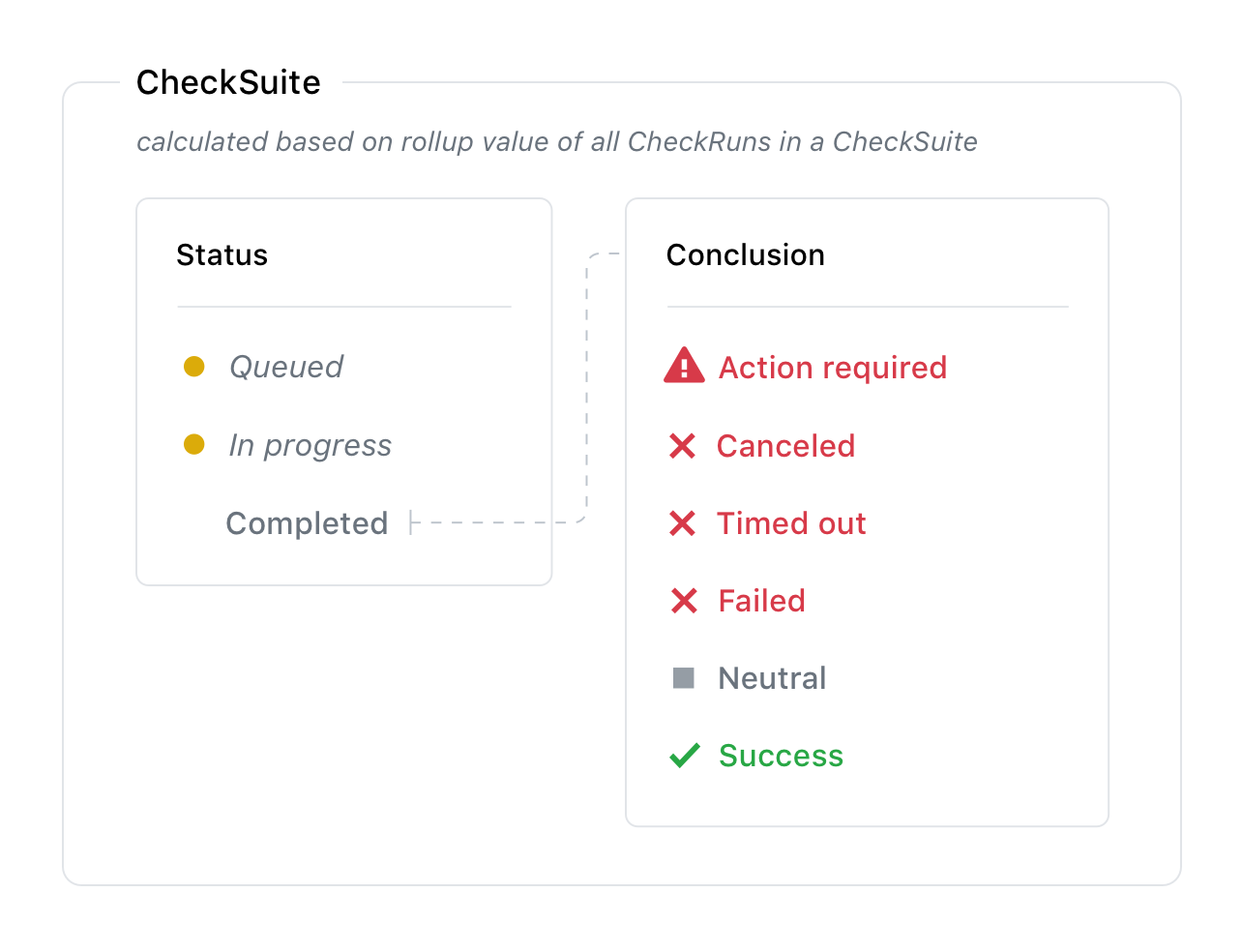
The check suite reports the highest priority check run conclusion in the check suite's conclusion. For example, if three check runs have conclusions of timed_out, success, and neutral the check suite conclusion will be timed_out.
By default, GitHub creates a check suite automatically when code is pushed to the repository. This default flow sends the check_suite event (with requested action) to all GitHub App's that have the checks:write permission. When your GitHub App receives the check_suite event, it can create new check runs for the latest commit. GitHub automatically adds new check runs to the correct check suite based on the check run's repository and SHA.
If you don't want to use the default automatic flow, you can control when you create check suites. To change the default settings for the creation of check suites, use the Update repository preferences for check suites endpoint. All changes to the automatic flow settings are recorded in the audit log for the repository. If you have disabled the automatic flow, you can create a check suite using the Create a check suite endpoint. You should continue to use the Create a check run endpoint to provide feedback on a commit.
L’autorisation d’accès en écriture à l’API Checks est uniquement disponible pour les applications GitHub. Les applications OAuth et les utilisateurs authentifiés peuvent afficher les exécutions de vérification et les suites de vérifications, mais ils ne peuvent pas les créer. Si vous ne créez pas une application GitHub, l’API Statuses peut vous intéresser.
To use the endpoints to manage check suites, the GitHub App must have the checks:write permission and can also subscribe to the check_suite webhook.
Pour plus d’informations sur l’authentification en tant qu’application GitHub, consultez « Options d’authentification pour les applications GitHub ».
About check runs
A check run is an individual test that is part of a check suite. Each run includes a status and conclusion.

If a check run is in an incomplete state for more than 14 days, then the check run's conclusion becomes stale and appears on GitHub as stale with . Only GitHub can mark check runs as stale. For more information about possible conclusions of a check run, see the conclusion parameter.
As soon as you receive the check_suite webhook, you can create the check run, even if the check is not complete. You can update the status of the check run as it completes with the values queued, in_progress, or completed, and you can update the output as more details become available. A check run can contain timestamps, a link to more details on your external site, detailed annotations for specific lines of code, and information about the analysis performed.

A check can also be manually re-run in the GitHub UI. See "About status checks" for more details. When this occurs, the GitHub App that created the check run will receive the check_run webhook requesting a new check run. If you create a check run without creating a check suite, GitHub creates the check suite for you automatically.
L’autorisation d’accès en écriture à l’API Checks est uniquement disponible pour les applications GitHub. Les applications OAuth et les utilisateurs authentifiés peuvent afficher les exécutions de vérification et les suites de vérifications, mais ils ne peuvent pas les créer. Si vous ne créez pas une application GitHub, l’API Statuses peut vous intéresser.
To use the endpoints to manage check runs, the GitHub App must have the checks:write permission and can also subscribe to the check_run webhook.
Check runs and requested actions
When you set up a check run with requested actions (not to be confused with GitHub Actions), you can display a button in the pull request view on GitHub that allows people to request your GitHub App to perform additional tasks.
For example, a code linting app could use requested actions to display a button in a pull request to automatically fix detected syntax errors.
To create a button that can request additional actions from your app, use the actions object when you Create a check run. For example, the actions object below displays a button in a pull request with the label "Fix this." The button appears after the check run completes.
"actions": [{
   "label": "Fix this",
   "description": "Let us fix that for you",
   "identifier": "fix_errors"
 }]

When a user clicks the button, GitHub sends the check_run.requested_action webhook to your app. When your app receives a check_run.requested_action webhook event, it can look for the requested_action.identifier key in the webhook payload to determine which button was clicked and perform the requested task.
For a detailed example of how to set up requested actions with the REST API, see "Creating CI tests with the Checks API."
Retention of checks data
Vérifie que les données datant de plus de 400 jours sont archivées. Dans le cadre du processus d’archivage GitHub crée un état de commit cumulatif représentant l’état de toutes les vérifications de ce commit. Par conséquent, la zone de fusion dans toute demande de tirage avec des vérifications archivées qui sont nécessaires sera dans un état bloqué, et vous devrez réexécuter les vérifications avant de pouvoir fusionner la demande de tirage.
