

 Formed in 2009, the Archive Team (not to be confused with the archive.org Archive-It Team) is a rogue archivist collective dedicated to saving copies of rapidly dying or deleted websites for the sake of history and digital heritage. The group is 100% composed of volunteers and interested parties, and has expanded into a large amount of related projects for saving online and digital history.

About pull requests in GitHub Desktop
You can view pull requests that you or your collaborators have proposed in GitHub Desktop. Pull requests let you propose changes to projects, provide feedback and reviews, and merge changes into projects. For more information, see "About pull requests."
When you view a pull request in GitHub Desktop, you can see a history of commits that contributors made. You can also see which files the commits modified, added, or deleted. From GitHub Desktop, you can open repositories in your preferred text editor to view any changes or make additional changes. After reviewing changes in a pull request, you can give feedback on GitHub. For more information, see "About pull request reviews."
Viewing a pull request in GitHub Desktop
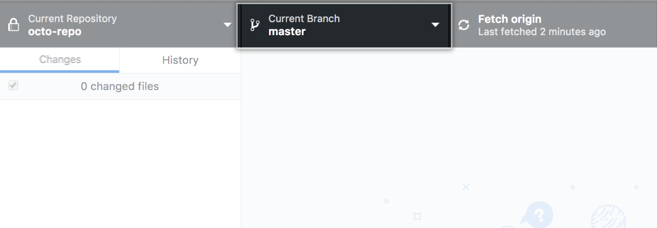
- In GitHub Desktop, click Current Branch.
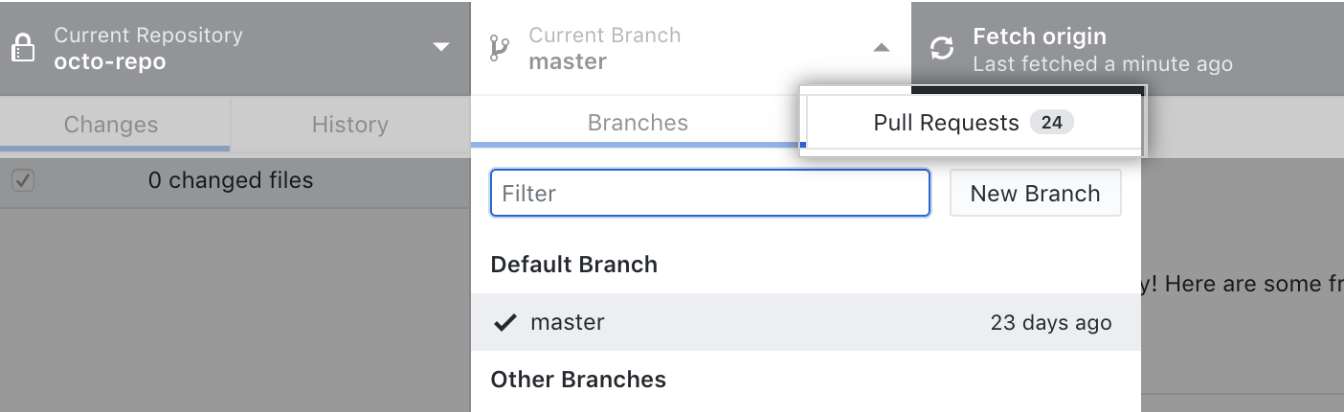
- At the top of the drop-down menu, click Pull Requests.
- In the list of pull requests, click the pull request you want to view.

- Optionally, to refresh the list of pull requests, click .

Opening a pull request in GitHub Desktop from GitHub
- Under your repository name, click Pull requests.

- In the list of pull requests, click the pull request that you would like to open in GitHub Desktop.
- To the right of the title of the pull request, click the Open with drop-down and then click the Open in Desktop button.

